This practical approach will provide you a way to handle key events in JavaScript in ASP.Net. There are three events associated with key events; they are :
- onkeyUp
- onkeyDown
- onkeyPress
You can use any of these events for handling key events in your application. The following is an example showing a user entering data into only the first textbox; let's suppose the name he/she enters in the first textbox and it should be displayed in upper as well as in lower case as in the following two textboxes.
The following is the design of the application:
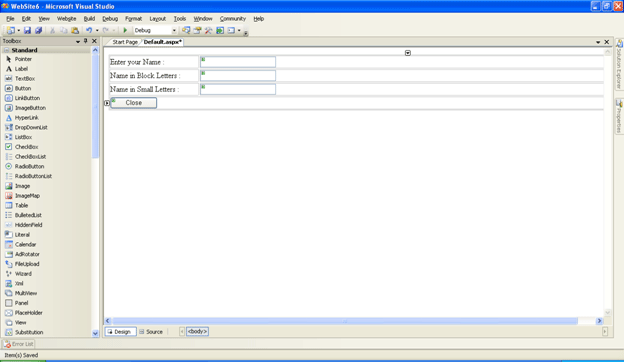
The following is the source code for it; we'll be calling the getUpper and getLower functions on the onkeyUp event so that as soon as the key is pressed the same effect should be displayed in the rest of the textboxes. Similarly we have a button control after the three textboxes if you want that when a user clicks on the button the following window should be closed. Then here is the source code for doing that.
<%@ Page Language="C#" AutoEventWireup="true" CodeFile="Default.aspx.cs" Inherits="_Default" %>
<!DOCTYPE html PUBLIC "-//W3C//DTD XHTML 1.0 Transitional//EN" "http://www.w3.org/TR/xhtml1/DTD/xhtml1-transitional.dtd">
<html xmlns="http://www.w3.org/1999/xhtml" >
<head runat="server">
<title>Untitled Page</title>
<script type="text/javascript">
function getUpper(a)
{
var upper=a.toUpperCase();
document.forms[0]["TextBox2"].value=upper;
}
function getLower(s)
{
var lower=s.toLowerCase();
document.forms[0]["TextBox3"].value=lower;
}
function CloseTab()
{
self.close();
}
</script>
</head>
<body>
<form id="form1" runat="server">
<div>
<table width="100%">
<tr>
<td style="width: 181px">
Enter your Name :</td>
<td>
<asp:TextBox ID="TextBox1" onkeyUp="getUpper(this.value);getLower(this.value)" runat="server"></asp:TextBox></td>
</tr>
<tr>
<td style="width: 181px">
Name in Block Letters :</td>
<td>
<asp:TextBox ID="TextBox2" runat="server"></asp:TextBox></td>
</tr>
<tr>
<td style="width: 181px">
Name in Small Letters :</td>
<td>
<asp:TextBox ID="TextBox3" runat="server"></asp:TextBox></td>
</tr>
<tr>
<td colspan="2">
<asp:Button ID="Button1" runat="server" Text="Close" OnClientClick="CloseTab()" Width="97px"/>
</td>
</tr>
</table>
</div>
</form>
</body>
</html>
Now run the application.
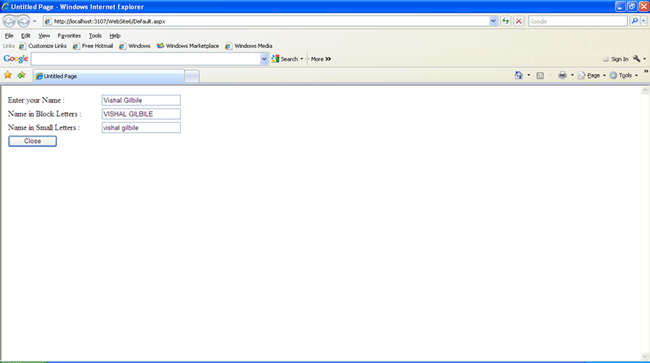
Your data will be displayed in upper and lower case in the respective textboxes and when you click on the close button the following alert box will displayed.
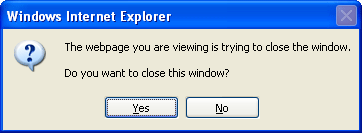
If you click on yes the window will be closed and if no then the window will not be closed.
I hope that you have enjoyed the article and it will help you for your project.