Abstract:
In this article I will explain how to import gmail contacts of a user by using GContacts Data API provided by Google. This article will help the developers, who are willing to develop social networking applications like facebook, orkut, hi5, twitter etc. In social network applications objective is to promote their website worldwide to n number of users. For this they targets gmail, yahoomail, AOL, hotmail etc. where you need to invite more people. By keeping that motive in mind I prepared this article with help of Google Contacts API and their suggested source code, I customized according to my requirement. Its just like kids play. There is no need to think more and more with hazards of knowledge. I will explain this article with Step by Step.
Hands on Experiment:
I used ASP.NET and C# for developing this application. This article targets intermediate developers who are having minimal knowledge on ASP.NET and C#.
Step 1:
Download Google data API setup from the specified URL
http://code.google.com/p/google-gdata/
Or you can directly download from the following URL
http://google-gdata.googlecode.com/files/Google%20Data%20API%20Setup%281.4.0.2%29.msi
This setup will install set of Google Data dll's (Google.GData.Apps.dll, Google.GData.Client.dll, Google.GData.Contacts.dll, Google.GData.Extensions.dll) into client machine.
Step 2:
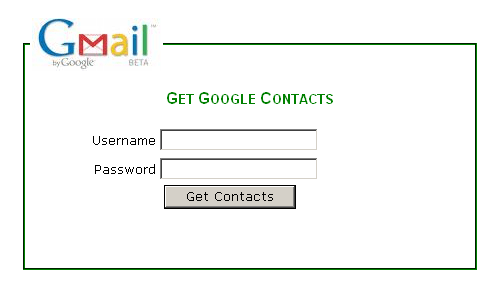
Design one page (Default.aspx) as shown below.
Step 3:
Add one new Class file to App_Code Folder->Now add the dll's(Google.GData.Apps.dll, Google.GData.Client.dll, Google.GData.Contacts.dll, and Google.GData.Extensions.dll) as a reference to your website by using a good option in visual studio->Solution Explorer ->Right Click-> Click on Add Reference->Browse ->Get dll's from Installed Location->Press OK.
Step 4:
a) Import Name spaces.
using Google.GData.Contacts;
using Google.GData.Client;
using Google.GData.Extensions;
using Google.Contacts;
b) Write Function As
public static DataSet GetGmailContacts(string App_Name, string Uname, string UPassword)
{
DataSet ds = new DataSet();
DataTable dt = new DataTable();
DataColumn C2 = new DataColumn();
C2.DataType = Type.GetType("System.String");
C2.ColumnName = "EmailID";
dt.Columns.Add(C2);
RequestSettings rs = new RequestSettings(App_NAme, Uname,UPassword);
rs.AutoPaging = true;
ContactsRequest cr = new ContactsRequest(rs);
Feed<Contact> f = cr.GetContacts();
foreach (Contact t in f.Entries)
{
foreach (EMail email in t.Emails)
{
DataRow dr1 = dt.NewRow();
dr1["EmailID"] = email.Address.ToString();
dt.Rows.Add(dr1);
}
}
ds.Tables.Add(dt);
return ds;
}
Step 5:
a) Open default.aspx->In button_Click(Get Contacts) event, you are required to write the code as follows
Session["username"] = txtgmailusername.Text;
Session["password"] = txtpassword.Text;
Session["App_Name"] = "MyNetwork Web Application!";
Response.Redirect("~/PopulateGcontacts.aspx");
b) Add one new page named (PopulateGcontacts.aspx). Place one GridView control and write the code as follows.
protected void Page_Load(object sender, EventArgs e)
{
string App_Name= Session["App_Name"].ToString();
string username= Session["username"].ToString();
string password= Session["password"].ToString();
DataSet ds = GContactsImport.GetGmailContacts(App_Name,username ,password);
GridView1.DataSource = ds;
GridView1.DataBind();
}
protected void GridView1_PageIndexChanging(object sender, GridViewPageEventArgs e)
{
GridView1.PageIndex = e.NewPageIndex;
}
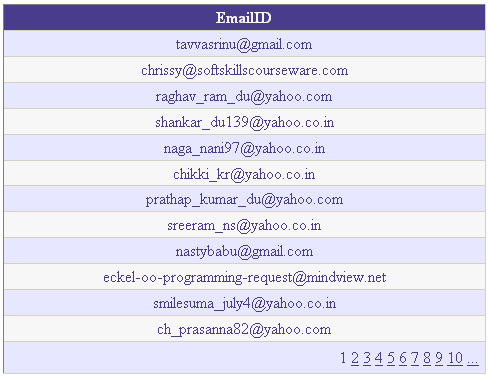
Finally our output screen will be like this
My Resource:
http://code.google.com/apis/contacts/docs/2.0/developers_guide_dotnet.html
Note: You need internet connection at the time of executing this application. Soon I will post hotmail, yahoomail, AOL contacts import into asp.net application as a group.
Conclusion:
In this example I left to catch exceptions and validations. This article will definitly help in to make the above mentioned scenario in real development. For this work I made lot of google search but I never get any exact solution to solve my requirement in easy manner. Finally I solved it with GContacts DataApi.