
SIGN UP MEMBER LOGIN:    
ARTICLE

Introduction to Brushes tools in XAML Silverlight

Posted by Abhimanyu Kumar Vatsa Articles | Silverlight with C# April 19, 2011
In this article, you will find an introduction to Brushes tools used in XAML Silverlight.
Reader Level:

Introduction


In Silverlight, Brushes are a very useful component; they allow selection of any color in a variety of ways and provide visual (user friendly) feedback to play with colors. Any element can be filled using brushes tools. Let's look at the screenshot of the "Brushes" section in Silverlight.
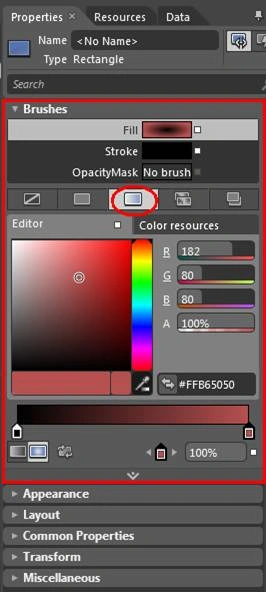

image002.jpg


Let's discuss all it's items.


Fill


This item gets or sets the brush that specifies how to paint the interior of the shape.


Stroke


This item gets or sets the brush that specifies how to paint the shape outline (border).


OpacityMask


This item gets or sets an opacity mask as brush implementation that is applied to any alpha-channel masking for the rendered content of this element.


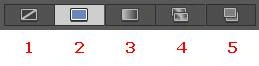
Look at the screenshot below for more options:-


image004.jpg


1. By selecting this option we hide every brush selection or simply say, select this option if you don't want the color box to be appear.


2. By selecting this we can apply solid color to any shape (no any special effect of color).


3. By selecting this we can apply gradient color to any shape. (It is a good topic to learn so it will be described in another article).


4. By selecting this we can apply tiled color/image to any shape.


5. By selecting this we can work with brush resources.


Be tuned for the next article.


HAVE A HAPPY CODING!!
erver'>
Login to add your contents and source code to this article
share this article :
post comment
 
Become a Sponsor
PREMIUM SPONSORS
  • Finally – a virtual platform that delivers next-generation Windows Server 2008 Hyper-V virtualization technology from a managed hosting partner you can truly depend on. Visit www.maximumasp.com/max for a FREE 30 day trial. Hurry offer ends soon. Climb aboard the MaxV platform and take advantage of High Availability, Intelligent Monitoring, Recurrent Backups, and Scalability – with no hassle or hidden fees. As a managed hosting partner focused solely on Microsoft technologies since 2000, MaximumASP is uniquely qualified to provide the superior support that our business is built on. Unparalleled expertise with Microsoft technologies lead to working directly with Microsoft as first to offer IIS 7 and SQL 2008 betas in a hosted environment; partnering in the Go Live Program for Hyper-V; and product co-launches built on WS 2008 with Hyper-V technology.
    ceTE software specializes in components for dynamic PDF generation and manipulation. The DynamicPDF™ product line allows you to dynamically generate PDF documents, merge PDF documents and new content to existing PDF documents from within your applications. Visit DynamicPDF here
6 Months Free & No Setup Fees ASP.NET Hosting!
Become a Sponsor