

Steps Involved:
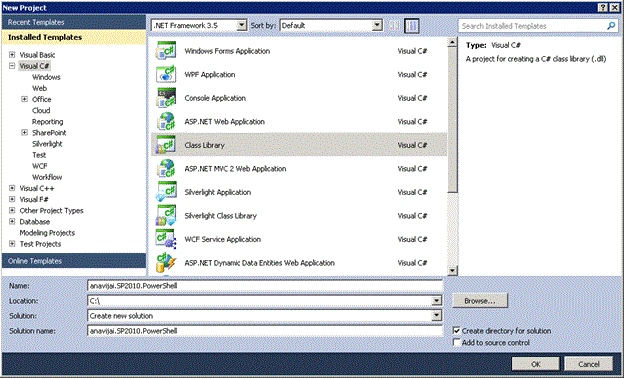
- Open Visual Studio 2010.
- Go to File => New => Project.
- Select Class Library template, enter the name and click Ok.
- Add the following references.
-System.Management.Automation.dll (C:\Program Files (x86)\Reference Assemblies\Microsoft\WindowsPowerShell\v1.0\System.Management.Automation.dll)
-System.Configuration.Install.dll (C:\Windows\Microsoft.NET\Framework\v2.0.50727\System.Configuration.Install.dll
-Microsoft.SharePoint.dll (C:\Program Files\Common Files\Microsoft Shared\Web Server Extensions\14\ISAPI\Microsoft.SharePoint.dll)
-Microsoft.SharePoint.PowerShell.dll (C:\Windows\assembly\GAC_MSIL\Microsoft.SharePoint.PowerShell\14.0.0.0__71e9bce111e9429c\Microsoft.SharePoint.Powershell.dll) - Add the following namespaces.
-using System.Management.Automation;
-using Microsoft.SharePoint;
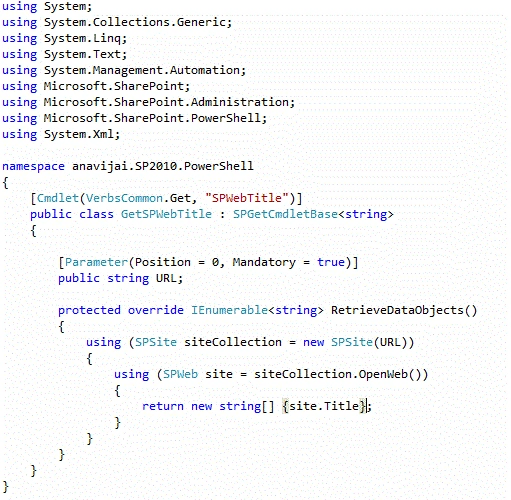
-using Microsoft.SharePoint.PowerShell; - I have renamed Class1.cs file to GetSPWebTitle.cs.
- Replace GetSPWebTitle.cs with the following code.
PowerShell Installer class:
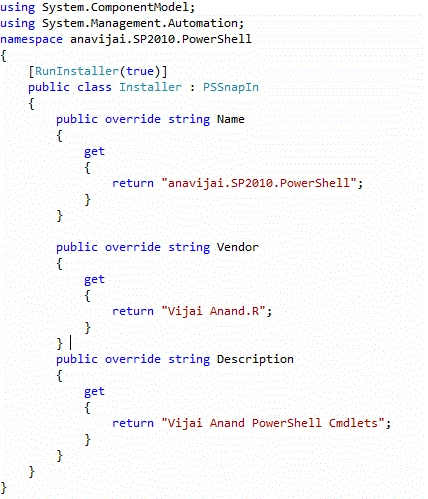
In order for our PowerShell Cmdlet to work, we need to create an installer-class. - Right click the solution explorer, add a new item.
- Select the class template and name it as Installer.cs.
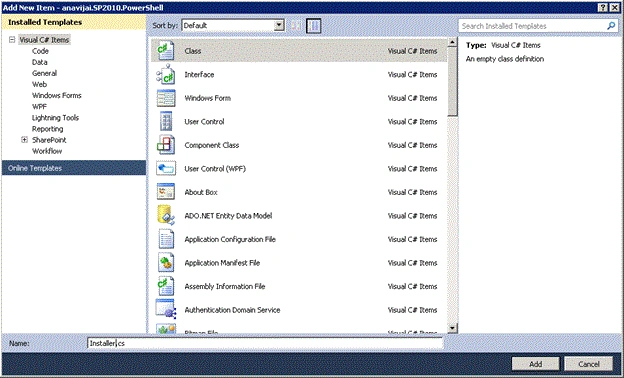
- Click on Add.
- Replace Installer.cs with the following code.
- Build the solution.
Install the snapin:
Install.bat
@SET GACUTIL="C:\Program Files (x86)\Microsoft SDKs\Windows\v7.0A\bin\gacutil.exe"
@SET NSTALLUTIL="C:\WINDOWS\Microsoft.NET\Framework64\v2.0.50727\InstallUtil.exe"
%GACUTIL% -if %~dp0anavijai.SP2010.PowerShell.dll
%INSTALLUTIL% %~dp0anavijai.SP2010.PowerShell.dll
Pause
Register the snapin:
Add-PSSnapin anavijai.SP2010.PowerShell
Get-Command - Module anavijai.SP2010.PowerShell
Snapin example:
Get-SPWebTitle - url "http://anavijai:1111"
santosh kumarPosted May 9, 2018, 12:44 AM
Hi Vijai, Can you help me with the script to connect to a storage cluster by powershell cmdlet