

In this article we will be seeing how to install or uninstall dll in GAC using powershell script.
In this article
- Install a dll into GAC using powershell script
- Uninstall a dll from GAC using powershell script
Powershell Scr ipt:
Set-Alias
Name: Gacutil
Value: C:\Program Files (x86)\Microsoft SDKs\Windows\v7.0A\bin\gacutil.exe

Install a dll:
Gacutil /i D:\anavijai.sample.dll
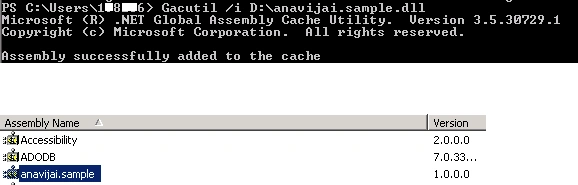
Uninstall a dll:
Gacutil /u anavijai.sample
Kumaresh RajalingamPosted Mar 24, 2016, 9:58 AM
Good one sir
Gowtham RajamanickamPosted Apr 20, 2015, 3:18 PM
good
Amit KashyapPosted Dec 12, 2014, 3:14 AM
In windows 2012 server we can found it under c:windows\Microsoft .Net framework \v1.1.4322
Ilya KholinoveditedPosted Feb 7, 2012, 7:47 AMEdited Feb 7, 2012, 7:48 AM
Some times you dont have gacutil installed on target system. you could use this code: BEGIN { Clear-Host $ErrorActionPreference = "Stop" if ( $null -eq ([AppDomain]::CurrentDomain.GetAssemblies() |? { $_.FullName -eq "System.EnterpriseServices, Version=2.0.0.0, Culture=neutral, PublicKeyToken=b03f5f7f11d50a3a" }) ) { [System.Reflection.Assembly]::Load("System.EnterpriseServices, Version=2.0.0.0, Culture=neutral, PublicKeyToken=b03f5f7f11d50a3a") | Out-Null } $publish = New-Object System.EnterpriseServices.Internal.Publish } PROCESS { $files=get-childitem ".\Source Dependencies" *.dll -rec|where-object {!($_.psiscontainer)} foreach( $file in $files ) { $assembly = $file.fullname if ( -not (Test-Path $assembly -type Leaf) ) { throw "The assembly '$assembly' does not exist." } if ( [System.Reflection.Assembly]::LoadFile( $assembly ).GetName().GetPublicKey().Length -eq 0 ) { throw "The assembly '$assembly' must be strongly signed." } Write-Output "Installing: $assembly" $publish.GacInstall( $assembly ) } } #(c) http://codeimpossible.com/2010/7/21/Installing-Assemblies-to-GAC-with-PowerShell
Soumya BhattacharyyaPosted Apr 17, 2011, 10:45 AM
Hi Vijai, Often in PRODUCTION environments, you won't have GACUtil installed and you probably do not want GACUtil installed. In that case you need to drag and drop the dll in GAC. But in Windows 2008, you have to disable UAC which needs a restart. How do you get around this problem? Thanks Soumya