This article explains how to remove Drop off library from the SharePoint 2010 site using powershell script.
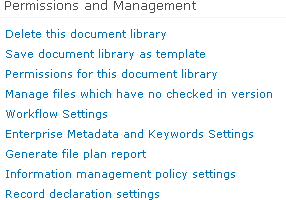
SharePoint 2010 introduced a new feature called Content Organizer. This article does not explain the Content Organizer feature. After activating the Content Organizer feature a new Drop off Library will be created in the site. Like the normal document library you can't delete this document library. You won't see an option "Delete this document library" (Drop off Library => Library Settings => Permissions and Management).
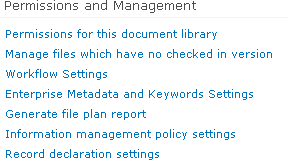
It doesn't work to remove this document library by deactivating the Content Organizer feature. You can remove this document library by using SharePoint object model or SharePoint Manager 2010 or Powershell.
Remove Drop Off Library using Powershell:
- In this we will be seeing how to remove Drop Off Library using the following powershell
$url = "http://serverName:2011/"
$feature = Get-SPFeature "DocumentRouting"
$site = New-Object Microsoft.SharePoint.SPSite($url)
foreach ($web in $site.AllWebs)
{
if ($web.Features[$feature.ID])
{
Disable-SPFeature $feature -Url $web.Url -Force -Confirm:$false
}
$list = $web.Lists["DROP OFF LIBRARY"]
if (!$list)
{
Write-Host "-Drop Off Library not found";
}
else
{
Write-Host "-"$list " was found in web" $web
$list.AllowDeletion = $true;
$list.Update()
}
}
- Go to the SharePoint Site => Drop Off Library => Library settings => Permissions and Management.
- Now you will be able to see "Delete this document library" option.