
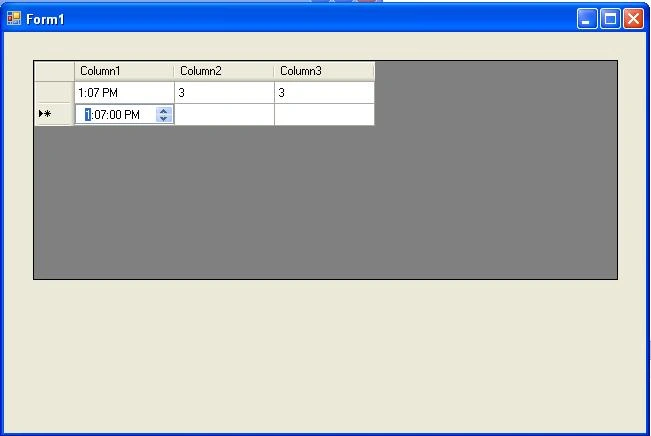
We can add a Time Control in DataGridview to give an option to user to put only time in any particular cell.
Add Custom control in your project and Inherit it From DataGridViewColumn
Make CalendarCell Class your main class because we will use more than one class in this File
public GridTimeControl(): base()
{
base.CellTemplate = new CalendarCell1();
}
Override CellTemplate property So then we can set Cell in data Grid View.
public override DataGridViewCell CellTemplate
{
get
{
return base.CellTemplate;
}
set
{
if (!((value == null)) && !(value.GetType().IsAssignableFrom(typeof(CalendarCell1))))
{
throw new InvalidCastException("Must be a CalendarCell");
}
base.CellTemplate = value;
}
}
public class CalendarCell1 : DataGridViewTextBoxCell
{
public CalendarCell1()
{
this.Style.Format = "hh:mm tt";
}
public override void InitializeEditingControl(int rowIndex, object initialFormattedValue, DataGridViewCellStyle dataGridViewCellStyle)
{
// Set the value of the editing control to the current cell value.
base.InitializeEditingControl(rowIndex, initialFormattedValue, dataGridViewCellStyle);
CalendarEditingControl1 ctl = (CalendarEditingControl1)DataGridView.EditingControl;
if (this.RowIndex >= 0)
{
if ((!object.ReferenceEquals(this.Value, DBNull.Value)))
{
if (this.Value != null)
{
if (this.Value != string.Empty)
{
try
{
ctl.Value = DateTime.Parse(this.Value.ToString());
}
catch (Exception ex)
{
}
}
}
}
}
}
public override System.Type EditType
{
get
{
return typeof(CalendarEditingControl1);
}
}
public override System.Type ValueType
{
get
{
return typeof(DateTime);
}
}
public override object DefaultNewRowValue
{
get
{
return DateTime.Now.ToShortTimeString();
}
}
}
Inheri Datetime Picker with class CalendarEditingControl
class CalendarEditingControl1 : DateTimePicker, IDataGridViewEditingControl
{
private DataGridView dataGridViewControl;
private bool valueIsChanged = false;
private int rowIndexNum;
public CalendarEditingControl1()
{
this.Format = DateTimePickerFormat.Time;
}
public object EditingControlFormattedValue
{
get
{
return this.Value.ToShortTimeString();
}
set
{ if (value is string)
{
this.Value = DateTime.Parse(System.Convert.ToString(value));
}
}
}
public object GetEditingControlFormattedValue(DataGridViewDataErrorContexts context)
{
return this.Value.ToShortTimeString(); //Return Only Time from DateTime
}
public void ApplyCellStyleToEditingControl(DataGridViewCellStyle dataGridViewCellStyle)
{
this.Font = dataGridViewCellStyle.Font;
this.ShowUpDown = true;
this.CalendarForeColor = dataGridViewCellStyle.ForeColor;
this.CalendarMonthBackground = dataGridViewCellStyle.BackColor;
}
public int EditingControlRowIndex
{
get
{
return rowIndexNum;
}
set
{
rowIndexNum = value;
}
}
public bool EditingControlWantsInputKey(Keys key, bool dataGridViewWantsInputKey)
{
if (Keys.KeyCode == Keys.Left || Keys.KeyCode == Keys.Up || Keys.KeyCode == Keys.Down || Keys.KeyCode == Keys.Right || Keys.KeyCode == Keys.Home || Keys.KeyCode == Keys.End || Keys.KeyCode == Keys.PageDown || Keys.KeyCode == Keys.PageUp)
{
return true;
}
else
{
return false;
}
}
public void PrepareEditingControlForEdit(bool selectAll)
{
}
public bool RepositionEditingControlOnValueChange
{
get
{
return false;
}
}
public DataGridView EditingControlDataGridView
{
get
{
return dataGridViewControl;
}
set
{
dataGridViewControl = value;
}
}
public bool EditingControlValueChanged
{
get
{
return valueIsChanged;
}
set
{
valueIsChanged = value;
}
}
public Cursor EditingControlCursor
{
get
{
return base.Cursor;
}
}
protected override void OnValueChanged(System.EventArgs eventargs)
{
valueIsChanged = true;
this.EditingControlDataGridView.NotifyCurrentCellDirty(true);
base.OnValueChanged(eventargs);
}
#region IDataGridViewEditingControl Members
Cursor IDataGridViewEditingControl.EditingPanelCursor
{
get { return base.Cursor; }//throw new Exception("The method or operation is not implemented."); }
}
#endregion
}
Hot MailPosted Feb 27, 2014, 1:35 PM
if we change time to lets 8:45 and hit tab then enter time value in other cell its starts from minute intead of hour
Ankur GuptaPosted Nov 30, 2013, 1:48 AM
you can get value easily by using for each loop
smitha sestuPosted Nov 28, 2013, 6:46 AM
how can i get the value of that colum??
prakash priyadarshiPosted Sep 24, 2013, 9:09 AM
thanx..
DmitryPosted Jan 26, 2011, 4:41 AM
Thank you very much, Ankur!
Pravin GhadgePosted Dec 28, 2010, 5:56 AM
Great Code This is very useful
Amol GunjalPosted May 31, 2010, 6:44 AM
can we add AJAX calender extender control in gridview