SIGN UP MEMBER LOGIN:    
ARTICLE

Creating a Console ListBox in C#

Posted by Vulpes Articles | C# Language March 21, 2011
C# developers who are interested in console programming are often frustrated by the lack of user interface features which the console has compared to Windows Forms and WPF applications.
Reader Level:

Introduction

C# developers who are interested in console programming are often frustrated by the lack of user interface features which the console has compared to Windows Forms and WPF applications.

Well, despite the limitations of its text based interface, you can with a bit of effort produce console versions of some of the simpler windows 'controls' and in this article I'd like to show you how to produce a listbox.

To do this we need to draw a box on the console and, fortunately, the unicode character set (as did MS-DOS code pages before it) supports a number of box drawing characters (see http://en.wikipedia.org/wiki/Box-drawing_characters).

Source Code

Here's the source code for producing a basic listbox containing the names of the 12 months of the year:

using System;
 
class ConsoleListBox
{

    static void Main()
    {
        Console.TreatControlCAsInput = false;
        Console.CancelKeyPress += new ConsoleCancelEventHandler(BreakHandler);
        Console.Clear();
        Console.CursorVisible = false;
 
        string[] months = {"January", "February", "March", "April", "May", "June", "July", "August", "September", "October", "November", "December"};

        WriteColorString("Choose Level using down and up arrow keys and press enter", 12, 20, ConsoleColor.Black, ConsoleColor.White);

        int choice = ChooseListBoxItem(months, 34, 3, ConsoleColor.Blue, ConsoleColor.White);
        // do something with choice
        WriteColorString("You chose " + months[choice - 1] + ". Press any key to exit", 21, 22, ConsoleColor.Black, ConsoleColor.White);
        Console.ReadKey();
        CleanUp();
    }

    public static int ChooseListBoxItem(string[] items, int ucol, int urow, ConsoleColor back, ConsoleColor fore)
    {
        int numItems = items.Length;
        int maxLength = items[0].Length;
        for (int i = 1; i < numItems; i++)
        {
            if (items[i].Length > maxLength)
            {
                maxLength = items[i].Length;
            }
        }
        int[] rightSpaces = new int[numItems];
        for (int i = 0; i < numItems; i++)
        {
            rightSpaces[i] = maxLength - items[i].Length + 1;
        }
        int lcol = ucol + maxLength + 3;
        int lrow = urow + numItems + 1;
        DrawBox(ucol, urow, lcol, lrow, back, fore, true);
        WriteColorString(" " + items[0] + new string(' ', rightSpaces[0]), ucol + 1, urow + 1, fore, back);
        for (int i = 2; i <= numItems; i++)
        {
            WriteColorString(items[i - 1], ucol + 2, urow + i, back, fore);
        }

        ConsoleKeyInfo cki;
        char key;
        int choice = 1;
 
        while (true)
        {
            cki = Console.ReadKey(true);
            key = cki.KeyChar;
            if (key == '\r') // enter
            {
                return choice;
            }
            else if (cki.Key == ConsoleKey.DownArrow)
            {
                WriteColorString(" " + items[choice - 1] + new string(' ', rightSpaces[choice - 1]), ucol + 1, urow + choice, back, fore);
                if (choice < numItems)
                {
                    choice++;
                }
                else
                {
                    choice = 1;
                }
                WriteColorString(" " + items[choice - 1] + new string(' ', rightSpaces[choice - 1]), ucol + 1, urow + choice, fore, back);

            }
            else if (cki.Key == ConsoleKey.UpArrow)
            {
                WriteColorString(" " + items[choice - 1] + new string(' ', rightSpaces[choice - 1]), ucol + 1, urow + choice, back, fore);
                if (choice > 1)
                {
                    choice--;
                }
                else
                {
                    choice = numItems;
                }
                WriteColorString(" " + items[choice - 1] + new string(' ', rightSpaces[choice - 1]), ucol + 1, urow + choice, fore, back);
            }
        }
    }

    public static void DrawBox(int ucol, int urow, int lcol, int lrow, ConsoleColor back, ConsoleColor fore, bool fill)
    {
        const char Horizontal = '\u2500';
        const char Vertical = '\u2502';
        const char UpperLeftCorner = '\u250c';
        const char UpperRightCorner = '\u2510';
        const char LowerLeftCorner = '\u2514';
        const char LowerRightCorner = '\u2518';
        string fillLine = fill ? new string(' ', lcol - ucol - 1) : "";
        SetColors(back, fore);
        // draw top edge
        Console.SetCursorPosition(ucol, urow);
        Console.Write(UpperLeftCorner);
        for (int i = ucol + 1; i < lcol; i++)
        {
            Console.Write(Horizontal);
        }
        Console.Write(UpperRightCorner);

        // draw sides
        for (int i = urow + 1; i < lrow; i++)
        {
            Console.SetCursorPosition(ucol, i);
            Console.Write(Vertical);
            if (fill) Console.Write(fillLine);
            Console.SetCursorPosition(lcol, i);
            Console.Write(Vertical);
        }
        // draw bottom edge
        Console.SetCursorPosition(ucol, lrow);
        Console.Write(LowerLeftCorner);
        for (int i = ucol + 1; i < lcol; i++)
        {
            Console.Write(Horizontal);
        }
        Console.Write(LowerRightCorner);
    }

    public static void WriteColorString(string s, int col, int row, ConsoleColor back, ConsoleColor fore)
    {
        SetColors(back, fore);
        // write string
        Console.SetCursorPosition(col, row);
        Console.Write(s);
    }

    public static void SetColors(ConsoleColor back, ConsoleColor fore)
    {
        Console.BackgroundColor = back;
        Console.ForegroundColor = fore;
    }

    public static void CleanUp()
    {
        Console.ResetColor();
        Console.CursorVisible = true;
        Console.Clear();
    }

    private static void BreakHandler(object sender, ConsoleCancelEventArgs args)
    {
        // exit gracefully if Control-C or Control-Break pressed
        CleanUp();
    }
 
}

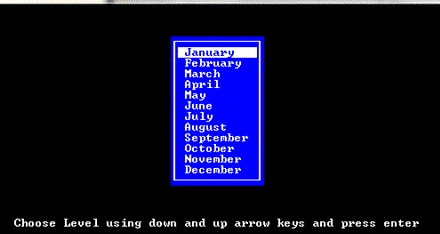
Output

When you build and run this program, the console should look like this :

List1.gif
 

Login to add your contents and source code to this article
share this article :
post comment
 

Thanks for this.

Posted by Nik O Jan 26, 2012

Good one..

Posted by Suthish Nair Mar 21, 2011
Become a Sponsor
PREMIUM SPONSORS
  • Finally – a virtual platform that delivers next-generation Windows Server 2008 Hyper-V virtualization technology from a managed hosting partner you can truly depend on. Visit www.maximumasp.com/max for a FREE 30 day trial. Hurry offer ends soon. Climb aboard the MaxV platform and take advantage of High Availability, Intelligent Monitoring, Recurrent Backups, and Scalability – with no hassle or hidden fees. As a managed hosting partner focused solely on Microsoft technologies since 2000, MaximumASP is uniquely qualified to provide the superior support that our business is built on. Unparalleled expertise with Microsoft technologies lead to working directly with Microsoft as first to offer IIS 7 and SQL 2008 betas in a hosted environment; partnering in the Go Live Program for Hyper-V; and product co-launches built on WS 2008 with Hyper-V technology.
    ceTE software specializes in components for dynamic PDF generation and manipulation. The DynamicPDF™ product line allows you to dynamically generate PDF documents, merge PDF documents and new content to existing PDF documents from within your applications. Visit DynamicPDF here
Team Foundation Server Hosting
Become a Sponsor