ARTICLE

Knob Control using Windows Forms and GDI+

Posted by Jigar Desai Articles | GDI+ & Graphics May 13, 2002
Control creation for windows form was never so easy like its now with .Net, although it needs some math skills if you want to create self drawn control.
Reader Level:
Download Files:
 

Control creation for windows form was never so easy like its now with .Net, although it needs some math skills if you want to create self drawn control. I havent seen much of examples to create such controls so I decided to make one. 

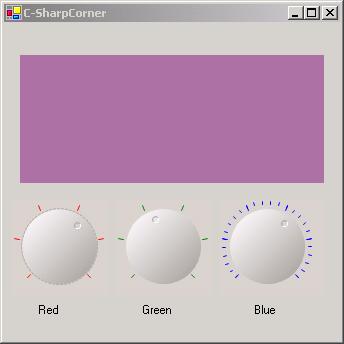
You must be familiar with slider control for windows form, my example Knob control is very much similar to that control in respect of functionality but there is major change in GUI. 

  • I have inherited control from UserControl class to make application simpler.
  • Delegates used for event handling of value changed.
  • Read carefully what is done in overriding IsInputKey method because by default using up down keys will change focus from object.
  • I have created variable _IsFocused that will show if object is in focus.
  • For sample I have selected Label control whose color will change when you will change value of three knob controls.

KnobControl.cs is Code for control.

Utility.cs contains important static methods used for Drawing.

Form1.cs is sample that shows use of knob Control. 

However lots of checking will be required to use this control in commercial application but this sample will give you head start if you are going in that direction.

Login to add your contents and source code to this article
post comment
     

thanks a lot

Posted by milad frounchi Aug 02, 2012

Great article and the code runs great on the desktop. I'm trying to make a knob control work in a Windows CE, .net CF environment to no avail. Any ideas?

Posted by Stuart Rubin May 13, 2011

Grasias!!!  por este control ActiveX

Posted by Martin Grasso Jun 20, 2010

very useful, thanks

Posted by adolfo Jun 16, 2010
COMMENT USING
PREMIUM SPONSORS
DynamicPDF™ product line allows you to dynamically generate PDF documents, merge PDF documents and add new content to existing PDF documents from within your applications.
Join a Chapter
SPONSORED BY
  • PDF reports have never been easier to create. With our included WYSIWYG Designer, you can layout your reports, set up your data source and let DynamicPDF ReportWriter do the rest.
Get Career Advice from Experts