Introduction
In my last article titled "Data Validation In Silverlight 3 Application", we discussed about how we can validate the user input. In this article we will see how Data Annotations help us in validating the data in Silverlight 3 Application.
Crating Silverlight Project
Fire up Visual Studio 2008 and create a Silverlight Application. Name it as DataAnnotationsInSL3.
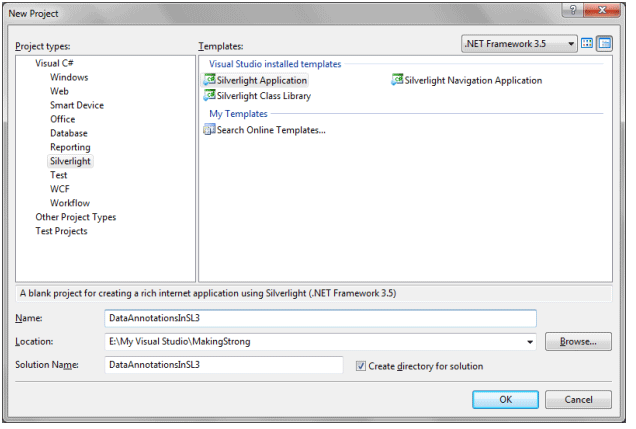
To make the application look good I am going to design it in Blend 3, don't worry this will be a simple design.
-
Open the Solution in Blend 3.
-
Add few TextBlocks, TextBoxes.The MainPage.xaml will look like as follows:
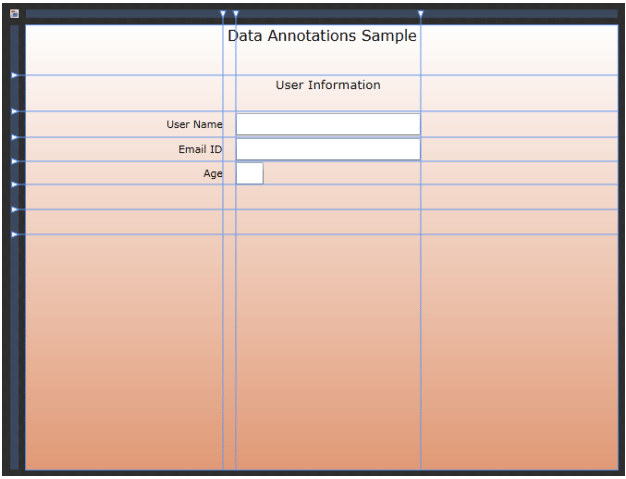
As you see from the above figure, I have 3 text boxes for User Name, Email ID, and Age. I have 2 Password Boxes for Password and confirm Password. All arefor User Input.
Now design part is done open the solution in Visual Studio Again. Here is the Xaml Code after designing.
<Grid x:Name="LayoutRoot">
<Grid.RowDefinitions>
<RowDefinition Height="0.112*"/>
<RowDefinition Height="0.081*"/>
<RowDefinition Height="0.058*"/>
<RowDefinition Height="0.054*"/>
<RowDefinition Height="0.052*"/>
<RowDefinition Height="0.056*"/>
<RowDefinition Height="0.056*"/>
<RowDefinition Height="0.529*"/>
</Grid.RowDefinitions>
<Grid.ColumnDefinitions>
<ColumnDefinition Width="0.333*"/>
<ColumnDefinition Width="0.022*"/>
<ColumnDefinition Width="0.312*"/>
<ColumnDefinition Width="0.333*"/>
</Grid.ColumnDefinitions>
<Grid.Background>
<LinearGradientBrush EndPoint="0.5,1" StartPoint="0.5,0">
<GradientStop Color="#FFE19A76" Offset="1"/>
<GradientStop Color="White"/>
</LinearGradientBrush>
</Grid.Background>
<TextBlock Text="User Name" TextWrapping="Wrap" Margin="0" Grid.Row="2" HorizontalAlignment="Right" VerticalAlignment="Center"/>
<TextBlock HorizontalAlignment="Right" Margin="0" VerticalAlignment="Center" Grid.Row="3" Text="Email ID" TextWrapping="Wrap"/>
<TextBlock HorizontalAlignment="Right" Margin="0" VerticalAlignment="Center" Grid.Row="6" Text="Age" TextWrapping="Wrap"/>
<TextBox x:Name="txtUserName" TextWrapping="Wrap" Margin="0" Grid.Column="2" Grid.Row="2" d:LayoutOverrides="Height" VerticalAlignment="Center"/>
<TextBox x:Name="txtEmailID" Margin="0" VerticalAlignment="Center" Grid.Column="2" Grid.Row="3" TextWrapping="Wrap"/>
<TextBox x:Name="txtAge" Margin="0" VerticalAlignment="Center" Grid.Column="2" Grid.Row="6" TextWrapping="Wrap"/>
<TextBlock HorizontalAlignment="Center" HorizontalAlignment="Left" Width="30" VerticalAlignment="Top" Text="Data Validation Sample" TextWrapping="Wrap" Grid.Column="2" FontSize="16"/>
<TextBlock HorizontalAlignment="Center" VerticalAlignment="Top" Grid.Column="2" FontSize="13.333" Text="User Information" TextWrapping="Wrap" Grid.Row="1"/>
</Grid>
-
Now we will add a class to the Silverlight Project and Name is
UserInfo.cs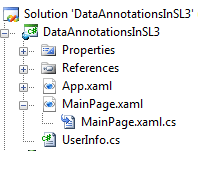
In my previous article on Data Validation, I had implemented INotifyPropertyChanged interface. Here we don't need that. We will see how it is not required.
-
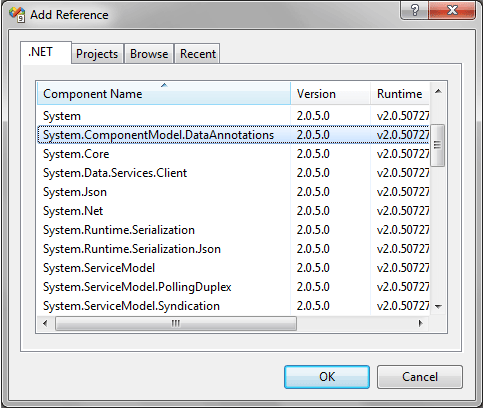
Add a Reference to System.ComponentModel.DataAnnotations
-
Now we will add properties to our UserInfo.cs class.
As we are following the same user inputs, I am adding the same properites. Follow the code below:
public class UserInfo
{
#region UserName
private string _UserName;
public string UserName
{
get { return _UserName; }
set { _UserName = value; }
}
#endregion
#region EmailID
private string _EmailID;
public string EmailID
{
get { return _EmailID; }
set { _EmailID = value; }
}
#endregion
#region Age
private string _Age;
public string Age
{
get { return _Age; }
set { _Age = value; }
}
#endregion
}
-
Now Add required attributes to the properties, for example Required, Range, and RegularExpression etc..
See the code below how User Name property is being validated. Add the code before the property.
[Required(ErrorMessage="User Name is Required")]
[StringLength(12,MinimumLength=6,ErrorMessage="User Name must be in between 6 to 12 Characters")]
-
Add ValidatorProperty method with required parameters.
[Required(ErrorMessage="User Name is Required")]
[StringLength(12,MinimumLength=6,ErrorMessage="User Name must be in between 6 to 12 Characters")]
public string UserName
{
get { return _UserName; }
set
{
Validator.ValidateProperty(value, new ValidationContext(this, null, null) { MemberName="UserName"});
_UserName = value;
}
}
-
For Email ID validation we need Regular Expression, go ahead write the following code.
-
For Age validation we need Range, add minimum and maximum values.
[Range(18,40,ErrorMessage="Age must be 18 ~ 40")]
public string Age
{
get { return _Age; }
set
{
Validator.ValidateProperty(value, new ValidationContext(this, null, null) { MemberName = "Age" });
_Age = value;
}
}
-
Last but not the least add the UserInfo instance to the LayoutRoot's DataContext.
Remebmer you can add it in two ways, in C# code behind as well as in Xaml. In my last article I added like the following:
serInfo user = new UserInfo();
this.LayoutRoot.DataContext = user;
Now you can do the same thing in XAML too, add the namespace referrence and then do as follows:
xmlns:myData="clr-namespace:DataAnnotationsInSL3"
<Grid.DataContext>
<myData:UserInfo />
</Grid.DataContext>
Now Run your application. Enter wrong input and you will get the error messages.
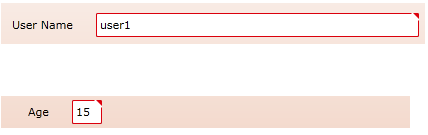
That's it we have successfully used Data Annotations to validate user input, and without using INotifyPropertyChanged interface.
Enjoy Coding.