
Introduction Now open the solution in Visual Studio 2008, we have code to write. J
In this article we will explore what are features available for a ListBox in Silverlight 3 Application.
Crating Silverlight Project
Fire up Visual Studio 2008 and create a Silverlight Application. Name it as ListBoxInSL3.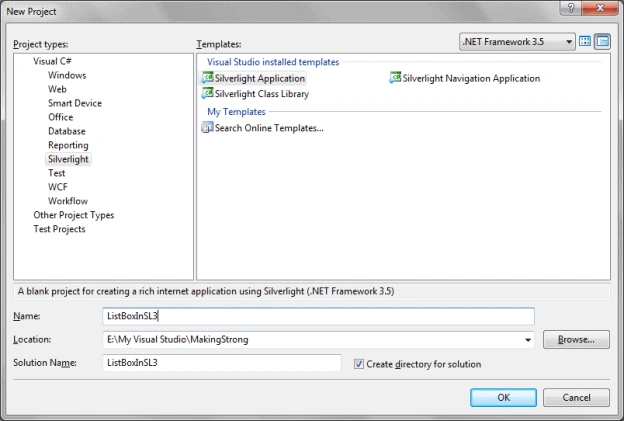
Here is the basic idea what we are going to do in this Silverlight Application: We will add ListBox and a TextBlock, whatever item you select from the ListBox it will be displayed in the TextBox.
Open Expression Blend 3 and start designing the application. Follow the below figure to have better idea.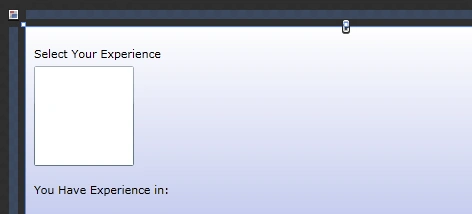
If you look at the Objects and Timeline Pane you will find these following controls are added with specific names.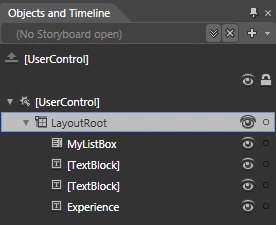
In ListBox we are going to explore the property called SelectionMode. If you want to see it, just select ListView and in the Properties Pane in Common Properties you will find it.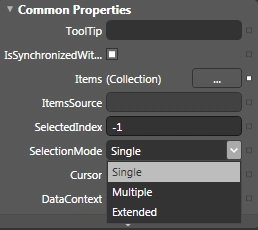
Selection Mode has three modes:
We will use the Multiple Selection Mode for the ListBox.
<ListBox x:Name="MyListBox" Height="100" SelectionMode="Multiple" HorizontalAlignment="Left" VerticalAlignment="Top" Width="100" Margin="8,39,0,0"/>
Add a List of strings as the Item Source of the ListBox.
List<string> myList = new List<string> { "C", "C++", "C#", "Java", "Visual Basic", "XAML" };
public MainPage()
{
InitializeComponent();
MyListBox.ItemsSource = myList;
}
Now we will add an event to the ListBox, called SelectionChanged.
<ListBox x:Name="MyListBox" Height="100" SelectionMode="Multiple" HorizontalAlignment="Left" VerticalAlignment="Top" Width="100" Margin="8,39,0,0" SelectionChanged="MyListBox_SelectionChanged"/>
Now in MainPage.xaml.cs find the event handler method and add the following code, to make sure what are the selections we have made.
private void MyListBox_SelectionChanged(object sender, SelectionChangedEventArgs e)
{
var selectedExp = MyListBox.SelectedItems;
Experience.Text = string.Empty;
foreach (string langName in selectedExp)
{
if (Experience.Text.Length>0)
{
Experience.Text += ", ";
}
Experience.Text += langName;
}
}
Now Run your application and select multiple values from the ListBox and you will find the selections are added to the TextBlock.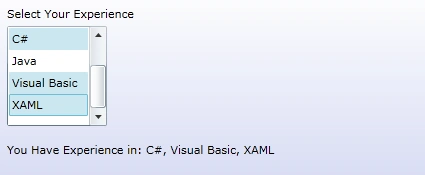
Single Mode
Now you might have thought of using the other two Modes: Single and Extended.
Single, as the name says you will be able to select only a single item in the ListBox.
What is Extended Mode?
It's nothing but the combination of both Single Mode and Multiple Mode. If you normally select it will be Single select mode and if you Press CTRL and select it will be Multiple mode.
Go ahead and try for it.
Enjoy Coding.

List Box in Silverlight 3 Application
Join the conversation! Your thoughts help the community grow.
Sign in to leave a comment
It is the same account you read, post and publish with — and you will come straight back to this page.
GiorgioPosted Nov 25, 2009, 1:40 PM
Hi, How can you implement a 4th selection mode? For example, if I will click on item 1 and hold the mouse down and drag the mouse to item 4 and then release the mouse button, and then see item 1 to 4 selected. So we are talking about a Drag Selection mode. How can I do that? Regards
LisaPosted Aug 14, 2009, 11:32 PM
Hi, first thanks the sharing. but I think you had forget to consider one case, when user's selection collection changed, the new selected collection will be shown after the the previous one. Duplication may occur.
praval singhPosted Jul 30, 2009, 2:43 AM
Sir , you have send me a 2 options about error - one that i install silver light 3 new version but it did not work i got same error message as - silver light error message error code 4005 error type parse error 4005 an error has occured xamlfile :http://localhost:4163/silverlightproject2/page.xaml line 5 position 17 send one options - to install fresh silverlight tools u send me vs2008
praval singhPosted Jul 30, 2009, 1:49 AM
Sir, thank for send me a message as version problem but download your listbox application and successfully run in browser still now i create a new silverlight application it gives me error silverlight error message error code 4005 silverlight parse error [email protected]
praval singhPosted Jul 29, 2009, 8:45 AM
Hello , I am trying to run silverlight project on vs 2008.page report an error as- silverlight error message error code :4005 error type parse error please send me at my ID [email protected] Thanx