
Introduction
In part III of this article series we have seen the Window Transparency and it's FullScreen View. We have seen how we can achieve Tooltip as the small Image Preview of the Mouse Hovered Image. In this article we will see how we can loop through the Image List and display it in ListBox.
To start with let me explain how I am using the List. I am having a Global List that will be refreshed each time a new item is added or an existing item is updated.
The following Global List is kept inside a Class. So that it can be accessed for other windows.
Now we can have the LINQ query to have SKIP and TAKE set ot records. Such as: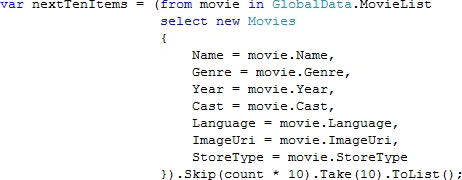
As you see in above code display, I have used a variable count. This variable is initiliazised as 0.
When we Click on Next Button we are making an increament and in Previous Button Click we are making a decreament.
Now we will have our Previous and Next Button Click events.
As the number of images displayed in the ListBox is always 10, we have to use the above logic to take the List.
Count * 10 is the number of records to be Skipped and next 10 records are to be taken for display.
Now the last tiny thing left is on SelectionChanged event of the ListBoc we need to display the Image in large.
The following screenshot is the final SlideShow.
So we have successfully created the SlideShow. I will post the Source Code once the application is full fledge.
Hope you like this article series.

Making an Image SlideShow in WPF: Part IV
Join the conversation! Your thoughts help the community grow.
Sign in to leave a comment
It is the same account you read, post and publish with — and you will come straight back to this page.
Dorababu MekaPosted May 3, 2011, 4:12 AM
I am unable to see the output as you said form the downloaded code so can you attach the complete working code again
Chris EganPosted Jun 7, 2010, 11:13 AM
I recently downloaded the application but did not see the image files or XML file. These would be very helpful in learning how to customize the application. Is there anyway for you to share these? Thanks.
Diptimaya PatraPosted May 19, 2010, 11:52 PM
http://www.ziddu.com/download/9933852/SlideShow.zip.html
Priscila TomePosted May 12, 2010, 1:48 PM
Good evening! I am Brazilian and unfortunately here we do not have many sources of advice / research on "new" technologies like WPF, very difficult to find something, and am currently working at the same time learning WPF and the need arose to make a slideshow. I was looking for something on the Internet SlideShow done in WPF, and a execelente chance I found your article, which helped me in parts, but some parts of the source code posted here is collapsed and I could not understand some things, I know his idea is to just give the kick-start, and I loved your article, but would you post the source code for download, not just me as others. Sorry if my English is rather bad and being a little long in the post. If you can contact me by email: [email protected] Thanks Priscila Tomé
Diptimaya PatraPosted Mar 11, 2010, 1:52 AM
I am trying to finish the app for slideshow only, then I would share it definitely. As promised. :-)
PaulPosted Mar 8, 2010, 2:23 AM
I'm working on a project now that requires this kind of functionality and I've never worked with presentation foundation before. This would give me a great head start.