

Objective
To insert images into m.s.access file and also to perform search, update, and delete operations.
Design
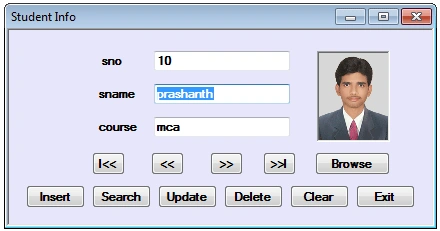
- Design the form as above with an OpenFileDialog control, 3 Labels, 3 TextBoxes, 11 buttons.
- PictureBox1 Properties.
- BorderStyle=Fixed3D; SizeMode=StrechImage.
Note that the OpenFileDialog control appears below the form(not on the form), which can be used for browsing an image.
Introduction
- In order to use OleDb Connection include the namespace: 'using System.Data.OleDb'
- For accessing records from the M.S.Access-2003 file we use the 'Jet' driver,
- And for accessing records from the M.S.Access-2007 file we use the 'Ace' driver.
- As we want to insert images into the msaccess, first we have to create a table in the m.s.access file, we can use the data type 'ole object' for storing the image.
- In this application, we will search a record by taking input from the InputBox. For this, we have to add a reference to Microsoft.VisualBasic.
Adding a Reference
- Goto Project Menu->Add Reference -> select 'Microsoft.VisualBasic' from the .NET tab.
- In order to use this we have to include the namespace: 'using Microsoft.VisualBasic'
Converting images into binary data
We can't store an image directly into the database. For this, we have two solutions.
- To store the location of the image in the database
- Converting the image into binary data inserts that binary data into the database and converts that back to the image while retrieving the records.
- If we store the location of an image in the database, and suppose that image is deleted or moved from that location, we will face problems while retrieving the records. So it is better to convert the image into binary data insert that binary data into the database and convert that back to the image while retrieving records.
We can convert an image into binary data using.
- FileStream
- MemoryStream
1. FileStream: uses file location to convert an image into binary data which we may/may not provide during updation of a record.
Ex
FileStream fs = new FileStream(openFileDialog1.FileName, FileMode.Open, FileAccess.Read);
byte[] photoArray = new byte[fs.Length];
fs.Read(photoArray, 0, photoArray.Length);
2. MemoryStream: So it is better to use MemoryStream which uses images in the PictureBox to convert an image into binary data.
Ex
MemoryStream ms = new MemoryStream();
pictureBox1.Image.Save(ms, ImageFormat.Jpeg);
byte[] photo_aray = new byte[ms.Length];
ms.Position = 0;
ms.Read(photo_aray, 0, photo_aray.Length);
In order to use FileStream or MemoryStream we have to include the namespace:'using System.IO'.
OpenFileDialog Control
We use OpenFileDialog control in order to browse for the images (photos) to insert into the record.
Creating a primary key in the Data Table
In this app., we use the Find() method to search a record, which requires details of the primary column for database tables this provided using the statement: adapter.MissingSchemaAction = MissingSchemaAction.AddWithKey.
But as we don't have any primary-key column in the M.S.Access table, we have to create a primary key column in the data table.
Eg
ds.Tables[0].Constraints.Add("pk_sno", ds.Tables[0].Columns[0], true);
Code
using System;
using System.Data;
using System.Drawing;
using System.Drawing.Imaging;
using System.Data.OleDb;
using System.Windows.Forms;
using System.IO;
using Microsoft.VisualBasic;

namespace access_img
{
    public partial class Form1 : Form
    {
        public Form1()
        {
            InitializeComponent();
        }

        OleDbConnection con;
        OleDbCommand cmd;
        OleDbDataAdapter adapter;
        DataSet ds;
        int rno = 0;
        MemoryStream ms;
        byte[] photo_aray;

        private void Form1_Load(object sender, EventArgs e)
        {
            con = new OleDbConnection(@"provider=microsoft.ace.oledb.12.0;data source=e:\prash\stud.accdb;persist securityiInfo=false"); // stud.accdb -> access07 filename
            // con = new OleDbConnection(@"provider=microsoft.jet.oledb.4.0;data source=e:\prash\stud.mdb"); // stud.mdb -> access03 filename
            loaddata();
            showdata();
        }

        void loaddata()
        {
            adapter = new OleDbDataAdapter("select * from student", con);
            ds = new DataSet(); // student -> table name in stud.accdb/stud.mdb file
            adapter.Fill(ds, "student");
            ds.Tables[0].Constraints.Add("pk_sno", ds.Tables[0].Columns[0], true); // creating primary key for Tables[0] in dataset
        }

        void showdata()
        {
            textBox1.Text = ds.Tables[0].Rows[rno][0].ToString();
            textBox2.Text = ds.Tables[0].Rows[rno][1].ToString();
            textBox3.Text = ds.Tables[0].Rows[rno][2].ToString();
            pictureBox1.Image = null;
            if (ds.Tables[0].Rows[rno][3] != System.DBNull.Value)
            {
                photo_aray = (byte[])ds.Tables[0].Rows[rno][3];
                MemoryStream ms = new MemoryStream(photo_aray);
                pictureBox1.Image = Image.FromStream(ms);
            }
        }

        private void btnBrowse_Click(object sender, EventArgs e)
        {
            openFileDialog1.Filter = "jpeg|*.jpg|bmp|*.bmp|all files|*.*";
            DialogResult res = openFileDialog1.ShowDialog();
            if (res == DialogResult.OK)
            {
                pictureBox1.Image = Image.FromFile(openFileDialog1.FileName);
            }
        }

        private void btnInsert_Click(object sender, EventArgs e)
        {
            cmd = new OleDbCommand("insert into student(sno,sname,course,photo) values(" + textBox1.Text + ",'" + textBox2.Text + "','" + textBox3.Text + "',@photo)", con);
            conv_photo();
            con.Open();
            int n = cmd.ExecuteNonQuery();
            con.Close();
            if (n > 0)
            {
                MessageBox.Show("record inserted");
                loaddata();
                rno++;
            }
            else
                MessageBox.Show("insertion failed");
        }

        void conv_photo()
        {
            // converting photo to binary data
            if (pictureBox1.Image != null)
            {
                // using MemoryStream:
                ms = new MemoryStream();
                pictureBox1.Image.Save(ms, ImageFormat.Jpeg);
                byte[] photo_aray = new byte[ms.Length];
                ms.Position = 0;
                ms.Read(photo_aray, 0, photo_aray.Length);
                cmd.Parameters.AddWithValue("@photo", photo_aray);
            }
        }

        private void btnSearch_Click(object sender, EventArgs e)
        {
            try
            {
                int n = Convert.ToInt32(Interaction.InputBox("Enter sno:", "Search", "20", 100, 100));
                DataRow drow;
                drow = ds.Tables[0].Rows.Find(n);
                if (drow != null)
                {
                    rno = ds.Tables[0].Rows.IndexOf(drow);
                    textBox1.Text = drow[0].ToString();
                    textBox2.Text = drow[1].ToString();
                    textBox3.Text = drow[2].ToString();
                    pictureBox1.Image = null;
                    if (drow[3] != System.DBNull.Value)
                    {
                        photo_aray = (byte[])drow[3];
                        MemoryStream ms = new MemoryStream(photo_aray);
                        pictureBox1.Image = Image.FromStream(ms);
                    }
                }
                else
                    MessageBox.Show("Record Not Found");
            }
            catch
            {
                MessageBox.Show("Invalid Input");
            }
        }

        private void btnUpdate_Click(object sender, EventArgs e)
        {
            cmd = new OleDbCommand("update student set sname='" + textBox2.Text + "', course='" + textBox3.Text + "', photo=@photo where sno=" + textBox1.Text, con);
            conv_photo();
            con.Open();
            int n = cmd.ExecuteNonQuery();
            con.Close();
            if (n > 0)
            {
                MessageBox.Show("Record Updated");
                loaddata();
            }
            else
                MessageBox.Show("Updation Failed");
        }

        private void btnDelete_Click(object sender, EventArgs e)
        {
            cmd = new OleDbCommand("delete from student where sno=" + textBox1.Text, con);
            con.Open();
            int n = cmd.ExecuteNonQuery();
            con.Close();
            if (n > 0)
            {
                MessageBox.Show("Record Deleted");
                loaddata();
                rno = 0;
                showdata();
            }
            else
                MessageBox.Show("Deletion failed");
        }

        private void btnFirst_Click(object sender, EventArgs e)
        {
            if (ds.Tables[0].Rows.Count > 0)
            {
                rno = 0;
                showdata();
                MessageBox.Show("First Record");
            }
            else
                MessageBox.Show("no records");
        }

        private void btnPrevious_Click(object sender, EventArgs e)
        {
            if (ds.Tables[0].Rows.Count > 0)
            {
                if (rno > 0)
                {
                    rno--;
                    showdata();
                }
                else
                    MessageBox.Show("First Record");
            }
            else
                MessageBox.Show("no records");
        }

        private void btnNext_Click(object sender, EventArgs e)
        {
            if (ds.Tables[0].Rows.Count > 0)
            {
                if (rno < ds.Tables[0].Rows.Count - 1)
                {
                    rno++;
                    showdata();
                }
                else
                    MessageBox.Show("Last Record");
            }
            else
                MessageBox.Show("no records");
        }

        private void btnLast_Click(object sender, EventArgs e)
        {
            if (ds.Tables[0].Rows.Count > 0)
            {
                rno = ds.Tables[0].Rows.Count - 1;
                showdata();
                MessageBox.Show("Last Record");
            }
            else
                MessageBox.Show("no records");
        }

        private void btnClear_Click(object sender, EventArgs e)
        {
            textBox1.Text = textBox2.Text = textBox3.Text = "";
        }

        private void btnExit_Click(object sender, EventArgs e)
        {
            this.Close();
        }
    }
}
Note. 'stud.accdb' and 'stud.mdb' files are provided in the access_img.zip file along with the source code.
ns communicationsPosted May 2, 2018, 12:34 AM
HI DEAR CAN U HELP CODE FOR INSERTING PICTURE Inserting images into MS Access file using OLEDB IN VB.NET
basel elgenPosted Oct 12, 2017, 7:40 PM
Thank you very much for this nice programm. it is the most working prog that I found about photos in Access and c Sharp.
prasad jainPosted May 29, 2017, 2:21 PM
The 'microsoft.ace.oledb.12.0' provider is not registered on the local machine error what t do
Anamika SinghPosted May 24, 2017, 7:30 AM
I am trying this code but i found all time error(Data type mismatch in criteria expression).
Madan DeshpandePosted Mar 30, 2016, 7:14 AM
Good one! it helped me.
Olu SolaPosted Sep 17, 2015, 9:16 AM
Pls ur answer would be appreciated. Thanks.
Olu SolaPosted Sep 17, 2015, 9:15 AM
Thank u. This code is very helpful. But have problem at the UPDATE BUTTON CODE LINE: "Syntax error" when i wanted to use 2picures or photos. How do include the second photo in the Update arrangement
Chandu AdhavPosted Jul 16, 2015, 2:58 AM
thanks sir this code is really helpful to me
Er Jasvinder NehalPosted May 30, 2015, 7:22 AM
i an using your coding , adapter.Fill(ds, "ATM"); in this line show error Fill: SelectCommand.Connection property has not been initialized. Please help me
Er Jasvinder NehalPosted May 30, 2015, 7:18 AM
i am using your code
Prasunjeet SoniPosted May 24, 2015, 7:10 AM
what will be the datatype for image in ms access
Shariq KhanPosted Apr 4, 2015, 12:56 PM
Great work dear friend
Chuck LookMonthPosted Feb 5, 2015, 2:16 PM
can u send me code for vb.net like that but using attachment multiple image...pls
member memberPosted Jan 21, 2015, 7:08 AM
Very good, thank you!
Shivram PopalghatPosted Jun 1, 2014, 7:03 AM
thanx
Lawrence TusabePosted May 28, 2014, 7:10 AM
precise code
Sanjay TiwariPosted Aug 24, 2013, 4:49 AM
can u send me code for web application.....pls
richard masuaPosted Apr 12, 2013, 3:40 PM
Hey guys this is so cool!but i cant search for a record when i enter sno its says"Invalid Input",what is valid input then?because i saved a record with 23 as my sno!please
richard masuaPosted Apr 12, 2013, 3:40 PM
Hey guys this is so cool!but i cant search for a record when i enter sno its says"Invalid Input",what is valid input then?because i saved a record with 23 as my sno!please
richard masuaPosted Apr 12, 2013, 3:40 PM
Hey guys this is so cool!but i cant search for a record when i enter sno its says"Invalid Input",what is valid input then?because i saved a record with 23 as my sno!please
Rida AliPosted Nov 25, 2012, 3:30 PM
Hi, i coded stream in the same way as urs. but it shows an error "0bject reference is not set to an instance of the object", i am usin msvs2010.
zin moePosted May 30, 2012, 12:56 AM
thank
Mukhtar HussainPosted Mar 29, 2012, 5:13 AM
you code it in C SHarp is it possible to code in MS Access
saket kumarPosted Feb 14, 2012, 3:12 PM
VERY GOOD
muh zuhryPosted Dec 26, 2011, 12:58 PM
Terimah kasih banyak saya dari indonesia baru belajar vb.net
bheema sekharPosted Jun 27, 2011, 5:40 AM
nice one
Bhushan TaydePosted Dec 6, 2010, 6:31 AM
sir how can deploy the project in wpf