

This article will be all about building a Windows Phone 7 App using XNA 4.0.
This article will be a demonstration of Windows Phone 7.
So XNA 4.0 Beta is out and everything is going well. But what are the new and removed objects in XNA 4.0 Beta?
Classes, interfaces, enums added in BETA:
- DisplayOrientation
- AvatarRendererState
- IAvatarAnimation
- LaunchParameters
- GameUpdateRequiredException
- NetworkException(Moved from Framework.Net to Framework.GamerServices)
- Added Framework.GamerServices namespace to Framework.Net namespace
Removed in BETA:
- GamerServiceType
I have written an article about How To Use LaunchParameters maybe you can read it sometime. So shall we not break our topic and go on what we are going to discuss.
Lets create a Windows Phone 7 Application using WP7 Emulator (device not yet released!)
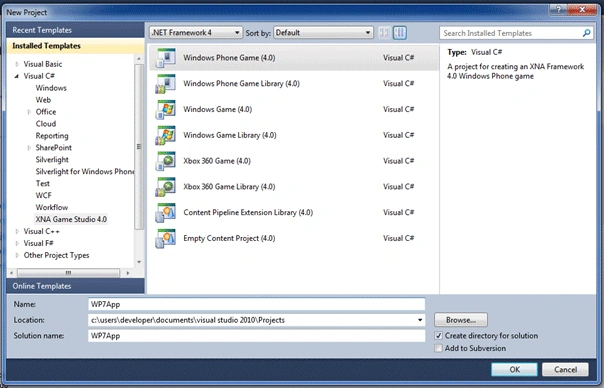
It will automatically add the following code:
using System;
using System.Collections.Generic;
using System.Linq;
using Microsoft.Xna.Framework;
using Microsoft.Xna.Framework.Audio;
using Microsoft.Xna.Framework.Content;
using Microsoft.Xna.Framework.GamerServices;
using Microsoft.Xna.Framework.Graphics;
using Microsoft.Xna.Framework.Input;
using Microsoft.Xna.Framework.Input.Touch;
using Microsoft.Xna.Framework.Media;
namespace WP7App
{
/// <summary>
/// This is the main type for your game
/// </summary>
public class Game1 : Microsoft.Xna.Framework.Game
{
GraphicsDeviceManager graphics;
SpriteBatch spriteBatch;
public Game1()
{
graphics = new GraphicsDeviceManager(this);
Content.RootDirectory = "Content";
// Frame rate is 30 fps by default for Windows Phone.
TargetElapsedTime = TimeSpan.FromTicks(333333);
}
/// <summary>
/// Allows the game to perform any initialization it needs to before starting to run.
/// This is where it can query for any required services and load any non-graphic
/// related content. Calling base.Initialize will enumerate through any components
/// and initialize them as well.
/// </summary>
protected override void Initialize()
{
// TODO: Add your initialization logic here
base.Initialize();
}
/// <summary>
/// LoadContent will be called once per game and is the place to load
/// all of your content.
/// </summary>
protected override void LoadContent()
{
// Create a new SpriteBatch, which can be used to draw textures.
spriteBatch = new SpriteBatch(GraphicsDevice);
// TODO: use this.Content to load your game content here
}
/// <summary>
/// UnloadContent will be called once per game and is the place to unload
/// all content.
/// </summary>
protected override void UnloadContent()
{
// TODO: Unload any non ContentManager content here
}
/// <summary>
/// Allows the game to run logic such as updating the world,
/// checking for collisions, gathering input, and playing audio.
/// </summary>
/// <param name="gameTime">Provides a snapshot of timing values.</param>
protected override void Update(GameTime gameTime)
{
// Allows the game to exit
if (GamePad.GetState(PlayerIndex.One).Buttons.Back == ButtonState.Pressed)
this.Exit();
// TODO: Add your update logic here
base.Update(gameTime);
}
/// <summary>
/// This is called when the game should draw itself.
/// </summary>
/// <param name="gameTime">Provides a snapshot of timing values.</param>
protected override void Draw(GameTime gameTime)
{
GraphicsDevice.Clear(Color.CornflowerBlue);
// TODO: Add your drawing code here
base.Draw(gameTime);
}
}
}
There is something new for Windows Game Projects which is:
TargetElapsedTime = TimeSpan.FromTicks(333333);
This means 30 FPS is the default FPS count of WP7 Games.
And the other one is (of course) Touch namespace:
using Microsoft.Xna.Framework.Input.Touch;
Lets add some Font and display the Width and Height of the WP7.
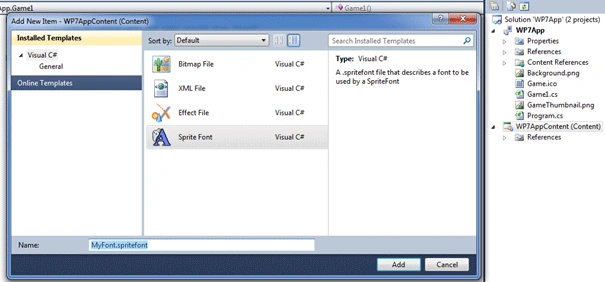
And the xml file will look like this:
<?xml version="1.0" encoding="utf-8"?>
<XnaContent xmlns:Graphics="Microsoft.Xna.Framework.Content.Pipeline.Graphics">
<Asset Type="Graphics:FontDescription">
<FontName>Kootenay</FontName>
<Size>14</Size>
<Spacing>0</Spacing>
<UseKerning>true</UseKerning>
<Style>Regular</Style>
<CharacterRegions>
<CharacterRegion>
<Start> </Start>
<End>~</End>
</CharacterRegion>
</CharacterRegions>
</Asset>
</XnaContent>
You can set the font's properties here
Add these 2 variables:
SpriteFont Font1;
Vector2 FontPos;
SpriteFont defines the Font used for the app.Pos; it stores the position of the font.
Add these in LoadContent()
Font1 = Content.Load<SpriteFont>("MyFont");
FontPos = new Vector2(graphics.GraphicsDevice.Viewport.Width / 2, graphics.GraphicsDevice.Viewport.Height / 2);
It initializes Font object which we created. And loads its asset.
We're centering the FontPos so that the Text we will be centered.
Add these codes in Draw Function:
spriteBatch.Begin();
string output = "Height: " + graphics.PreferredBackBufferHeight + " Width: " + graphics.PreferredBackBufferWidth;
Vector2 FontOrigin = Font1.MeasureString(output) / 2;
spriteBatch.DrawString(Font1, output, FontPos, Color.Black,
0, FontOrigin, 1.0f, SpriteEffects.None, 0.5f);
spriteBatch.End();
And run the project:
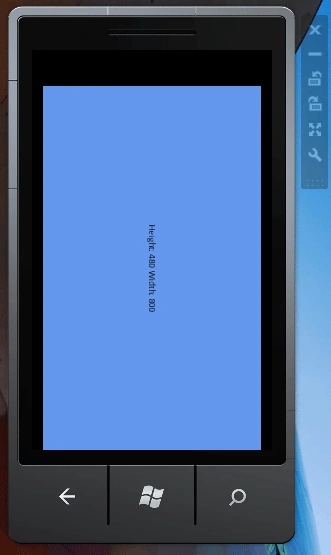
As you can see this is the default DisplayOrientation of WP7 Emulator.

The Rotating icons are the helpers that can help you change the DisplayOrientation.
Topmost icon is Close,
The icon below is minimizer.
The 4-Arrow icon helps you to zoom-in and zoom-out.
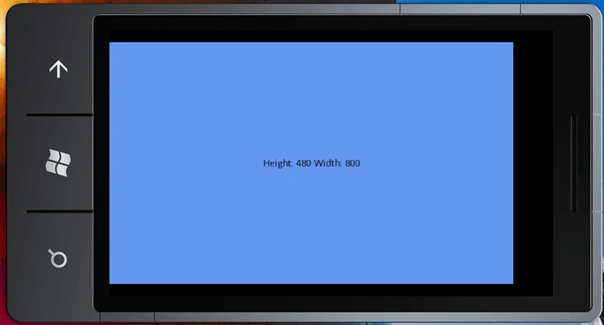
Here is how it appears...

The dotted-icon helps you move the WP7 emulator to anywhere you want.

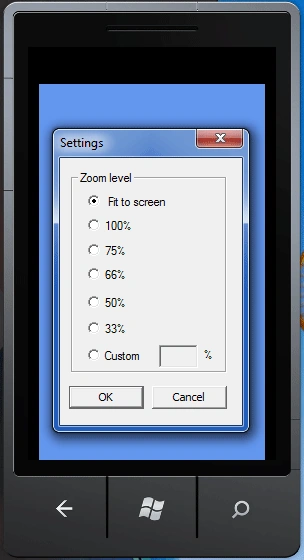
The Key-like icon helps you open the Settings Dialog Window in which you can set Zoom Level:
This is it! This was your first WP7 application and in addition now you know how to use the emulator. Hope this demonstration helped you!
Mahesh ChandPosted Oct 28, 2010, 10:31 PM
Nice