

Step 1 : Create a blank Solution "testParameterReport"
Step 2 : Add new project Windows Forms Application name "testParameterReport"
Step 3 : Run this Script for create Table and Storedprocedure.
SET ANSI_NULLS ON
GO
SET QUOTED_IDENTIFIER ON
GO
IF NOT EXISTS (SELECT * FROM sys.objects WHERE object_id = OBJECT_ID(N'[dbo].[CITY]') AND type in (N'U'))
BEGIN
CREATE TABLE [dbo].[CITY]( [CITYID] [int] IDENTITY(1,1) NOT NULL,[CITYNAME] [nvarchar](max) NOT NULL,
CONSTRAINT [PK_CITY] PRIMARY KEY CLUSTERED
(
[CITYID] ASC
)WITH (PAD_INDEX = OFF, IGNORE_DUP_KEY = OFF) ON [PRIMARY]
) ON [PRIMARY]
END
GO
SET ANSI_NULLS ON
GO
SET QUOTED_IDENTIFIER ON
GO
IF NOT EXISTS (SELECT * FROM sys.objects WHERE object_id = OBJECT_ID(N'[dbo].[EMPLOYEE]') AND type in (N'U'))
BEGIN
CREATE TABLE [dbo].[EMPLOYEE](
[EMPID] [int] IDENTITY(1,1) NOT NULL,
[EMPNAME] [nvarchar](max) NOT NULL,
[DESIGNATION] [nvarchar](max) NOT NULL,
[SALARY] [numeric](18, 2) NOT NULL,
[CITYID] [int] NOT NULL,
CONSTRAINT [PK_EMPLOYEE] PRIMARY KEY CLUSTERED
(
[EMPID] ASC
)WITH (PAD_INDEX = OFF, IGNORE_DUP_KEY = OFF) ON [PRIMARY]
) ON [PRIMARY]
END
GO
SET ANSI_NULLS ON
GO
SET QUOTED_IDENTIFIER ON
GO
IF NOT EXISTS (SELECT * FROM sys.objects WHERE object_id = OBJECT_ID(N'[dbo].[usp_EMPLOYEE]') AND type in (N'P', N'PC'))
BEGIN
EXEC dbo.sp_executesql @statement = N'CREATE PROCEDURE [dbo].[usp_EMPLOYEE]
(
@CITYID int = null
)
AS
BEGIN
SELECT EMPLOYEE.EMPNAME, EMPLOYEE.DESIGNATION, EMPLOYEE.SALARY, CITY.CITYNAME
FROM EMPLOYEE INNER JOIN
CITY ON EMPLOYEE.CITYID = CITY.CITYID
WHERE (EMPLOYEE.CITYID = @CITYID)
END
-
END
GO
SET ANSI_NULLS ON
GO
SET QUOTED_IDENTIFIER ON
GO
IF NOT EXISTS (SELECT * FROM sys.objects WHERE object_id = OBJECT_ID(N'[dbo].[usp_CITY]') AND type in (N'P', N'PC'))
BEGIN
EXEC dbo.sp_executesql @statement = N'CREATE PROCEDURE [dbo].[usp_CITY]
(
@Task int = 0,
@CITYID int = null,
@CITYNAME nvarchar(MAX) = ''''
)
AS
--- select name of the city from city table order by cityname. -----
IF(@Task = 1)
SELECT CITYNAME
FROM CITY
ORDER BY CITYNAME
IF(@Task = 2)
SELECT CITYID
FROM CITY
WHERE CITYNAME = @CITYNAME
'
END
GO
IF NOT EXISTS (SELECT * FROM sys.foreign_keys WHERE object_id = OBJECT_ID(N'[dbo].[FK_EMPLOYEE_CITY]') AND parent_object_id = OBJECT_ID(N'[dbo].[EMPLOYEE]'))
ALTER TABLE [dbo].[EMPLOYEE] WITH CHECK ADD CONSTRAINT [FK_EMPLOYEE_CITY] FOREIGN KEY([CITYID])
REFERENCES [dbo].[CITY] ([CITYID])
GO
ALTER TABLE [dbo].[EMPLOYEE] CHECK CONSTRAINT [FK_EMPLOYEE_CITY]
Step 4 : Create from name "Employeereport.cs"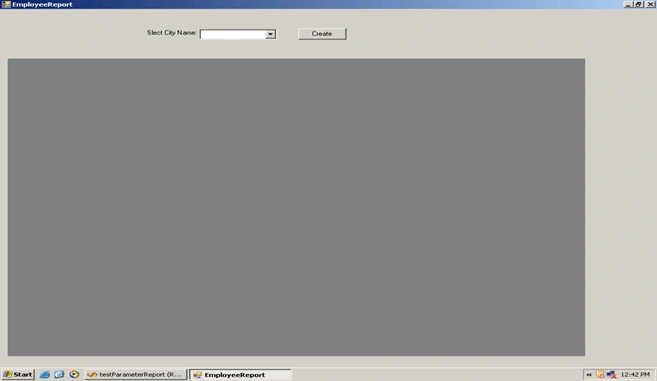
Step 5 : Create Crystalreport "EmployeeReport.rpt" and Bind with Storedprocedure "usp_EMPLOYEE".
Step 6 : Your code behind file like
using System;
using System.Collections.Generic;
using System.ComponentModel;
using System.Data;
using System.Drawing;
using System.Linq;
using System.Text;
using System.Windows.Forms;
using CrystalDecisions;
using CrystalDecisions.Shared;
using CrystalDecisions.CrystalReports;
using CrystalDecisions.CrystalReports.Engine;
using CrystalDecisions.Windows.Forms;
namespace testParameterReport
{
public partial class Employeereport : Form
{
CrystalReportViewer crystalReportViewer1 = new CrystalReportViewer();
public Employeereport()
{
InitializeComponent();
}
private void Employeereport_Load(object sender, EventArgs e)
{
BindCitycmb();
}
private void BindCitycmb()
{
using(EmployeeDataContext db = new EmployeeDataContext())
{
var info = db.usp_CITY(1, null, "");
if(info != null)
{
foreach (var mycity in info)
{
cmbcity.Items.Add(mycity.CITYNAME.ToString());
}
}
}
}
private int selectcityid()
{
int id = 0;
if (cmbcity.SelectedItem.ToString() != "")
{
using (EmployeeDataContext db = new EmployeeDataContext())
{
var info = from p in db.CITies
where p.CITYNAME == cmbcity.SelectedItem.ToString()
select new {
p.CITYID
};
foreach(var cid in info)
{
id = cid.CITYID;
}
}
}
return id;
}
private void btnreport_Click(object sender, EventArgs e)
{
if (dockPanel1.Controls.Contains(crystalReportViewer1))
{
dockPanel1.Controls.Remove(crystalReportViewer1);
createreportviewer();
}
else
{
createreportviewer();
}
}
private void createreportviewer()
{
crystalReportViewer1.Refresh();
crystalReportViewer1.Height = 600;
crystalReportViewer1.Width = 900;
crystalReportViewer1.ShowRefreshButton = false;
Createreport();
dockPanel1.Controls.Add(crystalReportViewer1);
}
private void Createreport()
{
int cityid = selectcityid();
//Add your Crystalreport file path.
crystalReportViewer1.ReportSource = @"D:\testParameterReport\testParameterReport\testParameterReport\EmployeeReport.rpt";
CrystalDecisions.CrystalReports.Engine.ReportDocument objReport
= new CrystalDecisions.CrystalReports.Engine.ReportDocument();
if (cityid != 0)
{
try
{
//Add your Crystalreport file path.
objReport.Load(@"D:\testParameterReport\testParameterReport\testParameterReport\EmployeeReport.rpt");
ParameterField f1 = crystalReportViewer1.ParameterFieldInfo[0];
ParameterDiscreteValue v1 = new ParameterDiscreteValue();
v1.Value = cityid;
f1.CurrentValues.Add(v1);
}
catch
{
crystalReportViewer1.Refresh();
Createreport();
}
finally
{
objReport.Dispose();
objReport.Close();
}
}
else
{
crystalReportViewer1.Visible = false;
}
}
}
}
brijesh prajapatieditedPosted Mar 7, 2013, 3:35 AMEdited Mar 7, 2013, 3:38 AM
Good Code Sir ... But My Question Set a Crystal Report Height And Width Throw Code Means My Report Size 5 * 5 inchs So plz Sugges me how to implement
MARIO FERNANDEZPosted Mar 9, 2012, 4:19 PM
hello very nice code, my question is: when you say "run this code" at the top of instructions, where do you want the code to be run at. I have sql 2008 and it looks like the code for it but, your missing Data base name and other instructions or is there any place on visual c# where you can run the code without doing it on sql window???,, greetings
Muhammad LabinashPosted Nov 17, 2009, 3:03 PM
Can Anyone help me, how to Create text box (for header text) and other Text box (for (for value)Dynamically in crystal report using vb.net