

Introduction
Unit tests allow the developers and testers to check the logical errors in the methods of classes in C# and VB.NET Projects. Unit test can be created once and can be run every time that source code changes. Unit test cases make sure that no bugs are introduced when you write the new code.
The more about TDD using C# and concepts here. This post speaks about Unit Test Framework that introduced in VS 2008 Team Suite for developers that was not available in VS 2005 and also explains about creating and running Unit Tests.
1. Create a new Class library project in VS 2008 and write the following code in class
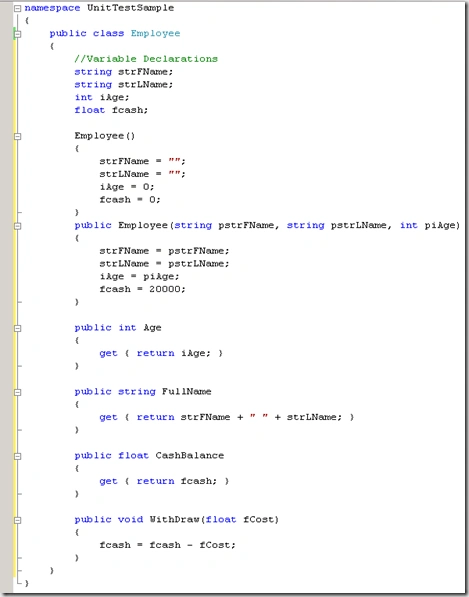
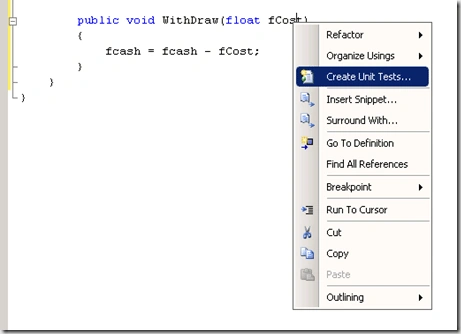
2. Right click on the WithDraw() method in the above class then select Create Unit Tests option.
3. You will get the Unit Test dialogue box as shown below
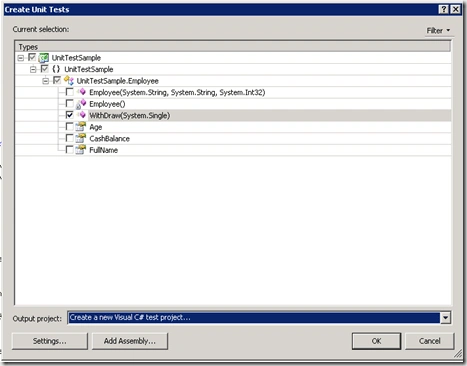
A new test project will be created in the solution and notice that every method is assigned the TestMethod() attribute. The class which contains these test methods are assigned TestClass() attribute.
4. The next step is to set the values to the variables in the test method
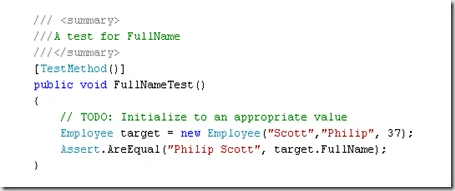
5. Save the values in the file and open the Test List editor from the solution it looks like as follows
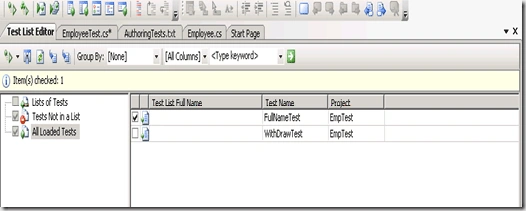
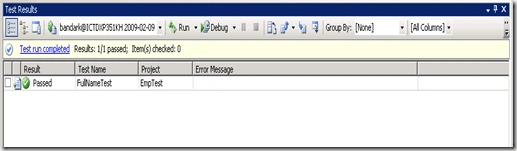
6. Check the Test cases that you want to test from the above editor and click on run button you will see the results of the test cases as follows
Conclusion
We have learned creating a test case and running using the Unit Test case framework in the Visual Studio 2008 Team edition. In the next article I will discuss about more test attributes and features provided by the Unit Test Framework.
Sachin ThoratPosted Jan 29, 2010, 4:35 AM
Hi Can you help me in understanding,how this test would help me in testing multiple values, Currently I can see that "Scott" "Philip" 37 values are hardcoded. Ideally tester would test the scenario for multiple values..