

StringCollection in C#
The StringCollection class is a new addition to the .NET Framework class library that represents a collection of strings. This article discusses how to use its methods and properties to manage a collection of strings.
The StringCollection class is defined in the System.Collections.A specialized namespace represents a collection of strings and provides functionality to manage the collection.
Creating StringCollection
The following code snippet creates an object of StringCollection class using the default constructor.
StringCollection authorNames = new StringCollection();
Add strings to a string collection
StringCollection class provides the following three methods to add strings to a string collection.
- Add
- AddRange
- Insert
Add method is used to add a string to a StringCollection at the end of the collection. The following code snippet adds strings to a StringCollection.
// Add string using Add method
authorNames.Add("Mahesh Chand");
authorNames.Add("Mike Gold");
authorNames.Add("Praveen Kumar");
authorNames.Add("Raj Beniwal");
The addRange method adds an array of strings to a StringCollection at the end of the collection. The following code snippet adds an array of strings to a StringCollection.
// Add an array of string using AddRange
string[] names = new string[]{"Mahesh Chand", "Mike Gold", "Praveen Kumar", "Raj Beniwal"};
authorNames.AddRange(names);
The insert method is used to insert a string at the specified location of a StringCollection. The following code snippet inserts a string at the 5th position in a StringCollection. You will get out of bounds error message if the StringCollection does not have five items.
// Insert an string at a specified index
authorNames.Insert(5, "New Author");
Access strings from a string collection
The foreach loop statement in C# is used to iterate through a collection of objects such as integers or strings.
The following code snippet creates an array of strings, adds strings to a StringCollection, and later uses a foreach statement to loop through the collection and display it on the system console.
StringCollection authorNames = new StringCollection();
string[] names = new string[]{"Mahesh Chand", "Mike Gold", "Praveen Kumar", "Raj Beniwal"};
authorNames.AddRange(names);
foreach (string name in authorNames)
{
    Console.WriteLine(name);
}
Remove strings from a string collection
StringCollection class provides three methods to remove strings from a string collection.
- Clear
- Remove
- RemoveAt
The clear method removes all items from a StringCollection. The following code snippet removes all items from a StringCollection.
authorNames.Clear();
The remove method removes the first occurrence of a given string from the string collection. The following code snippet removes a string from a StringCollection.
authorNames.Remove("Mike Gold");
The RemoveAt method removes a string specified at the given location from the string collection. The following code snippet removes a string at the specified index from a StringCollection.
authorNames.RemoveAt(5);
Find string in a string collection
The IndexOf method searches for the specified string and returns the zero-based index of the first occurrence within the StringCollection. The following code snippet finds the position of a string in a string collection.
int authorLocation = authorNames.IndexOf("Mike Gold");
Console.WriteLine("Position of Mike Gold is " + authorLocation.ToString());
Contains method returns true if a string is found in a StringCollection. The following code snippet checks if a string is found in the collection and returns the position in a string collection.
if (authorNames.Contains("Mike Gold"))
{
    Console.WriteLine("Mike Gold is at position: " + authorNames.IndexOf("Mike Gold"));
}
Copy strings to and from a string collection
The CopyTo method of StringCollection is used to copy items from a StringCollection to an array. The CopyTo method takes two arguments. First is the name of the StringCollection, and the second is the starting position in the StringCollection. The following code snippet copies all items from authorNames StringCollection to an array.
// Copy Collection to new Array
string[] newAuthorList = new string[authorNames.Count];
authorNames.CopyTo(newAuthorList, 0);
foreach (string name in newAuthorList)
{
    Console.WriteLine(name);
}
Count strings in a string collection
Count property returns a total number of items in a StringCollection. For example, the following code snippet returns the number of items in authorNames collection.
Console.WriteLine("Total items in string collection: " + authorNames.Count.ToString());
Getting items from a string collection
ArrayCollection is a collection. That means you can access its items by using an index. The following code snippet looks for the position of a string and accesses it using the Item property.
int authorLocation = authorNames.IndexOf("Mike Gold");
string authorName = authorNames[authorLocation];
StringCollection Code Sample:
Here is the listing of the complete code we have discussed in this article.
using System;
using System.Collections.Generic;
using System.Linq;
using System.Text;
using System.Collections;
using System.Collections.Specialized;

namespace StringCollectionSample
{
    class Program
    {
        static void Main(string[] args)
        {
            // Create a StringCollection object
            StringCollection authorNames = new StringCollection();
            // Add string using Add method
            authorNames.Add("Mahesh Chand");
            authorNames.Add("Mike Gold");
            authorNames.Add("Praveen Kumar");
            authorNames.Add("Raj Beniwal");
            // Add an array of string using AddRange
            string[] names = new string[] { "Chris Love", "Henry He", "Allen Neill", "David Maccarter" };
            authorNames.AddRange(names);
            // Insert an string at a specified index
            authorNames.Insert(5, "New Author");
            // authorNames.Clear();
            // authorNames.Remove("Mike Gold");
            // authorNames.RemoveAt(5);
            if (authorNames.Contains("Mike Gold"))
            {
                Console.WriteLine("Mike Gold is at position: " + authorNames.IndexOf("Mike Gold"));
            }
            int authorLocation = authorNames.IndexOf("Mike Gold");
            string authorName = authorNames[authorLocation];
            Console.WriteLine("Position of Mike Gold is " + authorLocation.ToString());
            Console.WriteLine("Total items in string collection: " + authorNames.Count.ToString());
            Console.WriteLine("-----------------------------");
            foreach (string name in authorNames)
            {
                Console.WriteLine(name);
            }
            Console.WriteLine("-----------------------------");
            // Copy Collection to new Array
            string[] newAuthorList = new string[authorNames.Count];
            authorNames.CopyTo(newAuthorList, 0);
            foreach (string name in newAuthorList)
            {
                Console.WriteLine(name);
            }
            Console.ReadLine();
        }
    }
}
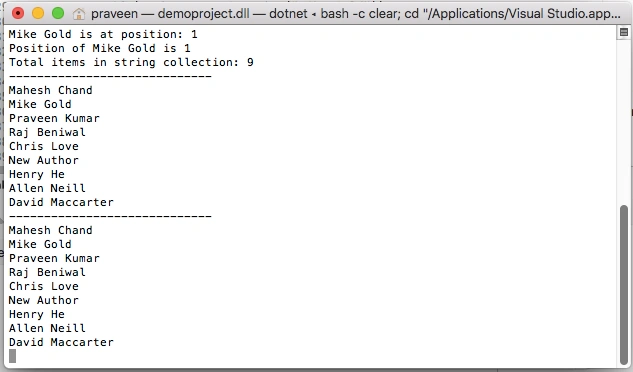
The output from the above code is shown in the below figure.
Summary
StringCollection class is a new addition to the .NET Framework class library that represents a collection of strings. In this article, we saw how to take advantage of this class and its methods and properties to manage a collection of strings.
Here are recommended articles on collections:
FireMystPosted Dec 18, 2018, 2:36 AM
Thanks for the article with clear examples! For anyone who's interested in the fastest collection for string lookups, here's an article that has plenty of benchmarks: http://cc.davelozinski.com/c-sharp/fastest-collection-for-string-lookups
Varun BansalPosted Oct 17, 2018, 7:48 AM
Whats comparison with respect to List, List<string>, Arraylist, It is faster?
Lajapathy ArunPosted Sep 18, 2012, 7:50 AM
i like it :)
Wang ZhanPosted Mar 7, 2012, 1:04 PM
Thank you for your article,I'm new in C# programming,and after learning your article,I've understood how to use StringSelection.
Asif IqbalPosted Jun 19, 2010, 5:11 AM
thats great article Asif Iqbal Software Eng
gaoren liPosted May 25, 2010, 10:00 PM
it's impelemted by ArrayList,and it's Not New actually!
matthewPosted May 24, 2010, 8:07 AM
Why use this instead of List<string>?