
Introduction:
A storyboard in a Blend or Silverlight application is a resource that contains a collection of animations each of which targets a specific property of a specific control. Animations here mean actions that temporarily change the property values of elements. For example, a rendering action of a button as skewed is an animation action.
Storyboards are created in the Blend IDE using the Storyboard picker.
Assume that you have created a Silverlight 2 application in Blend. Add a Button control to it.
Then, launch the Storyboard Picker by clicking the + symbol and selecting the New option. Figure 1 shows the New option. 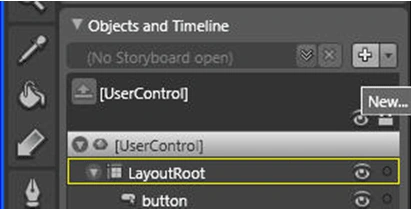
Figure 1
In the Create Storyboard Resource dialog box, leave the default name as is. 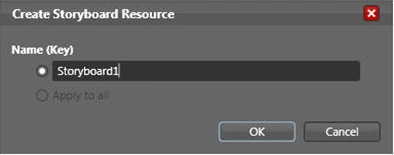
Figure 2
Open the newly created Storyboard by using the dropdown option in the Object and Timeline section.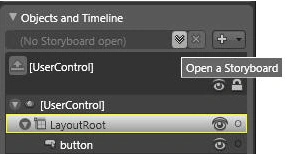
Figure 3
Select the Properties pane for the Button and after scrolling to the Transform property group, choose Skew option and skew the button. Figure 4 shows this setting in action.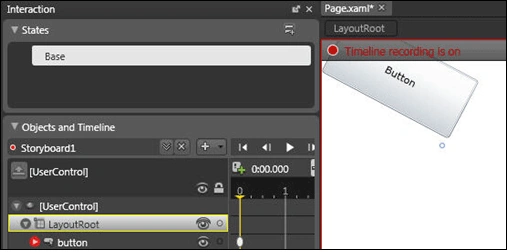
Figure 4
Click Base to stop recording.
Similarly, create another Storyboard, Storyboard2, and within it, skew the button in the opposite direction.
Then, in the Properties Pane for the button, click the lightning bolt symbol to open the Events pane.
Add an event for Button_Click. If you are using Visual Studio 2008 Express Edition or Visual Web Developer Express Edition then you will have to manually copy the event handler to the Page.xaml.cs file. Otherwise, in other editions such as Professional edition, the event handler is automatically added to the Page.xaml.cs file.
Within the event handler, in the Page.xaml.cs file, add the following code (marked bold for your reference):
private void Button_Click(object sender, System.Windows.RoutedEventArgs e)
{
Storyboard myStoryboard;
myStoryboard = (Storyboard)this.Resources["Storyboard1"];
myStoryboard.Begin();
myStoryboard = (Storyboard)this.Resources["Storyboard2"];
myStoryboard.Begin();
}
Save, build and test the application. Click the button on the browser output and see the animation action.
Conclusion: Thus, in the first part of this article series, you explored how to create storyboards and use them to create simple animations.

Join the conversation! Your thoughts help the community grow.