Through this article you will learn how to bind the record in gridview and how to delete their records on multiple checkbox select. In my previous article(http://www.c-sharpcorner.com/UploadFile/prathore/4530/Default.aspx?ArticleID=752de46f-3629-455c-b69d-2c52d1875365) you can see how to bind record in gridview. Here you will also learn how to delete their records.
Default.aspx:
<%@ Page Language="C#" AutoEventWireup="true" CodeFile="GridViewMutipleDeleteCheckBox.aspx.cs"
Inherits="GridViewMutipleDeleteCheckBox" %>
<!DOCTYPE html PUBLIC "-//W3C//DTD XHTML 1.0 Transitional//EN" "http://www.w3.org/TR/xhtml1/DTD/xhtml1-transitional.dtd">
<html xmlns="http://www.w3.org/1999/xhtml">
<head runat="server">
<title></title>
<script type="text/javascript" language="javascript">
function ConfirmOnDelete(item)
{
if (confirm("Would you like to delete selected item(s)?")==true)
return true;
else
return false;
}
</script>
</head>
<body>
<form id="form1" runat="server">
<div>
<asp:GridView ID="GridView1" runat="server" AutoGenerateColumns=false
onrowdatabound="GridView1_RowDataBound">
<Columns>
<asp:TemplateField>
<HeaderTemplate>
<asp:Button ID="ButtonDelete" runat="server" Text="Delete" OnClick=ButtonDelete_Click/>
</HeaderTemplate>
<ItemTemplate>
<asp:CheckBox ID="CheckBox1" runat="server" />
</ItemTemplate>
</asp:TemplateField>
<asp:BoundField DataField="EmpId" HeaderText="Emp Id" ReadOnly="True" />
<asp:BoundField DataField="EmpName" HeaderText="Title" />
<asp:BoundField DataField="Address" HeaderText="Emp Name" />
<asp:BoundField DataField="Phone" HeaderText="Address" />
<asp:BoundField DataField="Salary" HeaderText="Phone" />
<asp:BoundField DataField="Country" HeaderText="Country" />
</Columns>
</asp:GridView>
</div>
</form>
</body>
</html>
Code behind:
using System;
using System.Collections.Generic;
using System.Linq;
using System.Web;
using System.Web.UI;
using System.Web.UI.WebControls;
using System.Data;
using System.Data.SqlClient;
using System.Collections.Specialized;
using System.Text;
public partial class GridViewMutipleDeleteCheckBox : System.Web.UI.Page
{
SqlConnection con = new SqlConnection();
SqlCommand cmd = new SqlCommand();
string connectionString = "Data Source=testserver;Initial Catalog=Testdatabase; uid=sa;pwd=wintellect";
protected void Page_Load(object sender, EventArgs e)
{
if (!Page.IsPostBack)
BindGridView();
}
private void BindGridView()
{
con = new SqlConnection(connectionString);
cmd.Connection = con;
cmd.CommandText = "Select * from Puru_test_Emp";
con.Open();
GridView1.DataSource = cmd.ExecuteReader();
GridView1.DataBind();
con.Close();
}
private void DeleteRecords(StringCollection sc)
{
con = new SqlConnection(connectionString);
StringBuilder sb = new StringBuilder(string.Empty);
foreach (string item in sc)
{
const string sqlStatement = "DELETE FROM Puru_test_Emp WHERE EmpId";
sb.AppendFormat("{0}='{1}'; ", sqlStatement, item);
}
try
{
con.Open();
SqlCommand cmd = new SqlCommand(sb.ToString(), con);
cmd.CommandType = CommandType.Text;
cmd.ExecuteNonQuery();
}
catch (System.Data.SqlClient.SqlException ex)
{
string msg = "Deletion Error:";
msg += ex.Message;
throw new Exception(msg);
}
finally
{
con.Close();
}
}
protected void ButtonDelete_Click(object sender, EventArgs e)
{
StringCollection sc = new StringCollection();
string id = string.Empty;
for (int i = 0; i < GridView1.Rows.Count; i++)
{
CheckBox cb = (CheckBox)GridView1.Rows[i].Cells[0].FindControl("CheckBox1");
if (cb != null)
{
if (cb.Checked)
{
id = GridView1.Rows[i].Cells[1].Text;
sc.Add(id);
}
}
}
DeleteRecords(sc);
BindGridView();
}
protected void GridView1_RowDataBound(object sender, GridViewRowEventArgs e)
{
if (e.Row.RowType == DataControlRowType.Header)
{
Button b = (Button)e.Row.FindControl("ButtonDelete");
b.Attributes.Add("onclick", "return ConfirmOnDelete();");
}
}
}
Ourput: Press f5 (Debug) and see the result as follows:
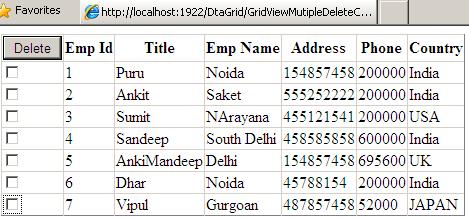
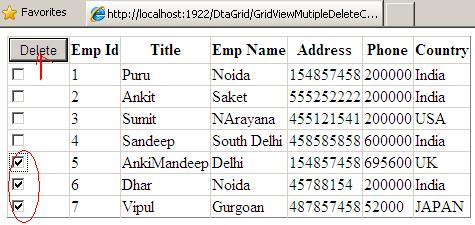
Suppose you want to delete last three records (Emp Id 5, 6, 7), first select records and click on delete button like as follows:
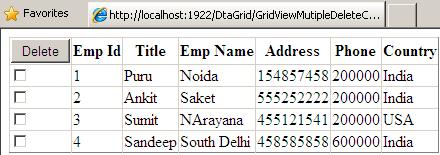
After delete you will see the remaining result as follows: