

- The Literal Control is similar to the Label Control as they both are used to display static text on a web page.
- The Literal Control is not inherited from WebControl namespace.
- The Literal Control doesn't provide substantial functionality but Literal text is programmable.
- It doesn't add any HTML elements to the web page. This control makes it possible to add HTML code directly in the code designer window without switching to design view and clicking the HTML button to edit the HTML.
- You cannot apply a style to a literal control.
- Unlike Label control, there is no property like BackColor, ForeColor, BorderColor, BorderStyle, BorderWidth, Height etc. for Literal control. That makes it more powerful, you can even put a pure HTML contents into it.
- Literal control is one of the rarely used controls but it is very useful.
- Literal control is light weight control.
- The Literal Control is useful when you want to add text to the output of the page dynamically (from the server).
- With that you can even programmatically manipulate the Literal text from the code behind.
The Literal control is used to display text; that is, it renders static text on a Web page without adding additional HTML tags. It passes content directly to the client browser unless you use the Mode property to encode the content.
- <asp:Literal ID="LiteralText" runat="server" Text="This is example of Literal"></asp:Literal>
- <div>
- This is example of Literal
- </div>
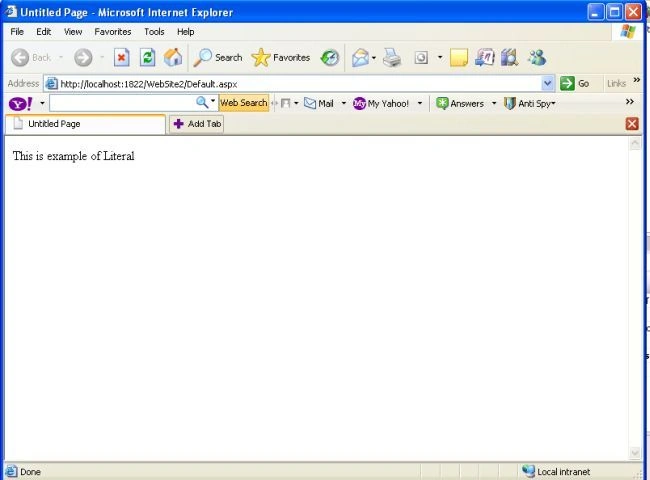
Table showing mode property of the Literal control:
|
Mode |
Description |
|
PassThrough |
The contents of the control are not modified. |
|
Encode |
The contents of the control are converted to an HTML-encoded string. |
|
Transform |
Unsupported markup-language elements are removed from the contents of the control. If the Literal control is rendered on a browser that supports HTML or XHTML, the control's contents are not modified. |
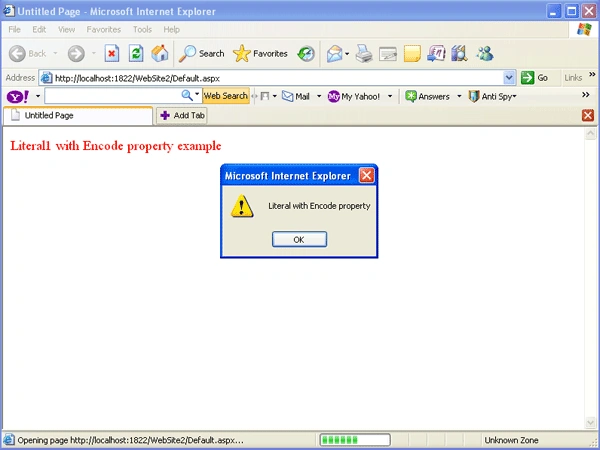
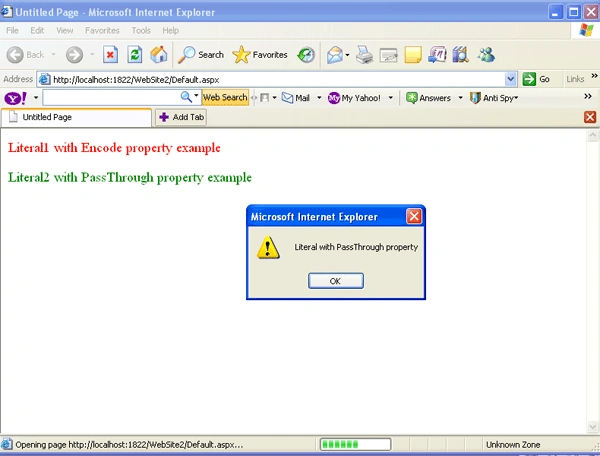
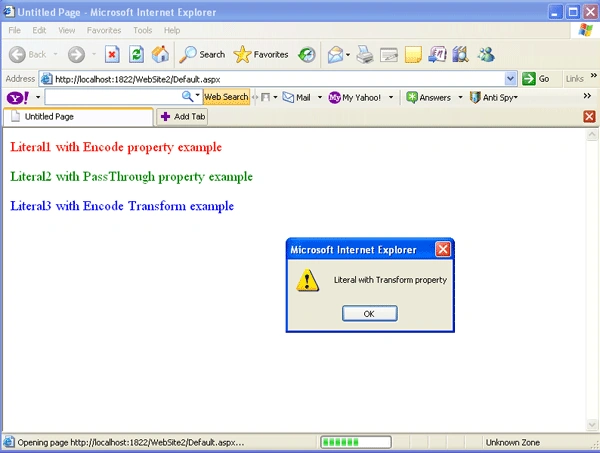
Listing shows how the Literal Control can be programmable in code behind
- <%@ Page Language="C#" AutoEventWireup="true" CodeFile="Default.aspx.cs" Inherits="_Default" %>
- <!DOCTYPE html PUBLIC "-//W3C//DTD XHTML 1.0 Transitional//EN" "http://www.w3.org/TR/xhtml1/DTD/xhtml1-transitional.dtd">
- <html xmlns="http://www.w3.org/1999/xhtml">
- <head runat="server">
- <title>Untitled Page</title>
- </head>
- <body>
- <form id="form1" runat="server">
- <div>
- <asp:Literal ID="Literal1" runat="server" />
- <asp:Literal ID="Literal2" runat="server" />
- <asp:Literal ID="Literal3" runat="server" />
- </div>
- </form>
- </body>
- </html>
- using System;
- using System.Configuration;
- using System.Data;
- using System.Linq;
- using System.Web;
- using System.Web.Security;
- using System.Web.UI;
- using System.Web.UI.HtmlControls;
- using System.Web.UI.WebControls;
- using System.Web.UI.WebControls.WebParts;
- using System.Xml.Linq;
- public partial class _Default : System.Web.UI.Page
- {
- protected void Page_Load(object sender, EventArgs e)
- {
- Literal1.Mode = LiteralMode.Encode;
- Literal1.Mode = LiteralMode.PassThrough;
- Literal1.Mode = LiteralMode.Transform;
- Literal1.Text = @"<font size=4 color=red>Literal1 with Encode property example</font><script>alert(""Literal with Encode property"");</script></br></br>";
- Literal2.Text = @"<font size=4 color=green>Literal2 with PassThrough property example</font><script>alert(""Literal with PassThrough property"");</script></br></br>";
- Literal3.Text = @"<font size=4 color=blue>Literal3 with Encode Transform example</font><script>alert(""Literal with Transform property"");</script></br></br>";
- }
- }
Difference between a Literal Control and a Label Control
|
Literal Control |
Label Control |
|
A Literal Web Server control used to insert static text on a web page. The Literal Control's only controllable aspect is the text that it holds. |
The Label Web Server control is used to display static text on web page. The Label Control has properties that enable one to programmatically apply styles/stylesheet class to the rendered output. Can handle JavaScript at Client side. |
|
The class hierarchy for this control is as follows: |
The class hierarchy for this control is as follows: |
|
Literal Control doesn't add any HTML elements to the web page |
Label Control is rendered as <span> tag. |
|
You can't apply any style property to the Literal Control. |
You can apply any style property to the Label Control. |
Conclusion
I hope that this article would have helped you in understanding the Literal Control in ASP.NET. Please share it if you know more about this article. Your feedback and constructive contributions are welcome.
Jonathan VargasPosted Nov 17, 2018, 10:05 PM
Extremely clear
Manav PandyaPosted Jul 21, 2017, 2:45 AM
Nice one .................
Manas MohapatraPosted Jul 24, 2015, 2:15 AM
Good one
Dharmveer SinghPosted Jan 13, 2015, 9:20 AM
Thanks! nice explanation.....
Sarat ChPosted Dec 1, 2014, 12:29 AM
Editable literal control is taking two lines after pressing enter key in Internet Explorer. I hv explored many sites but didn't got the solution. Please let me know if any solution is der. Thank you. ([email protected])
Rameez Ahmed SayadPosted May 24, 2013, 5:25 AM
nice explanation !!
sreenivasa reddyPosted Dec 28, 2011, 6:32 AM
hi ..........
Madhu VenugopalPosted Feb 10, 2011, 11:40 PM
Dear Mehra, Please find this mistake in the code. Literal1.Mode = LiteralMode.Encode; Literal1.Mode = LiteralMode.PassThrough; Literal1.Mode = LiteralMode.Transform; In effect, the L2 and L3 modes are set to defaults and L1 mode is transform. You intended to set the three modes to 2 diff. literals, but the copy-paste demon came into place and made the literals all one !!!
ragPosted Feb 10, 2011, 11:58 AM
Thank you Puran, This is really a nice and simple article
varaprasad malepatiPosted Oct 27, 2010, 7:08 AM
its very useful VARAPRASAD
Pankaj PareekPosted Feb 5, 2010, 12:54 AM
Thank you Puran Mehra, this is very useful for me I am always confused that what is a difference between these two controls.