

Introduction
The DataGridView control available as a part of Windows Forms controls in Visual Studio 2008 is much more powerful than it's previous versions. This tutorial is a basic introduction of how to write a simple data driven application using Visual Studio 2008 wizards without writing a single line of code. In my next articles, I will talk about more detailed features of the DataGridView control.
The DataGridView control provides a powerful and flexible way to display data in a tabular format. You can use the DataGridView control to show read-only views of a small amount of data, or you can scale it to show editable views of very large sets of data. This control also let's you display data in a master-details view.
With the DataGridView control, you can display and edit tabular data from many different kinds of data sources. Binding data to the DataGridView control is straightforward and intuitive, and in many cases it is as simple as setting the DataSource property. When you bind to a data source that contains multiple lists or tables, set the DataMember property to a string that specifies the list or table to bind to.
The DataGridView control supports the standard Windows Forms data binding model, so it will bind to instances of classes described in the following list,
- Any class that implements the IList interface, including one-dimensional arrays.
- Any class that implements the IListSource interface, such as the DataTable and DataSet classes.
- Any class that implements the IBindingList interface, such as the BindingList<(Of <(T>)>) class.
- Any class that implements the IBindingListView interface, such as the BindingSource class.
The DataGridView control supports data binding to the public properties of the objects returned by these interfaces or to the properties collection returned by an ICustomTypeDescriptor interface, if implemented on the returned objects. Typically, you will bind to a BindingSource component and bind the BindingSource component to another data source or populate it with business objects. The BindingSource component is the preferred data source because it can bind to a wide variety of data sources and can resolve many data binding issues automatically.
The DataGridView control can also be used in unbound mode, with no underlying data store. For a code example that uses an unbound DataGridView control, see Walkthrough: Creating an Unbound Windows Forms DataGridView Control. The DataGridView control is highly configurable and extensible, and it provides many properties, methods, and events to customize its appearance and behavior. When you want your Windows Forms application to display tabular data, consider using the DataGridView control before others (for example, DataGrid). If you are displaying a small grid of read-only values, or if you are enabling a user to edit a table with millions of records, the DataGridView control will provide you with a readily programmable, memory-efficient solution.
Getting Started
OK let's get started. Follow these steps and you will see how to write a data driven application without writing a single line of code.
Step 1
Create a new Windows Forms Application project in Visual Studio 2008.
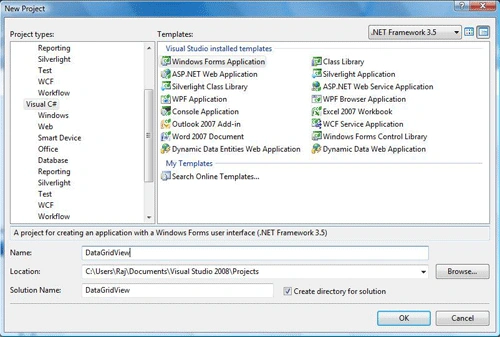
Figure 1.
Step 2
Drag and drop DataGridView control from toolbox to form window.
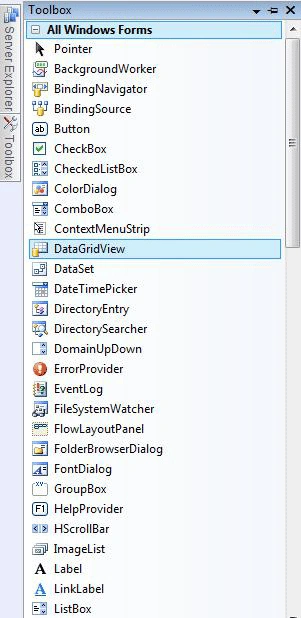
Figure 2.
Step 3
Now choose a data source by right clicking on the DataGridView and then click on Add Project Data Source. We will be adding a new data source to the project right now.
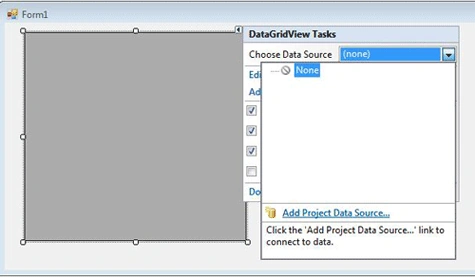
Figure 3.
Step 4
Now select data source type, I am choosing Database in this example.
After selecting Database, click next.
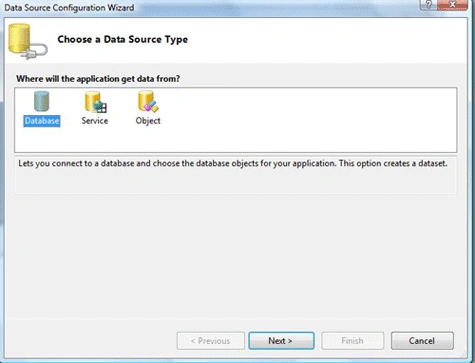
Figure 4
Step 5
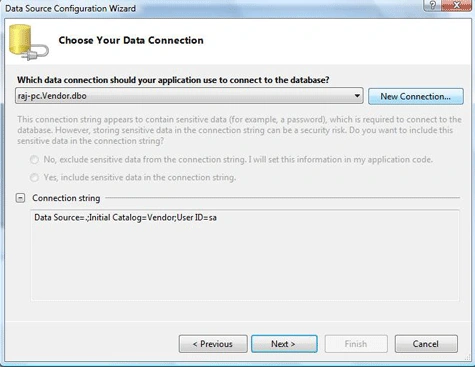
Choose your data connection, if you already have a connection available select that, otherwise make new connection, and follow the steps and after that click next.
Step 6
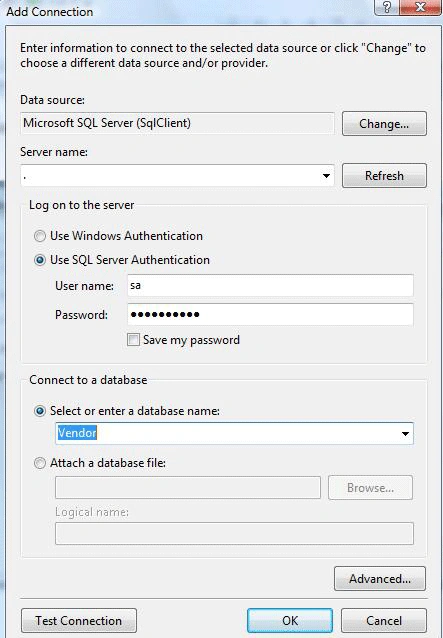
Add Connection Wizard.
Step 7
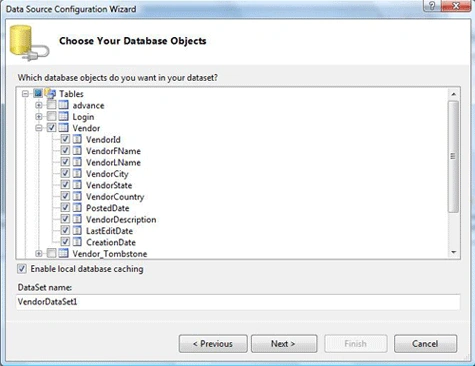
Choose you database objects, and click next, if you want local database caching then check enable local database caching check box and click next.
Step 8
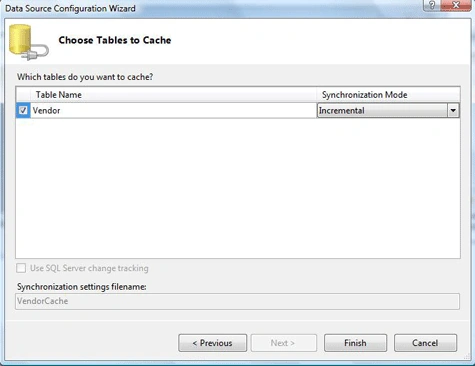
Select table for caching.
Step 9
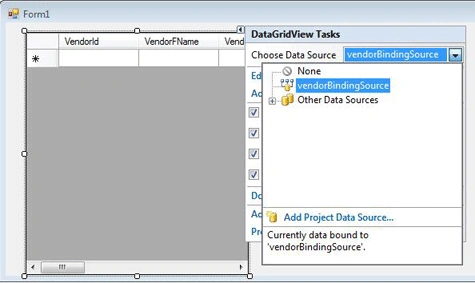
Now your data source is created, right click on DataGridView control and on the option Choose Data Source, select the data source you just created.
That's all. You are all set.
Now you simply need to add one line of code. If your form load event does not have this code allready. add this code. Otherwise it should have it.
- private void Form1_Load(object sender, EventArgs e)
- {
- // TODO: This line of code loads data into the 'vendorDataSet.Vendor' table.
- // You can move, or remove it, as needed.
- this.vendorTableAdapter.Fill(this.vendorDataSet.Vendor);
- }
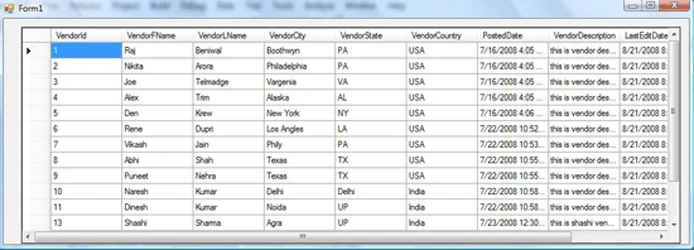
Now build and run the application. Your application looks like the following.
Summary
In this tutorial, you saw how to build a simple data driven application using a DataGridView control in Visual Studio 2008 without writing a single line of code.
More articles on DataGridView
- Database Table Update in a DataGridView without Writing Code
- Bind Objects to a DataGridView Control
- Generic DataGridView
- Sorting with DataGridView using C#.
- Host a combo box column within a DataGridView control
- Creating a Context Menu on a DataGridView Mouse Click
- Import Data from Text and CSV file to DataGridView in .Net
- Printing the DataGridView
- Convert a DataGridView to a Bitmap
- How to : Add an autonumber column in a DataGridView
- Custom Time Cell in DataGridView
panagiotis kartisPosted Aug 11, 2019, 2:40 PM
Very good thanks!!!!!!!!!
Bhavya GaurPosted Aug 30, 2018, 6:44 AM
Updated on 08/30/2018
xiaoyan ningPosted Feb 28, 2012, 3:43 AM
Have you go to the <a href="http://www.longchamp-sales.net">Longchamp sales</a> today? <a href="http://www.longchamp-sales.net">Longchamp Le Pliage</a> to create a new temptation for us, <a href="http://www.longchamp-sales.net">Longchamp Bags</a> provide you with a simple breezy feeling of spring. <a href="http://www.longchamp-bags.org">Longchamp Le Pliage</a> has certainly not do not provide us surprise,and Cheap <a href="http://www.longchamp-bags.org">Longchamp bags</a>, has been owned to a youthful vitality and its power.<a href="http://www.longchamp-bags.org">Longchamp Sale</a> always gave the surprise of what you want.
Raja BabuPosted Dec 7, 2010, 7:19 AM
your design datagrid in windows from. how can do with webform. by using c#. with fornt end values. i have 3 text boxes named as eid, ename, join date. and two buttons save, clear on entering the data in text boxes that has to display in datagrid.? design process is completed. but i dont know the code what to write, where to write, how to write.
Roshan SonekarPosted Nov 18, 2010, 1:19 PM
Sorry boss I want external autonumber to add to datatgridview
Tuck HohPosted Apr 1, 2010, 1:31 PM
How do you edit a column on the datagridview and when the enter key is press update the database?
SudhaPosted Jan 23, 2010, 7:38 PM
Hi, I need to work with the values entered by the user into the datagrid and display them back onto the same datagrid. I need to check the cells that are empty, and then pick the values from the cells that are not empty ( which are entered by the user) and perform some calculations and display them back onto the datagrid. I have struggling with this. Please help!! Thanks. gsm
denny rambakilaPosted Nov 26, 2009, 11:28 AM
hi i want ask about steps no 6.when i click change, i couldnt find datasource Microsoft Sql Server (SqlClient), there are only 3 datasource available which is access, sql server compact 3.5 and sql server database file how to make new datasource Microsoft Sql Server (SqlClient)? and is that working to show data from mssql server 2005 database? thanks in advance
Michael JeterPosted Jul 27, 2009, 9:35 AM
I am using a data grid view to basically create a list box. I have a text box that is bound to one of the columns in the data grid so that when a user selects a row from the data grid the text box is populated with that value. How can I make this work both ways so that if the user wanted to enter in a particular value listed in the grid then that row would be selected. I am basically creating an input form that can be used by either mouse users or 10 key users.
Shashi Sagar ShresthaPosted May 3, 2009, 2:26 AM
how to combination of these two object
theo philusPosted Apr 21, 2009, 5:13 PM
can you help me with the codes or send them to [email protected]
yaser ismailPosted Jan 25, 2009, 1:07 PM
can anyone tell me how can I pick data from cells ? for example I need to pick the value from cell ( row=1 , column=2 ) thank you
neelesh pandeyPosted Oct 12, 2008, 2:16 AM
how to bind the image in datagridview pls send the code
harsha mounikaPosted Sep 22, 2008, 6:37 AM
how to create buttons delete and edit to every record in grid view