The SiteMap control available in ASP.NET 3.5 provides a site navigation view in a hirerchichal format. The data source for the SiteMap control is an XML file that has name and URL of the site navigation.
The starting point in site map based navigation is the site map provider. ASP.NET ships with a single site map provider, named XMLSiteMapProvider which is able retrieve site map information from as XML file. If you want to retrieve a site map from another location or in a custom format, you will need to create your own site map provider.
The XmlSiteMapProvider looks for a file named Web.sitemap in the root of the virtual directory. Like all site map providers , its task is to extract the site map data and create the corresponding SiteMap object. This SiteMap object is then made available to other control through the SiteMapDataSource.
Site maps are used in conjunction with the SiteMapDataSource, SiteMapPath, and other controls to render an effective navigation interface for users to navigate a Web site. A SiteMap object is a component of the ASP.NET site navigation infrastructure that provides access to read-only site map information for page and control developers using navigation and SiteMapDataSource controls. Other components of the ASP.NET site navigation infrastructure include the SiteMapProvider and XmlSiteMapProvider classes, the Web.sitemap file, and the various controls that work with the SiteMap class, such as the SiteMapPath control, to render content and menus.
The SiteMap has several functions:
· It provides the root node of the site navigation hierarchy (there can be only one root node).
· It identifies which site map provider is the principal, or default, provider.
· It keeps track of all the provider objects that are used to create the SiteMap.
OK, let's get started. Create an ASP.NET application using Visual Studio 2008.
Now add a Site Map file to the project by right clicking on the project name, select Add New Item and select Site Map from the templates.
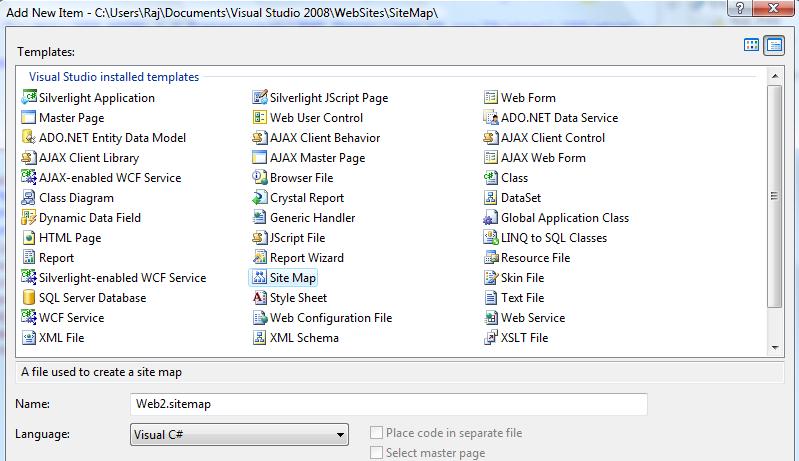
Figure 1.
After adding a Site Map file, we need to add Site Map Nodes represeted by siteMapNode XML elements as shown below.
Here is my final Web2.sitemap looks like. The siteMapNode has a title and a url attribute that represent the title and URL of the link.
<?xml version="1.0" encoding="utf-8" ?>
<siteMap xmlns="http://schemas.microsoft.com/AspNet/SiteMap-File-1.0" >
<siteMapNode url="" title="Modeling Corner" description="This is modeling site">
<siteMapNode title="Header" description="This is modeling corner header">
<siteMapNode url="www.modelingcorner.com" title="Models" description="This is model section">
<siteMapNode url="http://www.modelingcorner.com/Men/Default.aspx" title="Men Models" description="This section is for men models" />
<siteMapNode url="http://www.modelingcorner.com/Women/Default.aspx" title="Women Models" description="This section is for women models" />
<siteMapNode url="http://www.modelingcorner.com/Teens/Default.aspx" title="Teen Models" description="This section is for teen models" />
<siteMapNode url="http://www.modelingcorner.com/Kids/Default.aspx" title="Kid Models" description="This section is for kid models" />
<siteMapNode url="http://www.modelingcorner.com/Babies/Default.aspx" title="Baby Models" description="This section is for baby models" />
</siteMapNode>
<siteMapNode url="http://www.modelingcorner.com/Photographer/AllPhotographers.aspx" title="Photographers" description="This is photographer section"></siteMapNode>
<siteMapNode url="http://www.modelingcorner.com/Agents/Default.aspx" title="Agencies" description="This is agencies section"></siteMapNode>
<siteMapNode url="http://www.modelingcorner.com/Blogs/AllBlogs.aspx" title="Blogs" description="This is blogs section"></siteMapNode>
<siteMapNode url="http://www.modelingcorner.com/News/ShowAllNews.aspx" title="News" description="This is news section"></siteMapNode>
<siteMapNode url="http://www.modelingcorner.com/CastingCalls/ViewAllCasting.aspx" title="Castings" description="This is castings section"></siteMapNode>
<siteMapNode url="http://www.modelingcorner.com/Video/AllVideo.aspx" title="Videos" description="This is videos section"></siteMapNode>
<siteMapNode url="http://www.modelingcorner.com/Forum/Default.aspx" title="Forums" description="This is forum section"></siteMapNode>
</siteMapNode>
<siteMapNode title="Footer" url="" description="This is modeling corner footer">
<siteMapNode url="http://www.maximumasp.com/" title="Hosted By MaximumASP" description="This is host website name"></siteMapNode>
<siteMapNode url="http://www.modelingcorner.com/" title="Home" description="This is home page name"></siteMapNode>
<siteMapNode url="http://www.modelingcorner.com/Home/ContactUs.aspx" title="Contact Us" description="This is contact us page"></siteMapNode>
<siteMapNode url="http://www.modelingcorner.com/Home/AboutUs.aspx" title="About Us" description="This is about us page"></siteMapNode>
<siteMapNode url="http://www.modelingcorner.com/Home/Help.aspx" title="Help" description="This is help page"></siteMapNode>
<siteMapNode url="http://www.modelingcorner.com/Home/SearchTypes.aspx" title="Search" description="This is search page"></siteMapNode>
</siteMapNode>
</siteMapNode>
<!-- -->
</siteMap>
Now let's add a SiteMapDataSource control to the ASP.NET page. This is my page page looks like.
<asp:SiteMapDataSource ID="SiteMapDataSource1" runat="server" />
<asp:Menu ID="Menu1" runat="server" DataSourceID="SiteMapDataSource1"
BackColor="#F7F6F3" DynamicHorizontalOffset="2" Font-Names="Verdana"
Font-Size="14px" ForeColor="#7C6F57" StaticSubMenuIndent="14px">
<StaticSelectedStyle BackColor="#5D7B9D" />
<StaticMenuItemStyle HorizontalPadding="5px" VerticalPadding="2px" />
<DynamicHoverStyle BackColor="#7C6F57" ForeColor="White" />
<DynamicMenuStyle BackColor="#F7F6F3" />
<DynamicSelectedStyle BackColor="#5D7B9D" />
<DynamicMenuItemStyle HorizontalPadding="5px" VerticalPadding="2px" />
<StaticHoverStyle BackColor="#7C6F57" ForeColor="White" />
</asp:Menu>
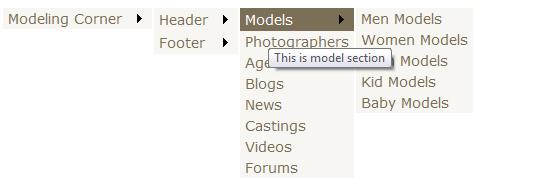
Now if you run and look at the output, you will see output looks like following where you can click on the root node and it will display next level nodes and so on.
Download the attached source code for more details.