

Most of the people on Windows Platform, will be using Media Player .It is having lot of features. But, still some features that are required are missing in it. It won't support features like hiding, topmost, default songs loading, enhanced recently played list, easy navigation of songs etc. I think it's better to design an application that will make playing of songs easier. So, I developed an application in VS.NET 2005 using C# and Windows Forms. I will explain features provided by this application followed by its design and coding.
Features present in this application:
- It allows us to hide the player completely, while playing it.
- It allows us to place player on top of all windows, while playing it. This allows us to do other work, while watching Video.
- It allows us to have a complete list of recently player songs.
- It allows us to load all songs present in our predefined songs Folder.
- It allows us to play Video in Windowless Mode.
- One Click away to play recent songs.
- One Click away to hide unwanted controls, while playing.
Now, create a new Windows Application using C# in VS.NET 2005 and name it as MediaPlayer. Add controls to Main Form (MediaPlayer) as shown below:
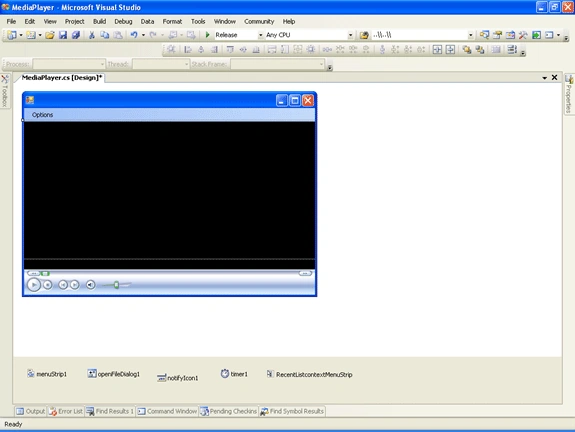
Here, I set following properties of MediaPlayer Form:
MainMenuStrip --> menuStrip1
ShowInTaskBar --> false
TopMost --> true
And I placed a Menu, contextMenu, openFileDialog, NotifyIcon followed by a timer. Contextmenu is assigned to NotifyIcon (to display list of recent played songs in Taskbar).
Following are the menu items present in MainMenu (optionsToolStripMenuItem):
- Open --> To show dialog for selecting songs present in the System.
- Play --> To play selected song.
- Pause --> To pause currently playing song.
- Stop --> To stop currently playing song.
- Top Most --> To set Player as top most window.
- Opacity --> To hide Player.
- Show In TaskBar --> To show or hide player in taskbar.
- Show Border --> To show or hide player's Border.
- Set Default Songs Path --> To set default songs path for automatically loading into the player.
- Default Songs List --> List of songs present in default song's path.
- Empty Recent Files --> to clear list of recently played items.
- Recent Files --> Recent files played in the Application.
- Exit --> To close the Application.
Various function of the controls are:
- openFileDialog1 control is used to show dialog box for selecting songs.
- notifyIcon1 control is used to show/hide player.
- timer1 control is used to change the notifyIcon's picture periodically.
- RecentListcontextMenuStrip control is used to show recently played songs.
Now, I will explain coding part of this application:
I used following COM Libraries AxWMPLib, WMPLib.
Form_Load:
In Form_Load, I will load recently selected songs present in List.txt file.This file will be created,whenever you select a song in the player for playing. If any line in List.txt starts with "----", it is considered as default Songs Path. Usually,We use to keep all the songs in our system in one or two folders for easy navigation.This folders are called as default songs path.If we enter those paths in the player,it will automatically load all those songs into player for easy navigation.This default songs path will be having lot of songs(around 1000),which consume lot of time to load into player. Inorder to compensate this, we are going to load those songs on a separate thread.
Form_Closed:
In Form_Closed, We are going to write all recently played songs back to the file for later use. And, thread to load default songs will be killed, if it is still alive.
We are using getDirs(),getFiles() methods recursively to load all songs present in Default Songs path.
Finally, we are using Invoke() method to add items to Default Songs List Menuitem.Since,We cant add items to a control directly,which is been created by another thread(Main thread).
Just set default songs path of your system separated by ";" for each path (like C:\songs\;c:\New Songs\ and press Enter) in textbox present in Set Default Songs Path menuitem. That's it, it will load all songs in that path completely with easy navigation into the player.
Finally, I added some code to enhance UI of the application. And, the final output will be like this:
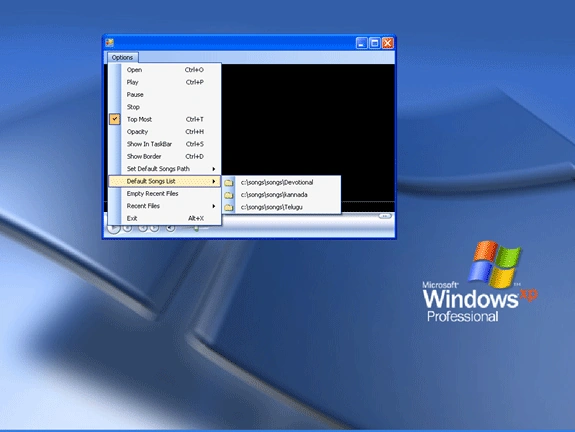
We can access recently played songs by clicking NotifyIcon present in taskbar. We can hide the player by double clicking the NotifyIcon.
We can still enhance this application by improving UI.
By using this application, we can easily play songs without any extra effort in browsing system for songs. Now, playing songs is just a click away from you. I am attaching source code for further reference. I hope this code will be useful for all.
Deepank PantPosted Mar 23, 2017, 1:57 PM
Nice work. I have developed my own by using VLC activeX plugin. If you want to check it out then please follow the link: https://techiedeepank.wordpress.com/2017/03/20/dplayer-a-media-player-developed-using-c-by-techie-deepank/
Asfend YarPosted Feb 22, 2016, 2:07 PM
keep it up
Sr KarthigaPosted Feb 19, 2016, 6:05 AM
Nice Explanation
Francesco GaudinoPosted Sep 14, 2011, 6:45 AM
How i can hide the caption?
abhishek kumarPosted Mar 30, 2010, 5:10 AM
how to prepare in media player plz help me coding in visual studio 2005 form with coding plz send me id [email protected]
naja redaPosted Jul 3, 2009, 4:16 AM
how do you made that black window
HubertPosted May 14, 2009, 2:16 PM
without using timer. Is there a way to get the curent time (not duration time) from the media player for a current frame (or frame number) ? from the media control ? thanks
SUPRATIM DASPosted May 2, 2009, 4:43 AM
Excelent Invention.