Date Time has its own set format string modifiers because there are so many ways to display a date and time. Date and time format strings control formatting operations in which a date and/or time is represented as a String.
Date and Time format strings are categorized into two types.
- Standard Date Time format strings
- Custom Date Time format strings.
Standard DateTime format Strings:
In DateTimeFormatInfo there are defined standard patterns for the current culture. For example property ShortTimePattern is string that contains value h:mm tt for en-US culture and value HH:mm for de-DE culture.
Following table shows the patterns defined in DateTimeFormat and their values for en-US culture.
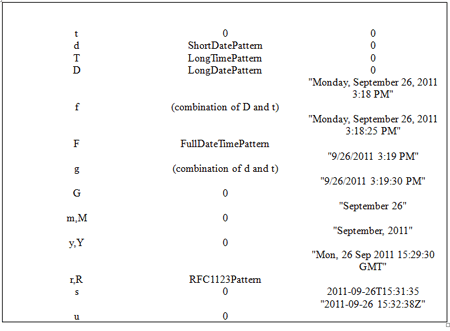
The source code to execute is given below. I have written this standard Date Time Formats in a separate method ,just call this method where ever you want.
public void StandardDateTimeFormats(DateTime dt)
{
Console.WriteLine("========================");
Console.Write("Short Time Pattern \n");
Console.WriteLine("========================");
Console.Write(String.Format("{0:t}\n", dt));//Short Time Pattern like "3:09 PM"
Console.WriteLine("\n========================");
Console.Write("Short Date Pattern \n");
Console.WriteLine("========================");
Console.Write(String.Format("{0:d}\n", dt));//Short Date Pattern like "9/26/2011"
Console.WriteLine("\n========================");
Console.Write("Long Time Pattern \n");
Console.WriteLine("========================");
Console.Write(String.Format("{0:T}\n", dt));//Long Time Pattern like "3:13:03 PM"
Console.WriteLine("\n========================");
Console.Write("Long Date Pattern \n");
Console.WriteLine("========================");
Console.Write(String.Format("{0:D}\n", dt));//Long Date Pattern like "Monday, September 26, 2011"
Console.WriteLine("\n========================");
Console.Write("Combination of Date and Time Pattern \n");
Console.WriteLine("========================");
Console.Write(String.Format("{0:f}\n", dt));//Combination of Date and Time Pattern like "Monday, September 26, 2011 3:18 PM"
Console.WriteLine("\n========================");
Console.Write("Full Date and Time Pattern \n");
Console.WriteLine("========================");
Console.Write(String.Format("{0:F}\n", dt));//Full Date and Time Pattern like "Monday, September 26, 2011 3:18:25 PM"
Console.WriteLine("\n========================");
Console.Write("Combination of Date and Time Pattern \n");
Console.WriteLine("========================");
Console.Write(String.Format("{0:g}\n", dt));//Combination of Date and Time Pattern like "9/26/2011 3:19 PM" (Short Date+Short Time )
Console.WriteLine("\n========================");
Console.Write("Combination of Full Date and Time Pattern \n");
Console.WriteLine("========================");
Console.Write(String.Format("{0:G}\n", dt));//Combination of Full Date and Time Pattern like "9/26/2011 3:19:30 PM"(Short Date+Long Time )
Console.WriteLine("\n========================");
Console.Write("Month day Pattern \n");
Console.WriteLine("========================");
Console.Write(String.Format("{0:m}\n", dt));//Month Day Pattern like "September 26"
//If you put the 'M' as specifier also you will get the same output like for 'm'.
Console.WriteLine("\n========================");
Console.Write("Year month Pattern \n");
Console.WriteLine("========================");
Console.Write(String.Format("{0:y}\n", dt));//Year month Pattern like "September, 2011"
//If you put the 'Y' as specifier also you will get the same output like for 'y'.
Console.WriteLine("\n========================");
Console.Write("RFC1123 Pattern \n");
Console.WriteLine("========================");
Console.Write(String.Format("{0:r}\n", dt));//RFC1123 Pattern Pattern like "Mon, 26 Sep 2011 15:29:30 GMT"
//If you put the 'R' as specifier also you will get the same output like for 'r'.
Console.WriteLine("\n========================");
Console.Write("Sortable Date Time Pattern\n");
Console.WriteLine("========================");
Console.Write(String.Format("{0:s}\n", dt));//Sortable Date Time Pattern like "2011-09-26T15:31:35"
Console.WriteLine("\n========================");
Console.Write("Universal Sortable Date Time Pattern \n");
Console.WriteLine("========================");
Console.Write(String.Format("{0:u}\n", dt));//Universal Sortable Date Time Pattern like "2011-09-26 15:32:38Z"
}
public void StandardDateTimeFormats(DateTime dt)
{
Console.WriteLine("========================");
Console.Write("Short Time Pattern \n");
Console.WriteLine("========================");
Console.Write(String.Format("{0:t}\n", dt));//Short Time Pattern like "3:09 PM"
Console.WriteLine("\n========================");
Console.Write("Short Date Pattern \n");
Console.WriteLine("========================");
Console.Write(String.Format("{0:d}\n", dt));//Short Date Pattern like "9/26/2011"
Console.WriteLine("\n========================");
Console.Write("Long Time Pattern \n");
Console.WriteLine("========================");
Console.Write(String.Format("{0:T}\n", dt));//Long Time Pattern like "3:13:03 PM"
Console.WriteLine("\n========================");
Console.Write("Long Date Pattern \n");
Console.WriteLine("========================");
Console.Write(String.Format("{0:D}\n", dt));//Long Date Pattern like "Monday, September 26, 2011"
Console.WriteLine("\n========================");
Console.Write("Combination of Date and Time Pattern \n");
Console.WriteLine("========================");
Console.Write(String.Format("{0:f}\n", dt));//Combination of Date and Time Pattern like "Monday, September 26, 2011 3:18 PM"
Console.WriteLine("\n========================");
Console.Write("Full Date and Time Pattern \n");
Console.WriteLine("========================");
Console.Write(String.Format("{0:F}\n", dt));//Full Date and Time Pattern like "Monday, September 26, 2011 3:18:25 PM"
Console.WriteLine("\n========================");
Console.Write("Combination of Date and Time Pattern \n");
Console.WriteLine("========================");
Console.Write(String.Format("{0:g}\n", dt));//Combination of Date and Time Pattern like "9/26/2011 3:19 PM" (Short Date+Short Time )
Console.WriteLine("\n========================");
Console.Write("Combination of Full Date and Time Pattern \n");
Console.WriteLine("========================");
Console.Write(String.Format("{0:G}\n", dt));//Combination of Full Date and Time Pattern like "9/26/2011 3:19:30 PM"(Short Date+Long Time )
Console.WriteLine("\n========================");
Console.Write("Month day Pattern \n");
Console.WriteLine("========================");
Console.Write(String.Format("{0:m}\n", dt));//Month Day Pattern like "September 26"
//If you put the 'M' as specifier also you will get the same output like for 'm'.
Console.WriteLine("\n========================");
Console.Write("Year month Pattern \n");
Console.WriteLine("========================");
Console.Write(String.Format("{0:y}\n", dt));//Year month Pattern like "September, 2011"
//If you put the 'Y' as specifier also you will get the same output like for 'y'.
Console.WriteLine("\n========================");
Console.Write("RFC1123 Pattern \n");
Console.WriteLine("========================");
Console.Write(String.Format("{0:r}\n", dt));//RFC1123 Pattern Pattern like "Mon, 26 Sep 2011 15:29:30 GMT"
//If you put the 'R' as specifier also you will get the same output like for 'r'.
Console.WriteLine("\n========================");
Console.Write("Sortable Date Time Pattern\n");
Console.WriteLine("========================");
Console.Write(String.Format("{0:s}\n", dt));//Sortable Date Time Pattern like "2011-09-26T15:31:35"
Console.WriteLine("\n========================");
Console.Write("Universal Sortable Date Time Pattern \n");
Console.WriteLine("========================");
Console.Write(String.Format("{0:u}\n", dt));//Universal Sortable Date Time Pattern like "2011-09-26 15:32:38Z"
}
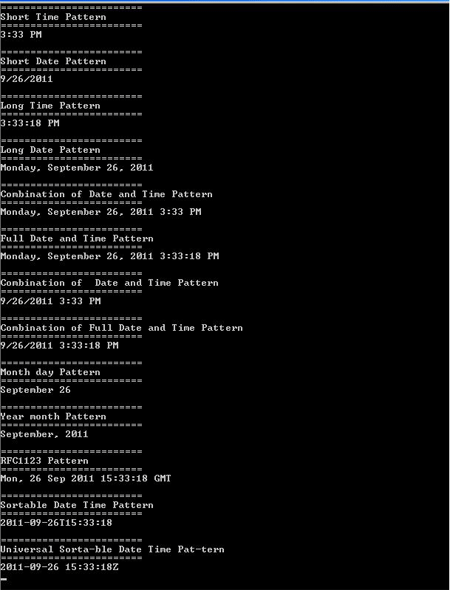
The output of the above code when you run is shown in this below screen shot.
Custom Date Time format strings:
Custom format string gives you the flexibility to build your own formatting. When using a single character format string specifier, you will need to append it with a "%", otherwise it will be interpreted as a Standard Format String. Here are the basics for building your own string:
There are following custom format specifiers y (year), M (month), d (day), h (hour 12), H (hour 24), m (minute), s (second), f (second fraction), F (second fraction, trailing zeroes are trimmed), t (P.M or A.M) and z (time zone).
Following example shows how are the format specifiers are used.
Year:
Console.Write(String.Format("{0:%y}\n", dt));//The output would be -"11"
Console.Write(String.Format("{0:yy}\n", dt));//The output would be -"11"
Console.Write(String.Format("{0:yyy}\n", dt));//The output would be -"2011"
Console.Write(String.Format("{0:yyyy}\n", dt));//The output would be -"2011"
Month:
Console.Write(String.Format("{0:%M}\n", dt));//The output would be -"9"
Console.Write(String.Format("{0:MM}\n", dt));//The output would be -"09"
Console.Write(String.Format("{0:MMM}\n", dt));//The output would be -"Sep"
Console.Write(String.Format("{0:MMMM}\n", dt));//The output would be -"September"
Day
Console.Write(String.Format("{0:%d}\n", dt));//The output would be -"26"
Console.Write(String.Format("{0:dd}\n", dt));//The output would be -"26"
Console.Write(String.Format("{0:ddd}\n", dt));//The output would be -"Mon"
Console.Write(String.Format("{0:dddd}\n", dt));//The output would be -"Monday"
NOTE:When you give the Capital "D" instead of "d" you will get the output as D
Hour
Console.Write(String.Format("{0:%h}\n", dt));//The output would be -"4"
Console.Write(String.Format("{0:hh}\n", dt));//The output would be -"04"
Console.Write(String.Format("{0:hhh}\n", dt));//The output would be -"04"
Console.Write(String.Format("{0:hhhh}\n", dt));//The output would be -"04"
Console.Write(String.Format("{0:%H}\n", dt));//The output would be -"16"
Console.Write(String.Format("{0:HH}\n", dt));//The output would be -"16"
Console.Write(String.Format("{0:HHH}\n", dt));//The output would be -"16"
Console.Write(String.Format("{0:HHHH}\n", dt));//The output would be -"16"
Minutes
Console.Write(String.Format("{0:%m}\n", dt));//The output would be -"47"
Console.Write(String.Format("{0:mm}\n", dt));//The output would be -"47"
Console.Write(String.Format("{0:mmm}\n", dt));//The output would be -"47"
Console.Write(String.Format("{0:mmmm}\n", dt));//The output would be -"47"
Seconds
Console.Write(String.Format("{0:%s}\n", dt));//The output would be -"39"
Console.Write(String.Format("{0:ss}\n", dt));//The output would be -"39"
Console.Write(String.Format("{0:sss}\n", dt));//The output would be -"39"
Console.Write(String.Format("{0:ssss}\n", dt));//The output would be -"39"
Milliseconds
Console.Write(String.Format("{0:%f}\n", dt));//The output would be -"8"
Console.Write(String.Format("{0:ff}\n", dt));//The output would be -"84"
Console.Write(String.Format("{0:fff}\n", dt));//The output would be -"847"
Console.Write(String.Format("{0:ffff}\n", dt));//The output would be -"8475"
The output of the above code when you run is shown in this below screen shot.
Console.Write(String.Format("{0:%F}\n", dt));//The output would be -"8"
Console.Write(String.Format("{0:FF}\n", dt));//The output would be -"84"
Console.Write(String.Format("{0:FFF}\n", dt));//The output would be -"847"
Console.Write(String.Format("{0:FFFF}\n", dt));//The output would be -"8475"
Kind
Console.Write(String.Format("{0:%K}\n", dt));//The output would be -"+05:30"
Console.Write(String.Format("{0:KK}\n", dt));//The output would be -"+05:30+05:30"
Console.Write(String.Format("{0:KKK}\n", dt));//The output would be -"+05:30+05:30+05:30"
Console.Write(String.Format("{0:KKKK}\n", dt));//The output would be -"+05:30+05:30+05:30+05:30"
// Note: The multiple K were just read as multiple instances of the
// single K
TimeZone
Console.Write(String.Format("{0:%z}\n", dt));//The output would be -"+5"
Console.Write(String.Format("{0:zz}\n", dt));//The output would be -"+05"
Console.Write(String.Format("{0:zzz}\n", dt));//The output would be -"+05:30"
Console.Write(String.Format("{0:zzzz}\n", dt));//The output would be -"+05:30"
Other
Console.Write(String.Format("{0:%g}\n", dt));//The output would be -"A.D."
Console.Write(String.Format("{0:gg}\n", dt));//The output would be -"A.D."
Console.Write(String.Format("{0:ggg}\n", dt));//The output would be -"A.D."
Console.Write(String.Format("{0:gggg}\n", dt));//The output would be -"A.D."
Console.Write(String.Format("{0:%t}\n", dt));//The output would be -"P"
Console.Write(String.Format("{0:tt}\n", dt));//The output would be -"PM"
Console.Write(String.Format("{0:ttt}\n", dt));//The output would be -"PM"
Console.Write(String.Format("{0:tttt}\n", dt));//The output would be -"PM"
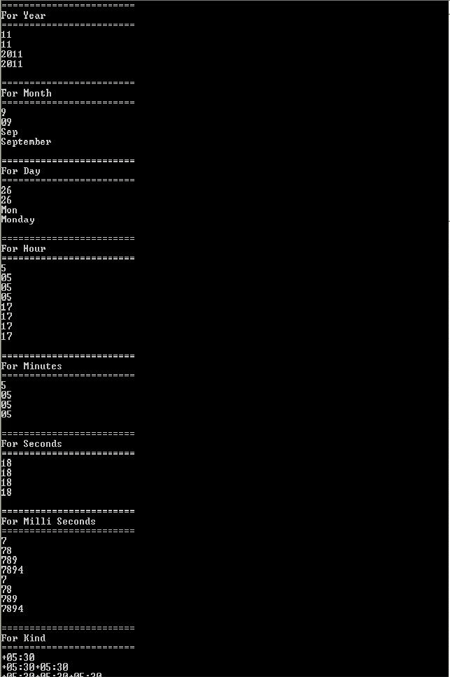
The output of the above code when you run is shown in this below screen shot.
These are the different ways of Date Time Formats to do customize the Date according to our requirement.
For any references please visit this link
http://msdn.microsoft.com/en-us/library/97x6twsz%28v=VS.90%29.aspx.
I hope this article has given a good information about the Date Time Formats. I have done my best to given this information,any suggestions regarding this are always welcome.
I hope you will find more useful ways to utilize them all.
Thank you all.
Happy Coding :-)