SIGN UP MEMBER LOGIN:    
ARTICLE

How to get list of Tables in MS Access using C# code

Posted by Amit Choudhary Articles | ADO.NET in C# February 10, 2010
In this article you will learn how to get list of Tables in MS Access using C# code.
Reader Level:

Many time you want to access your tables dynamically means as required you access the table. Rather than opening the MS Access application and then open the database check the tables.

Here I'll show you how to get the table names from the Access Database.

string ConnectionString = @"Provider=Microsoft.Jet.OLEDB.4.0;Data Source=" + Server.MapPath("~/App_Data/PhraseContentFiles/" + filename + "") + ";User Id=admin;Password=;";

            OleDbConnection connection = new OleDbConnection(ConnectionString);
            connection.Open();
            System.Data.DataTable dt = null;

            // Get the data table containing the schema
            dt = connection.GetOleDbSchemaTable(OleDbSchemaGuid.Tables, null);

// Get the data table containing the schema
dt = connection.GetOleDbSchemaTable(OleDbSchemaGuid.Tables, null);
These few lines of code can give you all system tables schema now if you want to have only tables created by the user then you have to put a filter on data of your DataTable dt.

foreach (DataRow row in dt.Rows)
            {
string strSheetTableName = row["TABLE_NAME"].ToString();
if (row["TABLE_TYPE"].ToString()=="TABLE")
                    ddlTableName.Items.Add(strTableName);
                i++;
            }

Following is the schema of the Access Table that contains information about the all tables in the Access Database.
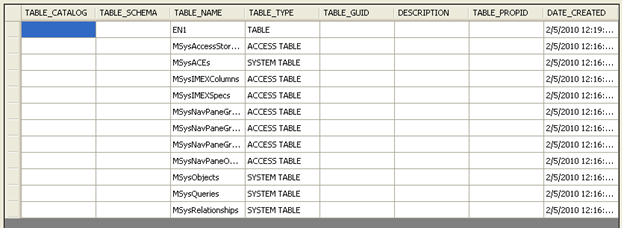
image1.gif
 

Login to add your contents and source code to this article
share this article :
post comment
 

hi friend,

first of all i want to mention here that for 2007 access database the file extension is accdb not mdb. so you have to use providers for 2007 here what i have mentioned in the article are for mdb file i.e., for 97-2003 version.
for 2007 you have to mention following providers:

Provider=Microsoft.ACE.OLEDB.12.0;Data Source=C:\myFolder\myAccess2007file.accdb;Persist Security Info=False;

after looking at your code.. i found you want to open the file as a seperate process.. tell if you want to acess it from code behing by database connectivity or as seperate process..??

Posted by Amit Choudhary May 08, 2010

Sir,
I hav created one web form using ASP.NET-C# and database Mhe s Access 2007. I did save my database in .mdb format.
i want to open a particular table from the database in a button click. The codes i have written s working fine to open the complete database

protectedvoid btnOk_Click(object sender, EventArgs e)
{
Process mProcess = newProcess();
mProcess.StartInfo.FileName =
"D:\\Trade Enquiry Management System\\App_Data\\TenderEnquiryManagementSystem.md b";
mProcess.StartInfo.WindowStyle =
ProcessWindowStyle.Normal;
mProcess.StartInfo.CreateNoWindow =
true;
mProcess.Start();
mProcess.WaitForExit();
if (!mProcess.HasExited)
{
mProcess.Kill();
}
mProcess.Close();
}


Bt i want to open a table 'Enquiry' under
TenderEnquiryManagementSystem.mdb 
'll u pls help me to get the code for that????

Posted by Reitha G Nair May 07, 2010
Nevron Gauge for SharePoint
Become a Sponsor
PREMIUM SPONSORS
  • ceTE software specializes in components for dynamic PDF generation and manipulation. The DynamicPDF™ product line allows you to dynamically generate PDF documents, merge PDF documents and new content to existing PDF documents from within your applications.
    ceTE software specializes in components for dynamic PDF generation and manipulation. The DynamicPDF™ product line allows you to dynamically generate PDF documents, merge PDF documents and new content to existing PDF documents from within your applications. Visit DynamicPDF here
6 Months Free & No Setup Fees ASP.NET Hosting!
Become a Sponsor