
Introduction
First, create a Location Manager object by calling the getSystemService() method and LOCATION_SERVICE as an argument. Call getBestProvider() to get the location in the form of a string. Now the provider to the getLastKnownLocation() as an argument to get the location. Finally, get the latitude and longitude by calling the getLatitude() and getLongitude() methods.
Step 1
Create an XML file and write this:
- <RelativeLayout xmlns:android="http://schemas.android.com/apk/res/android"
- xmlns:tools="http://schemas.android.com/tools"
- android:layout_width="match_parent"
- android:layout_height="match_parent"
- android:paddingLeft="@dimen/activity_horizontal_margin"
- android:paddingRight="@dimen/activity_horizontal_margin"
- android:paddingTop="@dimen/activity_vertical_margin"
- android:paddingBottom="@dimen/activity_vertical_margin"
- tools:context=".MainActivity">
- <TextView
- android:id="@+id/textview1"
- android:layout_width="wrap_content"
- android:layout_height="wrap_content"
- android:text="@string/hello_world" />
- <TextView
- android:id="@+id/textview2"
- android:layout_width="wrap_content"
- android:layout_height="wrap_content"
- android:layout_marginTop="30dp" />
- <TextView
- android:id="@+id/textview3"
- android:layout_width="wrap_content"
- android:layout_height="wrap_content"
- android:layout_marginTop="60dp" />
- </RelativeLayout>
Step 2
First, create a Location Manager object by calling the getSystemService() method and LOCATION_SERVICE as an argument. Call getBestProvider() to get the location in the form of a string. Now the provider to getLastKnownLocation() as an argument to get the location. Finally, get the latitude and longitude by calling the getLatitude() and getLongitude() methods.
Create a Java file and write this:
- package com.currentlocation;
- import android.content.Context;
- import android.location.Criteria;
- import android.location.Location;
- import android.location.LocationListener;
- import android.location.LocationManager;
- import android.os.Bundle;
- import android.app.Activity;
- import android.view.Menu;
- import android.widget.TextView;
- import android.widget.Toast;
- public class MainActivity extends Activity implements LocationListener {
- LocationManager locationmanager;
- @Override
- protected void onCreate(Bundle savedInstanceState) {
- super.onCreate(savedInstanceState);
- setContentView(R.layout.activity_main);
- locationmanager=(LocationManager)getSystemService(Context.LOCATION_SERVICE);
- Criteria cri=new Criteria();
- String provider=locationmanager.getBestProvider(cri,false);
- if(provider!=null & !provider.equals(""))
- {
- Location location=locationmanager.getLastKnownLocation(provider);
- locationmanager.requestLocationUpdates(provider,2000,1,this);
- if(location!=null)
- {
- onLocationChanged(location);
- }
- else{
- Toast.makeText(getApplicationContext(),"location not found",Toast.LENGTH_LONG ).show();
- }
- }
- else
- {
- Toast.makeText(getApplicationContext(),"Provider is null",Toast.LENGTH_LONG).show();
- }
- }
- @Override
- public boolean onCreateOptionsMenu(Menu menu) {
- // Inflate the menu; this adds items to the action bar if it is present.
- getMenuInflater().inflate(R.menu.main, menu);
- return true;
- }
- @Override
- public void onLocationChanged(Location location) {
- TextView textView2=(TextView)findViewById(R.id.textview2);
- TextView textView3=(TextView)findViewById(R.id.textview3);
- textView2.setText("Latitude"+location.getLatitude());
- textView3.setText("Longitude"+ location.getLongitude());
- }
- @Override
- public void onStatusChanged(String s, int i, Bundle bundle) {
- }
- @Override
- public void onProviderEnabled(String s) {
- }
- @Override
- public void onProviderDisabled(String s) {
- }
- }
Step 3
Perform the following changes in the Android Manifest.xml file:
- <?xml version="1.0" encoding="utf-8"?>
- <manifest xmlns:android="http://schemas.android.com/apk/res/android"
- package="com.currentlocation"
- android:versionCode="1"
- android:versionName="1.0" >
- <uses-permission android:name="android.permission.INTERNET"></uses-permission>
- <uses-permission android:name="android.permission.ACCESS_FINE_LOCATION"></uses-permission>
- <uses-sdk
- android:minSdkVersion="7"
- android:targetSdkVersion="16" />
- <application
- android:allowBackup="true"
- android:icon="@drawable/ic_launcher"
- android:label="@string/app_name"
- android:theme="@style/AppTheme" >
- <activity
- android:name="com.currentlocation.MainActivity"
- android:label="@string/app_name" >
- <intent-filter>
- <action android:name="android.intent.action.MAIN" />
- <category android:name="android.intent.category.LAUNCHER" />
- </intent-filter>
- </activity>
- </application>
- </manifest>
Step 4
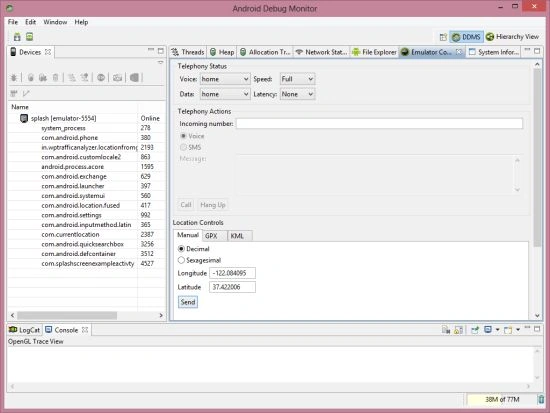
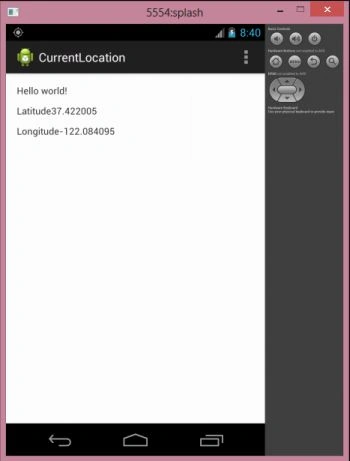
Set latitude and longitude in Android Studio DDMS to run the application on the emulator as in the following:
 Step 5
Amir AliPosted Aug 26, 2014, 6:27 PM
create another application and paste the code in that application
Jimmy WhitePosted Mar 26, 2014, 5:27 AM
Nice Example, thanks :)