

Introduction
This article describes how to use GridView in ASP.Net and jQuery. We can do it server-side but if you do it using jQuery then you are putting less load on the server. You can handle it client-side.
Description
To create this application you need the jQuery plugins listed below.
- jquery.tablesorter.min.js
- jquery-1.4.3.min.js
You can download them from the source code attached in this page.
Design
Add a GridView with AutogeneratedColumn=false and apply any design.
Now design your screen like the following screen: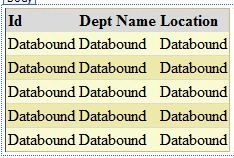
Or you can copy the following source code:
<form id="form1" runat="server">
<div>
<asp:GridView ID="gvDept" runat="server" AutoGenerateColumns="False" BackColor="LightGoldenrodYellow"
BorderColor="Tan" BorderWidth="1px" CellPadding="2" ForeColor="Black" GridLines="None">
<AlternatingRowStyle BackColor="PaleGoldenrod" />
<Columns>
<asp:BoundField DataField="DEPTNO" HeaderText="Id">
<ItemStyle Width="50px" />
</asp:BoundField>
<asp:BoundField DataField="DNAME" HeaderText="Dept Name" />
<asp:BoundField DataField="LOC" HeaderText="Location" />
</Columns>
<FooterStyle BackColor="Tan" />
<HeaderStyle BackColor="Tan" Font-Bold="True" />
<PagerStyle BackColor="PaleGoldenrod" ForeColor="DarkSlateBlue" HorizontalAlign="Center" />
<SelectedRowStyle BackColor="DarkSlateBlue" ForeColor="GhostWhite" />
<SortedAscendingCellStyle BackColor="#FAFAE7" />
<SortedAscendingHeaderStyle BackColor="#DAC09E" />
<SortedDescendingCellStyle BackColor="#E1DB9C" />
<SortedDescendingHeaderStyle BackColor="#C2A47B" />
</asp:GridView>
</div>
</form>
Next add the following JavaScript and CSS style code in the head tag (it's used for sorting):
<style type="text/css">
th
{
cursor: pointer;
background-color: #dadada;
color: Black;
font-weight: bold;
text-align: left;
}
th.headerSortUp
{
background-image: url(images/asc.gif);
background-position: right center;
background-repeat: no-repeat;
}
th.headerSortDown
{
background-image: url(images/desc.gif);
background-position: right center;
background-repeat: no-repeat;
}
td
{
border-bottom: solid 1px #dadada;
}
</style>
<script src="scripts/jquery-1.4.3.min.js" type="text/javascript"></script>
<script src="scripts/jquery.tablesorter.min.js" type="text/javascript"></script>
<script type="text/javascript">
$(document).ready(function () {
$("#gvDept").tablesorter();
});
</script>
Now go to the code view.
Write the BindGrid method using the database or you can use a static datatable.
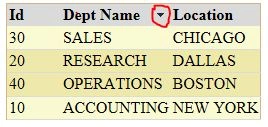
After binding, write these two lines that are requeired for sorting:
sunitha suniPosted Jul 9, 2020, 2:42 AM
Dear Sir even tried with all your mentioned plugins but its not working ,i m working in bootstrap ,inside div i placed gridview
hardik kanzariyaPosted Jan 22, 2020, 12:34 PM
Problem with paging properties when clicking to ascending order or descending order it upper shows so what I do?
Palash SachanPosted Sep 29, 2018, 2:11 AM
Problem with pager pager goes inside gridview on sort
Vithal WadjePosted Sep 30, 2014, 2:17 PM
how can detect duplicates rows in gridview