

Introduction
We are working with data and data are storing in JavaScript variables. We need to see what value is passed to the function and how the value is manipulated and what result the value is producing so we need to debug the JavaScript function to trace a variable value line by line. In the previous article, I explained how to debug a JavaScript function using Visual Studio and Internet Explorer; that article is.
Debugging JavaScript Code Using VS and IE
So now we go through step-by-step to debug a JavaScript function using Google Chrome.
Create UI Design and Develop Functionality for Addition
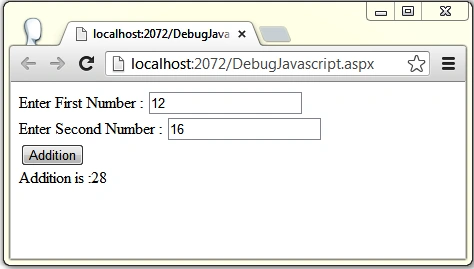
We create a UI Design that takes two values and calculates the addition of these two values on a button click.
<html xmlns="http://www.w3.org/1999/xhtml">
<head runat="server">
    <title></title>
    <script type ="text/javascript">
        function AddNumber()
        {
            var result = document.getElementById("<%=lblResult.ClientID %>");
            var firstNumber = document.getElementById("<%=txtFirstNumber.ClientID %>").value;
            var secondNumber = document.getElementById("<%=txtSecondNumber.ClientID %>").value;
            var addition = parseInt( firstNumber) + parseInt(secondNumber);
            result.innerHTML = "Addition is :" + addition;
            return false;
        }
    </script>
</head>
<body>
    <form id="form1" runat="server">
    <div>
    Enter First Number : <asp:TextBox ID="txtFirstNumber" runat="server"></asp:TextBox><br />
    Enter Second Number : <asp:TextBox ID="txtSecondNumber" runat="server"></asp:TextBox><br />
    <asp:Button ID="btnAdd" runat="server" Text="Addition" OnClientClick="javascript:return AddNumber();" /><br />
    <asp:Label ID="lblResult" runat="server"></asp:Label>
    </div>
    </form>
</body>
</html>
Value Input Window
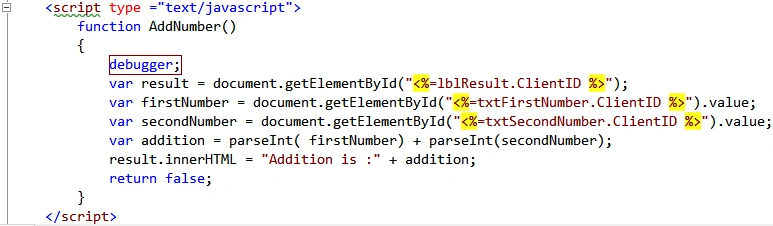
Add Debugger in the JavaScript function so the cursor can hit here whenever the function is called.
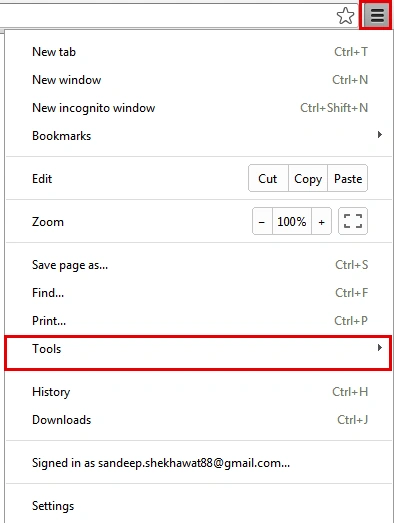
Setting and Debug In Google Chrome
Go to "Tools" then click on "JavaScript console".
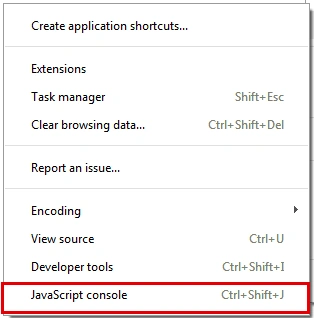
Run the application and insert values into the input fields then click on the "Addition" button. The cursor will then reach the debugger in the source tab under the JavaScript console window.
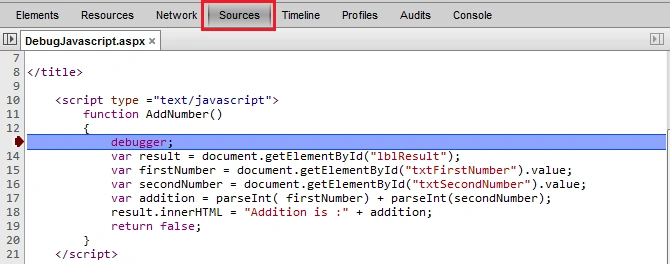
In this function, we declare several variables and on starting, these variables are #ff0000; check the Scope Variables panel in the Right Pane.

Click on F10 and move forward line by line, then check the value of the variables using a mouse move on that variable.
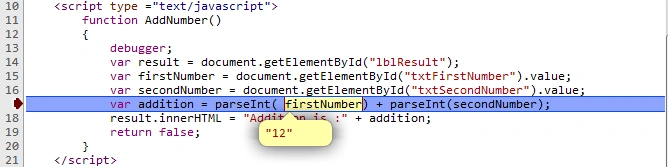
We can also check data in the scope variables window.

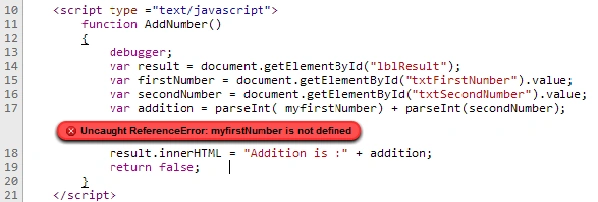
We can also check for an error in the JavaScript code. For example, we don't define a variable and use that variable. I have a variable firstNumber and use the myfirstNumber variable to parse in an int type but instead, firstNumber is undefined.
We can insert a breakpoint by double-clicking on line number or using the right-click of the mouse, then click on "Add breakpoint item". When we use a breakpoint we don't need to define the debugger in the JavaScript function and the cursor will hit the breakpoint directly.
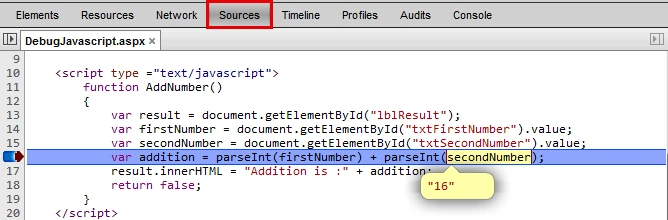
We have the Breakpoints window where the line with the breakpoint checkbox checked will be shown.

mr sharmaPosted Sep 25, 2015, 3:00 PM
Thanks.
Gowtham RajamanickamPosted Mar 13, 2015, 5:23 AM
Good article !
Mohan JPosted Jan 7, 2015, 2:04 AM
thanks a lot....great
Sandeep Singh ShekhawatPosted Jun 11, 2014, 12:06 AM
Thanks Gopi....
Sandeep Singh ShekhawatPosted Jun 11, 2014, 12:05 AM
Thanks Saineshwar !
Gopi ChandPosted Jun 2, 2014, 5:46 AM
Very innovative article sir...:)
Saineshwar BageriPosted Jun 2, 2014, 12:09 AM
Nice Article