
Introduction
AllowPaging is an important property in web applications to enable paging. Suppose we want to show a limited number of records from a database using a DetailsView or GridView, then we simply enable its AllowPaging property to True and easily add a paging facility. But when we want to add a paging feature to a DataList or Repeater control, then there is not an AllowPaging property. We used PagedDataSource to add a paging feature in DataList or Repeater controls. Here I am displaying records from a database in a DalaList control and adding a paging feature in a DataList.
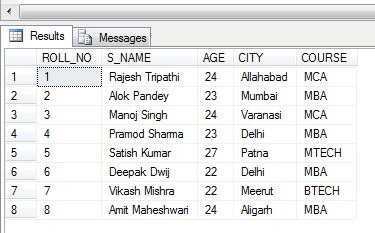
In this example, the database name is "student" and the database table name is "student_detail". I am giving a screenshot of all records to it easier to understand.
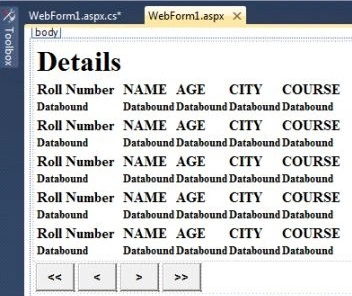
Now take a web application -> take a DataList and four Button controls like in the following figure.
Write the following code.
Code on .aspx
<%@ Page Language="C#" AutoEventWireup="true" CodeBehind="WebForm1.aspx.cs" Inherits="PagininDataList.WebForm1" %>
<!DOCTYPE html PUBLIC "-//W3C//DTD XHTML 1.0 Transitional//EN" "http://www.w3.org/TR/xhtml1/DTD/xhtml1-transitional.dtd">

<html xmlns="http://www.w3.org/1999/xhtml">
<head runat="server">
    <title></title>
    <style type="text/css">
        .style1
        {
            width: 672px;
        }
    </style>
</head>
<body>
    <form id="form1" runat="server">
        <div>
            <table style="height: 79px; width: 429px">
                <asp:DataList ID="DataList1" runat="server">
                    <HeaderTemplate>
                        <h1> Details </h1>
                    </HeaderTemplate>
                    <ItemTemplate>
                        <tr>
                            <td><h4>Roll Number</h4> </td>
                            <td><h4>NAME</h4></td>
                            <td><h4>AGE</h4></td>
                            <td><h4>CITY</h4></td>
                            <td><h4>COURSE</h4></td>
                        </tr>
                        <tr>
                            <td><h5><%#Eval("roll_no") %></h5></td>
                            <td><h5><%#Eval("s_name") %></h5></td>
                            <td><h5><%#Eval("age") %></h5></td>
                            <td><h5><%#Eval("city") %></h5></td>
                            <td><h5><%#Eval("course") %></h5></td>
                        </tr>
                    </ItemTemplate>
                </asp:DataList>
            </table>
            <table>
                <tr>
                    <td>
                        <asp:Button ID="btnfirst" runat="server" Font-Bold="true" Text="<<" Height="31px" Width="43px" onclick="btnfirst_Click" />
                    </td>
                    <td>
                        <asp:Button ID="btnprevious" runat="server" Font-Bold="true" Text="<" Height="31px" Width="43px" onclick="btnprevious_Click" />
                    </td>
                    <td>
                        <asp:Button ID="btnnext" runat="server" Font-Bold="true" Text=">" Height="31px" Width="43px" onclick="btnnext_Click" />
                    </td>
                    <td>
                        <asp:Button ID="btnlast" runat="server" Font-Bold="true" Text=">>" Height="31px" Width="43px" onclick="btnlast_Click" />
                    </td>
                </tr>
            </table>
        </div>
    </form>
</body>
</html>

Anu VPosted Mar 14, 2016, 1:53 AM
Nice
Upendra Pratap ShahiPosted Jun 29, 2015, 5:06 AM
nice..
Euclides MatussePosted Mar 28, 2013, 11:12 AM
Pealse add below the :- ltnfirst_Click(object sender, EventArgs e) { pos = 0;this.ViewState["vs"] = 0; databind(); } because when we are in the last page, then if we go to the first after switch-page and the following page she continues with this.ViewState ["vs"] to the number of pages, i.e., continues with the previous count to remove this error we have to add the Middle row I have written above.
alireza KERAMATIPosted Oct 7, 2012, 6:07 AM
Very Good
Pradeep yadaveditedPosted Aug 24, 2012, 2:40 PMEdited Aug 24, 2012, 2:41 PM
Pls add below the :- btnlast_Click(object sender, EventArgs e) { pos = adsource.PageCount - 1; this.ViewState["vs"] = pos; databind(); } bcause when we are at last page then if we come to the second last page it gives an error to remove this error we have to add the Middle row I have written above. Thanx and Regards Pradeep Kumar Yadav