

Introduction
File upload is a common feature of many applications. Sometimes we need to upload multiple files with some data.
Problem Statement
I have developedan application using AngularJS and Web API 2 and I want to upload files as well as post some data. Both data and files, I want to post in a single request. How to achieve this?
Solution
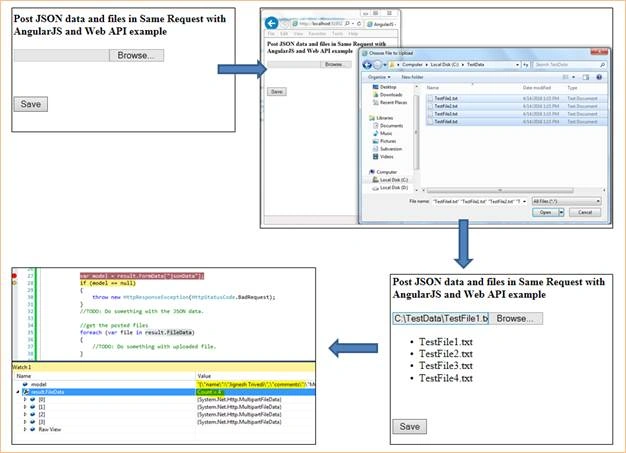
This can be done in many ways. Here I am discussing one way that I feel is the best. The following steps are required tobe performed to achieve this. In this way, I will use directive in AngularJS and Web API.
Step 1: Define AngularJS Application.
- var app = angular.module("AngularApp", []);
Here, I have created a simple directive for file upload that picks up the selected files and emits "selectedFiles" event which is written in Angular controller. In this event we just add files which are selected in to the files array. Later on in this article we will look this into controller code and will discuss it.
- app.directive('uploadFiles', function () {
- return {
- scope: true, //create a new scope
- link: function (scope, el, attrs) {
- el.bind('change', function (event) {
- var files = event.target.files;
- //iterate files since 'multiple' may be specified on the element
- for (var i = 0; i < files.length; i++) {
- //emit event upward
- scope.$emit("seletedFile", { file: files[i] });
- }
- });
- }
- };
- });
Next step is to define the angular controller. In the controller, I have defined “selectedFile” event which is emitted from the directive. In this event we just push the selected files in to array. Later on this will used to post the files. I have also defined dummy JSON data which I want to post to Web API with selected files. Save method of the controller is use angular http service to post data and files. The transformRequest is http service property and it can be a single function that returns the transformed value. Here we just are overriding the default Transformations. This will allow us to change way of data send up to the server.
- app.controller("demoController", function ($scope, $http) {
- //1. Used to list all selected files
- $scope.files = [];
- //2. a simple model that want to pass to Web API along with selected files
- $scope.jsonData = {
- name: "Jignesh Trivedi",
- comments: "Multiple upload files"
- };
- //3. listen for the file selected event which is raised from directive
- $scope.$on("seletedFile", function (event, args) {
- $scope.$apply(function () {
- //add the file object to the scope's files collection
- $scope.files.push(args.file);
- });
- });
- //4. Post data and selected files.
- $scope.save = function () {
- $http({
- method: 'POST',
- url: "http://localhost:51739/PostFileWithData",
- headers: { 'Content-Type': undefined },
- transformRequest: function (data) {
- var formData = new FormData();
- formData.append("model", angular.toJson(data.model));
- for (var i = 0; i < data.files.length; i++) {
- formData.append("file" + i, data.files[i]);
- }
- return formData;
- },
- data: { model: $scope.jsonData, files: $scope.files }
- }).
- success(function (data, status, headers, config) {
- alert("success!");
- }).
- error(function (data, status, headers, config) {
- alert("failed!");
- });
- };
- });
Imad SiddiquiPosted May 14, 2020, 6:05 AM
Can we try the same C# code without a path to upload the file? I don't want to upload the path, I only want to read the file and JSON data and push it into the DB.
Anubhav MishraPosted Mar 4, 2020, 12:24 AM
I followed the above steps apart from the WEB API part. The problem is scope.$emit is emitting the number of event(selectedFile) correctly as per the length of files however, $scope.$on is catching this event 3 times for each file. I am unable to understand why. Can you help me with it?
Abhishek GuptaPosted Aug 15, 2019, 2:39 AM
Nice article. for Angular JS 1.6.4 compatible code: $scope.submiCustomerDetails = function () { var jsonData = { firstName: $scope.firstName, middleName : $scope.middleName, lastName : $scope.lastName, email : $scope.email, comments : $scope.comments, files : $scope.files }; var url = "<your service url>>"; var config = { headers : { 'Content-Type': undefined }, transformRequest: function (data) { var formData = new FormData(); formData.append("model", angular.toJson(data.model)); for (var i = 0; i < data.files.length; i++) { formData.append("file" + i, data.files[i]); } return formData; }, data: { model: $scope.jsonData, files: $scope.files } }; $http.post(url,jsonData,config) .then( function(response) { $log.log('success'); }, function error(response) { $log.log('error'); }); };
Punit SinghiPosted Jul 26, 2019, 12:51 PM
Nice article, but you are using server.mappath, what happens if server are located different location so physical location won't match... wouldn't it created issue?
biswaranjan dasPosted Mar 13, 2019, 3:50 PM
Files are created with encrypted name without extension in the concern folder like BodyPart_65f65fde-bf77-4064-a3d3-d42a2cfabf40 , BodyPart_c28661a8-250f-4301-b07b-3027163dc3f9
muqofa ridaPosted Feb 18, 2019, 9:49 PM
Thank you it`s help me
anoop guptaPosted Sep 2, 2018, 5:52 AM
File Not get when Is ajax hit to API. Can you please give me your contact number
anoop guptaPosted Sep 1, 2018, 4:08 AM
Why content type undefined
anoop guptaPosted Sep 1, 2018, 3:30 AM
BAKWAS Article always go to error
anoop guptaPosted Sep 1, 2018, 3:20 AM
File not get in API
Viknaraj ManogararajahPosted Aug 7, 2018, 11:15 AM
nice article thank you for sharing....
revathi sharmiPosted Aug 7, 2018, 1:30 AM
Need to return some data with success on this. how i can do that?
revathi sharmiPosted Aug 7, 2018, 1:29 AM
Always its going to error section.
MD IslamPosted May 5, 2018, 5:23 AM
Hi Jignesh Trivedi I am getting 404 error saying like POST http://localhost:52224/PostFileWithData 404 (Not Found) at console
Sabab ZulfikerPosted Apr 13, 2018, 6:41 AM
How can I extract the attributes like name, comments from result.FormData["jsonData"] , so that I can store them into database. And what is the required operation for uploading the files into database??
anubha agrawalPosted May 2, 2017, 5:37 AM
Hi Jignesh, is it possible to post json values to web services not web api controller?
Manveer SinghPosted Sep 28, 2016, 2:54 AM
Hi Jignesh,can you please share the code for as in case of different files with data as Fields, 1: Employee Name, 2. Photo(Image), 3. Signature(Image).
Pradeep SahooPosted May 9, 2016, 10:22 PM
Nice . Thanks for sharing
Vivek KumarPosted Apr 28, 2016, 2:53 PM
Good one
Kuppurasu NagarajPosted Apr 22, 2016, 12:10 PM
Nice Sharing..
Debasis SahaPosted Apr 21, 2016, 1:29 PM
Nice One..
Gowtham KPosted Apr 21, 2016, 1:22 PM
Good One, Thanks for sharing
Rahul Kumar SaxenaPosted Apr 21, 2016, 9:04 AM
Good one
Vignesh ManiPosted Apr 21, 2016, 8:23 AM
Nice one
Shakti Singh DulawatPosted Apr 21, 2016, 7:53 AM
Thanks for this article, just want to know when you pass two request from single event does it slow down performance of application ?