

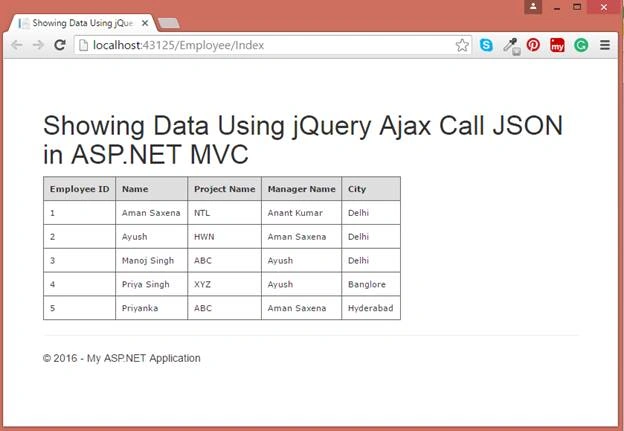
In this article I am going to show how to display data using jQuery, AJAX Call, JSON in ASP.NET MVC Application.
Open Visual Studio, then Add New Project.
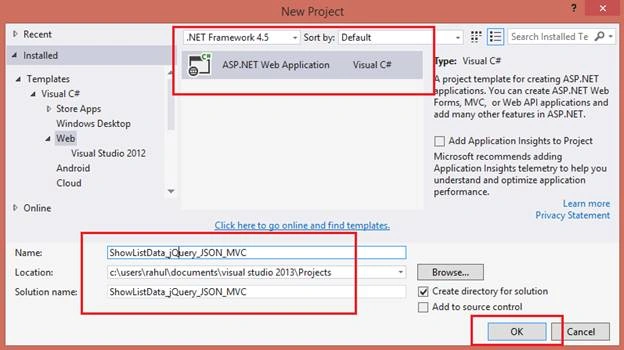
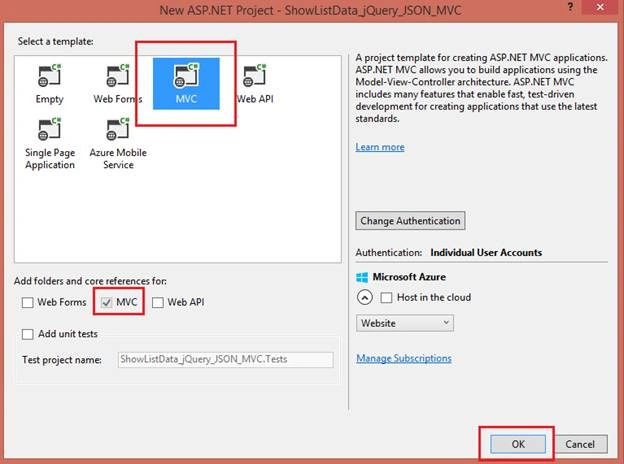
Below is my Data Table in design mode from which I will show data.
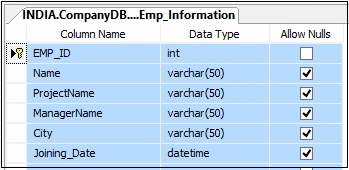
Script of my Data Table,
Below is my Data Table in design mode from which I will show data.
Script of my Data Table,
- CREATE TABLE [dbo].[Emp_Information](
- [EMP_ID] [int] IDENTITY(1,1)NOTNULL,
- [Name] [varchar](50)NULL,
- [ProjectName] [varchar](50)NULL,
- [ManagerName] [varchar](50)NULL,
- [City] [varchar](50)NULL,
- [Joining_Date] [datetime] NULL,
- CONSTRAINT [PK_Emp_Information] PRIMARYKEYCLUSTERED
- (
- [EMP_ID] ASC
- )WITH (PAD_INDEX=OFF,STATISTICS_NORECOMPUTE=OFF,
- IGNORE_DUP_KEY=OFF,ALLOW_ROW_LOCKS=ON,ALLOW_PAGE_LOCKS=ON)ON [PRIMARY]
- )ON [PRIMARY]
- GO
- SETANSI_PADDINGOFF
- GO
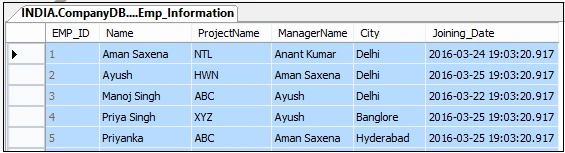
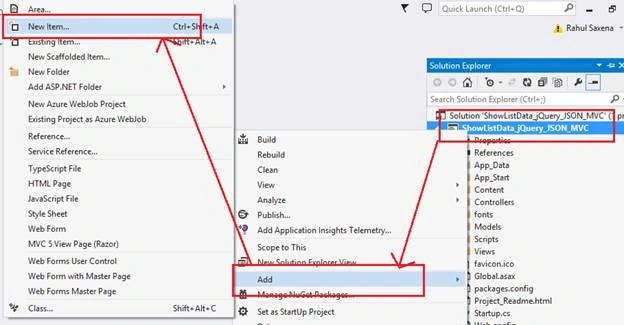
Now add an ADO.NET Entity Data Model. So, right click on Project Solution Explorer, Add, then click New Item,
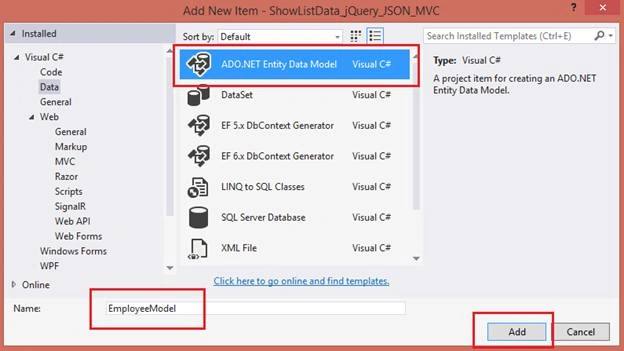
Select ADO.NET Entity Data Model,
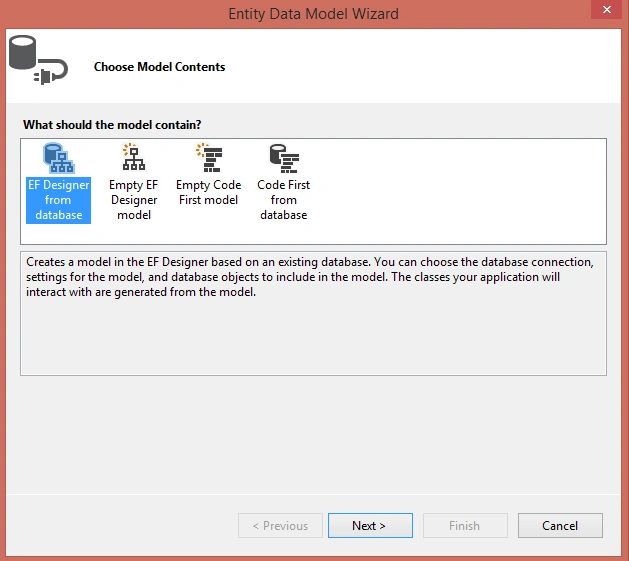
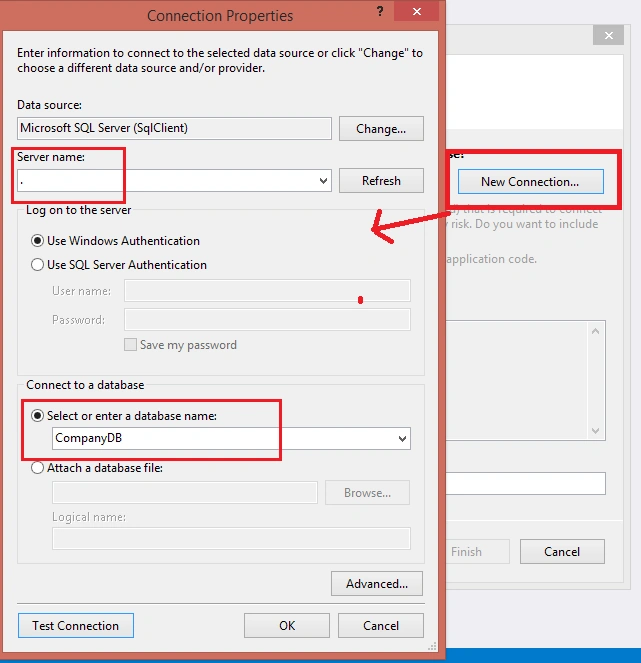
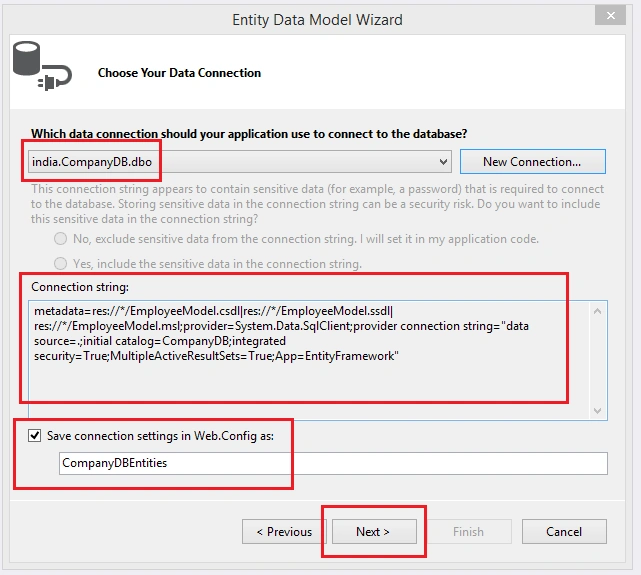
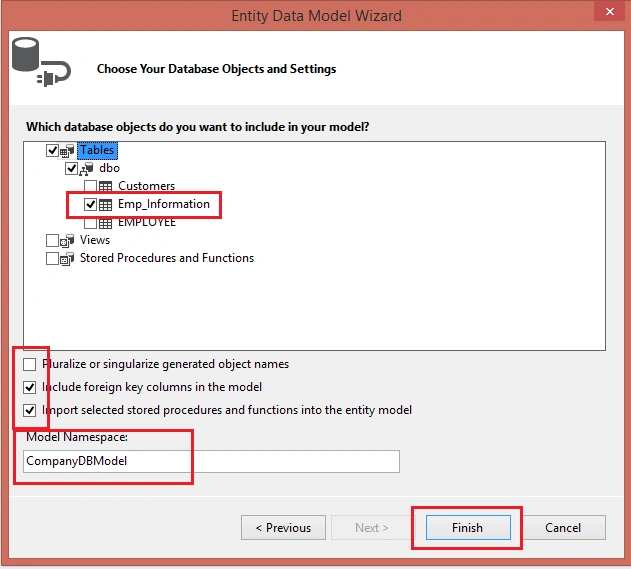
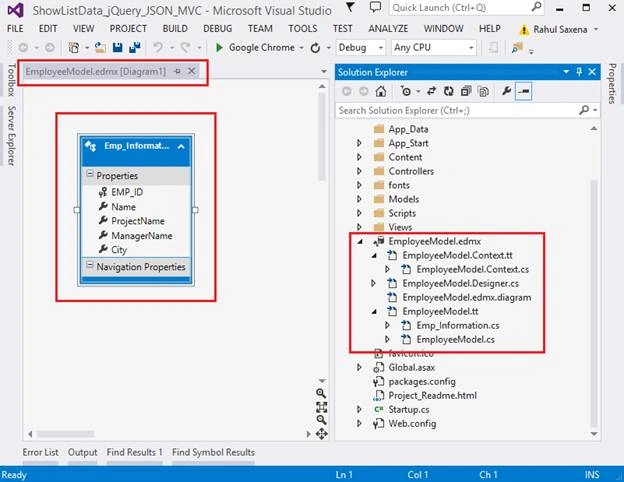
Now Right Click on Models Folder, Add, then New Class. Here's the screenshot,
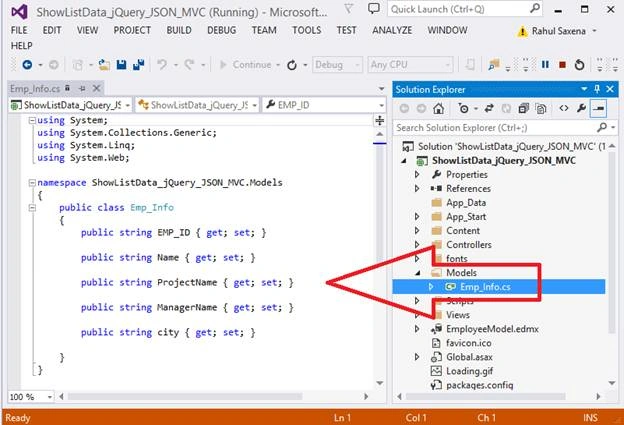
Now add a new Controller, Right Click on Controller Folder and then Add New Controller,
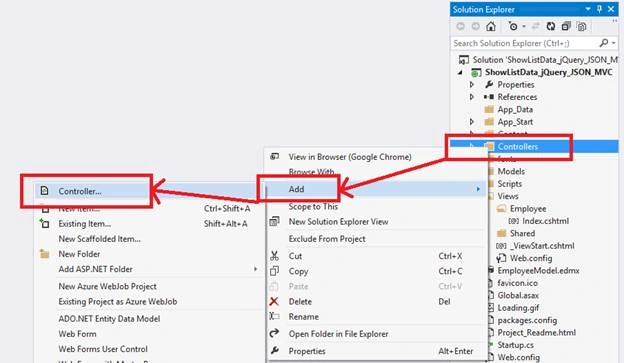
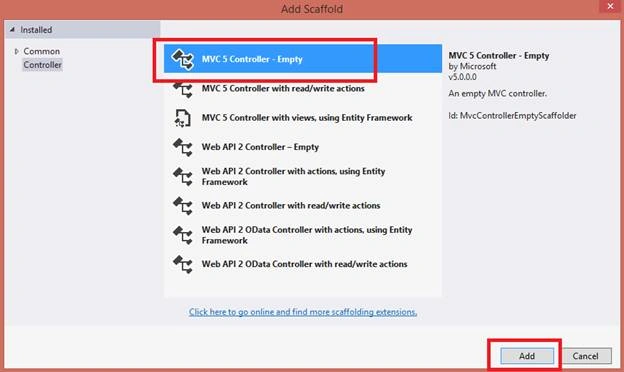
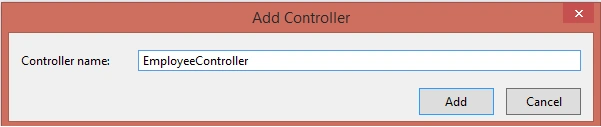
Here in this controller do the following code:
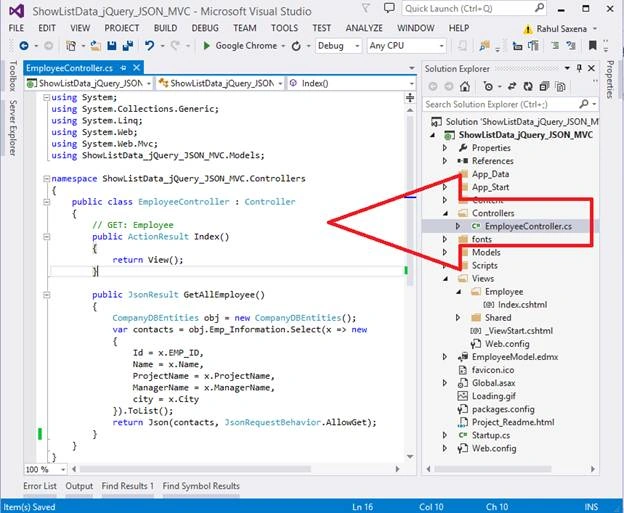
- using System;
- using System.Collections.Generic;
- using System.Linq;
- using System.Web;
- using System.Web.Mvc;
- using ShowListData_jQuery_JSON_MVC.Models;
- namespace ShowListData_jQuery_JSON_MVC.Controllers
- {
- public class EmployeeController: Controller
- {
- // GET: Employee
- public ActionResult Index()
- {
- return View();
- }
- public JsonResultGetAllEmployee()
- {
- CompanyDBEntitiesobj = new CompanyDBEntities();
- var contacts = obj.Emp_Information.Select(x => new
- {
- Id = x.EMP_ID,
- Name = x.Name,
- ProjectName = x.ProjectName,
- ManagerName = x.ManagerName,
- city = x.City
- }).ToList();
- return Json(contacts, JsonRequestBehavior.AllowGet);
- }
- }
- }
- Now my View(Index.cshtml):
- @ {
- ViewBag.Title = " Showing Data Using jQuery Ajax Call JSON in ASP.NET MVC";
- } <
- h1 >
- Showing Data Using jQuery Ajax Call JSON in ASP.NET MVC <
- /h1> <
- div >
- <
- tableid = "tblEmployee"
- class = "tblEmployee" >
- <
- thead >
- <
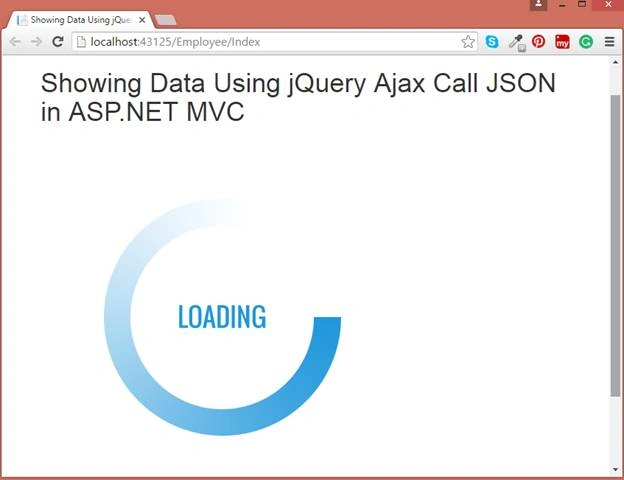
- img src = "~/Loading.gif"
- alt = "Loading"
- id = "imgLoading"
- class = "Load" / >
- <
- /thead> <
- tbody > < /tbody> <
- /table> <
- /div> <
- script src = "~/Scripts/jquery-1.10.2.min.js" > < /script> <
- script type = "text/javascript" >
- $(document).ready(function()
- {
- $("#tblEmployeetbodytr").remove();
- $.ajax
- ({
- type: 'POST',
- url: '@Url.Action("GetAllEmployee")',
- dataType: 'json',
- data: {},
- success: function(data)
- {
- $("#imgLoading").hide();
- var items = '';
- var rows = "<tr>" +
- "<th align='left' class='EmployeeTableTH'>Employee ID</th><th align='left' class='EmployeeTableTH'>Name</th><th align='left' class='EmployeeTableTH'>Project Name</th><th align='left' class='EmployeeTableTH'>Manager Name</th><th align='left' class='EmployeeTableTH'>City</th>" +
- "</tr>";
- $('#tblEmployeetbody').append(rows);
- $.each(data, function(i, item)
- {
- var rows = "<tr>" +
- "<td class='EmployeeTableTD'>" + item.Id + "</td>" +
- "<td class='EmployeeTableTD'>" + item.Name + "</td>" +
- "<td class='EmployeeTableTD'>" + item.ProjectName + "</td>" +
- "<td class='EmployeeTableTD'>" + item.ManagerName + "</td>" +
- "<td class='EmployeeTableTD'>" + item.city + "</td>" +
- "</tr>";
- $('#tblEmployeetbody').append(rows);
- });
- },
- error: function(ex)
- {
- var r = jQuery.parseJSON(response.responseText);
- alert("Message: " + r.Message);
- }
- });
- return false;
- }); <
- /script> <
- styletype = "text/css" >
- .tblEmployee
- {
- font - family: verdana, arial, sans - serif;
- font - size: 11 px;
- color: #333333;
- border-width: 1px;
- border-color: # 666666;
- border - collapse: collapse;
- }
- .EmployeeTableTH
- {
- border - width: 1 px;
- padding: 8 px;
- border - style: solid;
- border - color: #666666;
- background-color: # dedede;
- }
- .EmployeeTableTD
- {
- border - width: 1 px;
- padding: 8 px;
- border - style: solid;
- border - color: #666666;
- background-color: # ffffff;
- } <
- /style>
Read more articles on ASP.NET:
Troy WilsonPosted May 22, 2018, 11:40 AM
Pay no attention to the negative person below. I used your tutorial as a basis to create a web services solution that I use in a production environment everyday and it works great. I've since made my own improvements, but this gave me a good start.
Sebastian GugPosted Apr 19, 2018, 8:43 AM
This has been a giant waste of time, please never ever attempt to make a tutorial again.
Ivin Raj SPosted Feb 9, 2018, 3:45 AM
Sir how to add pagination ? page size 10
Chris ChanPosted Sep 2, 2017, 4:36 AM
Why is that it has JsonResultGetAllEmployee() return type error?
Chris ChanPosted Sep 2, 2017, 4:36 AM
Why is that it has JsonResultGetAllEmployee() return type error?
Chris ChanPosted Sep 2, 2017, 4:36 AM
Why is that it has JsonResultGetAllEmployee() return type error?
ribha shakoorPosted Aug 21, 2017, 12:27 PM
How can I print this dynamically created table using jquery-ajax-call ?
Alaeddin AlhamoudPosted Aug 4, 2017, 6:52 AM
Thats good , but Image if i have 100 k record !!!! u should give size to ur record , should load 5 or 10 per press on button or scrolling ;) Thanx
Ashish GuptaPosted Jul 3, 2017, 6:16 AM
Public JsonResultGetAllEmployee() ?? return type ?
Delpin Susai RajPosted Aug 28, 2016, 6:34 AM
Good one
Vignesh ManiPosted Apr 11, 2016, 6:56 AM
Nice
Rahul Kumar SaxenaPosted Apr 11, 2016, 12:57 AM
Tahnks 2 All
Rahul Kumar SaxenaPosted Apr 11, 2016, 12:57 AM
Thanks Ankit Bansal
Rahul Kumar SaxenaPosted Apr 11, 2016, 12:56 AM
Thanks Humayun Kabir Mamun
Rahul Kumar SaxenaPosted Apr 11, 2016, 12:56 AM
Thanks Manoj Kulkarni
Rahul Kumar SaxenaPosted Apr 11, 2016, 12:56 AM
Thanks Vivek Kumar
Rahul Kumar SaxenaPosted Apr 11, 2016, 12:56 AM
Thanks Ankur Mistry
Ankit BansalPosted Apr 11, 2016, 12:15 AM
Very nice Rahul sir..
Humayun Kabir MamunPosted Apr 10, 2016, 11:54 PM
Nice...
Manoj KulkarniPosted Apr 10, 2016, 11:05 PM
Nice article. Thank you for sharing
Vivek KumarPosted Apr 10, 2016, 4:54 PM
Nice one.
Ankur MistryPosted Apr 10, 2016, 1:11 PM
Helpful staff
Rahul Kumar SaxenaPosted Apr 10, 2016, 11:15 AM
Thanks
Rahul Kumar SaxenaPosted Apr 10, 2016, 11:15 AM
Thanks Sthitaprajnya Debasis Nayak
Sthitaprajnya Debasis NayakPosted Apr 10, 2016, 8:23 AM
Super Sir !!!
Rahul Kumar SaxenaPosted Apr 10, 2016, 2:48 AM
Thanks Nitin Tyagi
NitinPosted Apr 10, 2016, 1:19 AM
Wonderful representation
Rahul Kumar SaxenaPosted Apr 9, 2016, 12:24 PM
Thanks 2 All
Rahul Kumar SaxenaPosted Apr 9, 2016, 12:23 PM
Thanks Vignesh Mani
Rahul Kumar SaxenaPosted Apr 9, 2016, 12:23 PM
Thanks Prakash Tripathi
Rahul Kumar SaxenaPosted Apr 9, 2016, 12:23 PM
Thanks Gowtham K
Rahul Kumar SaxenaPosted Apr 9, 2016, 12:23 PM
Thanks Kuppurasu Nagaraj
Rahul Kumar SaxenaPosted Apr 9, 2016, 12:22 PM
Thanks Gowtham Rajamanickam
Vignesh ManiPosted Apr 9, 2016, 11:21 AM
Good one
Prakash TripathiPosted Apr 9, 2016, 10:49 AM
The way article is presented is nice.
Gowtham KPosted Apr 9, 2016, 10:24 AM
Good One, Thanks for sharing:)
Kuppurasu NagarajPosted Apr 9, 2016, 10:18 AM
Nice article..
Gowtham RajamanickamPosted Apr 9, 2016, 9:32 AM
Very good article