

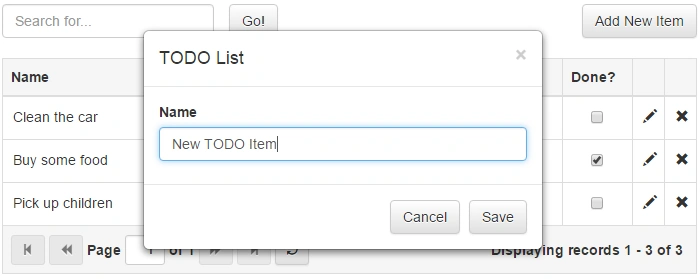
This article is going to show how you can easily create TODO List with Gijgo Controls and TypeScript in ASP.NET Core.
BackgroundIn this article, I'm going to use jQuery Grid and jQuery Dialog 0.6.2 by gijgo.com, jQuery 2.2.3, TypeScript 1.8, Entity Framework Core 1.0.0 and ASP.NET Core MVC 1.0.0.
A few words about the libraries that I'm going use in this article:
- ASP.NET Core is a re-implementation of ASP.NET as a modular Web framework, together with other frameworks like Entity Framework.The new framework uses the new open-source .NET Compiler Platform (codename "Roslyn"), a cross platform.
- Gijgo is a set of free open source JavaScript controls, distributed under MIT License. All the widgets are of high performance and built on top of the jQuery JavaScript Library. Gijgo is compatible with jQuery UI, Bootstrap and Foundation.
- TypeScript is a free and an open source programming language, developed and maintained by Microsoft. It is a strict superset of JavaScript, adds optional static typing and a class-based object-oriented programming to the language.
In order to be able to run the example from the attachment or build it from scratch, you need to have the following tools:
How to run the example from the attachment.If you want to run the example from the attachment, you have to follow the steps, given below:
- Open the project in Visual Studio 2015.
- Execute "Add-Migration InitialCreate" and then "Update-Database" in "Package Manager Console" in order to create the database.

- Run the project and perform CRUD operations with players.
If you want to build the same app from scratch, you can follow the steps below. Keep in mind, that this can change in the future, because I'm using release candidates that may change.
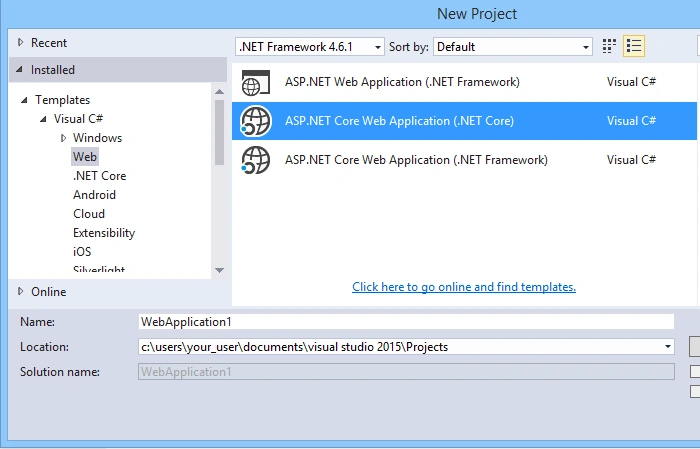
- Open Visual Studio 2015 and create new Web project from type "ASP.NET Core Web Application (.NET Core)".
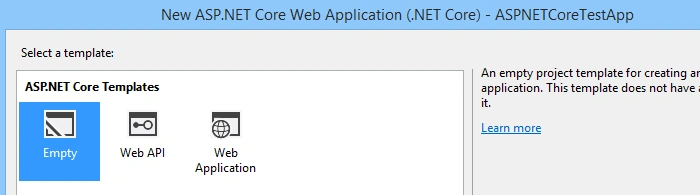
- Choose "Empty" template for your Application.
- Run the following commands in "Package Manager Console" to install ASP.NET MVC Core and Entity Framework Core.
- Install-Package Microsoft.EntityFrameworkCore.SqlServer -Version 1.0.0
- Install-Package Microsoft.EntityFrameworkCore.Tools -Version 1.0.0-preview2-final
- Install-Package Microsoft.EntityFrameworkCore.Tools.Core -Version 1.0.0-rc2-final
- Install-Package Microsoft.AspNetCore.Mvc -Version 1.0.0
- Install-Package Microsoft.AspNetCore.Razor.Tools -Version 1.0.0-preview2-final
- Install-Package Microsoft.AspNetCore.StaticFiles -Version 1.0.0
- Install-Package Microsoft.Extensions.Configuration.Json -Version 1.0.0
- Install-Package Microsoft.Extensions.Configuration.EnvironmentVariables -Version 1.0.0
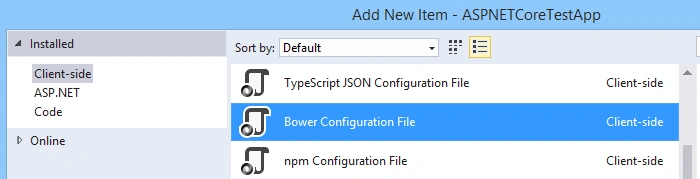
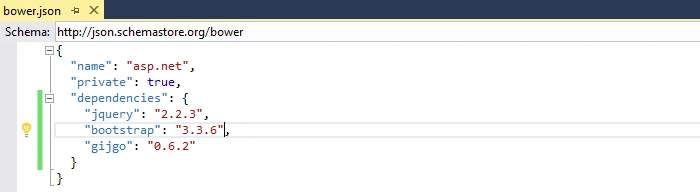
- Add new item to the project from type "Client-side/Bower Configuration File" (bower.json).
- Add dependencies in bower.json to jquery 2.2.3, bootstrap 3.3.6 and gijgo 0.6.2.This is going to automatically include those 2 libraries in the "wwwroot/libs" folder of your project.
- Open "Node.js command prompt" and navigate to the wwwroot folder in your project.
- Run the following commands in the command prompt:
- npm install tsd@next -g (install TypeScript Definition manager for DefinitelyTyped)
- tsd install jQuery --save (install TypeScript definitions for jquery)
- tsd install gijgo --save (install TypeScript definitions for gijgo)

- Add "ASP.NET Configuration File" to your solution called appsettings.json.
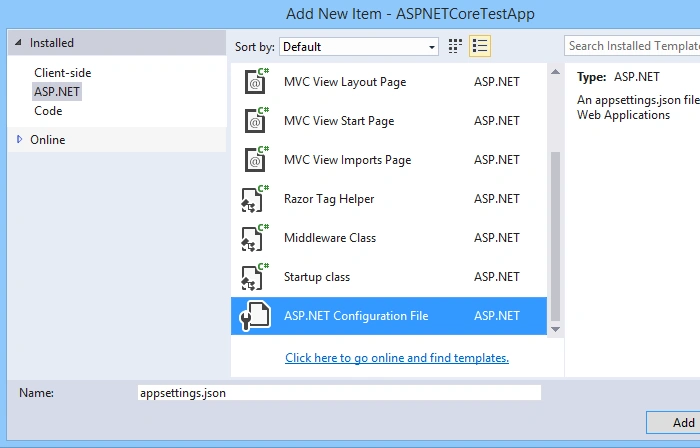
- Configure correct default connection string to DB that you are going to use for this example. Don't create the database yet, because the database will be created automatically by the EntityFramework.

- Create Models folder at a root level of the project.
- Add TODOItem class, that represents the TODO entity to the Models folder.
- public class TODOItem
- {
- public int ID { get; set; }
- public string Name { get; set; }
- public bool IsCompleted { get; set; }
- }
- Add ApplicationDbContext class to the Models folder.
- public class ApplicationDbContext : DbContext
- {
- public DbSet TODOItems { get; set; }
- public ApplicationDbContext(DbContextOptions options)
- : base(options)
- {
- }
- protected override void OnModelCreating(ModelBuilder builder)
- {
- base.OnModelCreating(builder);
- }
- }
- Enable appsettings.json, EntityFramework and MVC in the StartUp.cs file, as it shown below:
- public class Startup
- {
- public IConfigurationRoot Configuration { get; set; }
- public Startup(IHostingEnvironment env)
- {
- var builder = new ConfigurationBuilder()
- .SetBasePath(env.ContentRootPath)
- .AddJsonFile("appsettings.json", optional: true, reloadOnChange: true)
- .AddJsonFile($"appsettings.{env.EnvironmentName}.json", optional: true);
- builder.AddEnvironmentVariables();
- Configuration = builder.Build();
- }
- public void ConfigureServices(IServiceCollection services)
- {
- services.AddDbContext(options =>
- options.UseSqlServer(Configuration.GetConnectionString("DefaultConnection")));
- services.AddMvc();
- }
- public void Configure(IApplicationBuilder app)
- {
- app.UseStaticFiles();
- app.UseMvc(routes => {
- routes.MapRoute(name: "default", template: "{controller=Home}/{action=Index}/{id?}");
- });
- }
- }
- Add Controllers folder and HomeController.cs to manage operations with TODO items on the Server side inside this folder.
- public class HomeController : Controller
- {
- private ApplicationDbContext _context;
- public HomeController(ApplicationDbContext context)
- {
- this._context = context;
- }
- // GET: //
- public IActionResult Index()
- {
- return View();
- }
- public JsonResult GetTODOItems(int? page, int? limit, string searchString = null)
- {
- var records = this._context.TODOItems.AsQueryable();
- if (!string.IsNullOrWhiteSpace(searchString))
- {
- records = records.Where(p => p.Name.Contains(searchString));
- }
- int total = records.Count();
- if (page.HasValue && limit.HasValue)
- {
- int start = (page.Value - 1) * limit.Value;
- records = records.Skip(start).Take(limit.Value);
- }
- return Json(new { records, total }, new JsonSerializerSettings
- {
- ContractResolver = new DefaultContractResolver { NamingStrategy = null }
- });
- }
- [HttpPost]
- public JsonResult Save(TODOItem todoItem)
- {
- if (todoItem.ID > 0)
- {
- var entity = this._context.TODOItems.First(p => p.ID == todoItem.ID);
- if (!string.IsNullOrWhiteSpace(todoItem.Name))
- {
- entity.Name = todoItem.Name;
- }
- if (todoItem.IsCompleted != null)
- {
- entity.IsCompleted = todoItem.IsCompleted;
- }
- }
- else
- {
- this._context.TODOItems.Add(new TODOItem
- {
- Name = todoItem.Name,
- IsCompleted = false
- });
- }
- this._context.SaveChanges();
- return Json(true);
- }
- [HttpPost]
- public JsonResult Remove(int id)
- {
- var entity = this._context.TODOItems.First(p => p.ID == id);
- this._context.TODOItems.Remove(entity);
- this._context.SaveChanges();
- return Json(true);
- }
- }
- Create Views folder and Home folder with Index.cshtml inside the Views folder. Add the HTML structure in the Index.cshtml, which is required for the management of TODO items. You can find a sample code about it in the $Views\Home\Index.cshtml file from the attachment.
- Create /wwwroot/scripts/site.ts file that manages TODO items with TypeScript on the client side. You can find a sample code about it in the $wwwroot\scripts\site.ts file from the attachment.
- Add manually Microsoft.EntityFrameworkCore.Tools to the tools section in the project.json file.

- Execute "Add-Migration InitialCreate" and then "Update-Database" in "Package Manager Console" in order to create the database.
- Run the project and manage your TODO Items.
I hope that this article is going to be useful for your project.
Oracular ManPosted Feb 21, 2018, 7:40 PM
Doesn't work with the latest .NET core 2.0 implementation
Mahesh ChandPosted Jul 8, 2016, 8:03 AM
Great. However, I would have liked to see how the outlook looks like.
Shobana JPosted Jul 8, 2016, 4:19 AM
Nice
kalu singh raoPosted Jul 6, 2016, 1:34 AM
Nice...
RajaPosted Jul 6, 2016, 12:08 AM
Good One..