

Download Microsoft Visual Studio 2015 Installer Project.
Right Click on your Solution -> Add New Project -> Choose Other Projects -> Visual Studio Installer -> SetUp and Development -> Give the project Name

Click Ok
Right Click On Application Folder-> Add -> Project Output
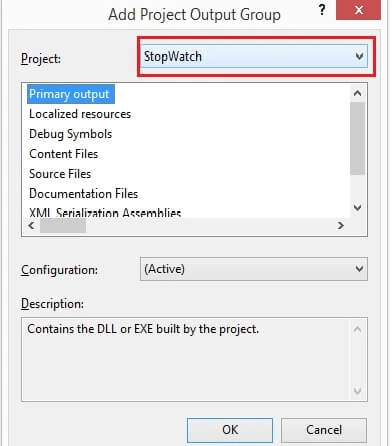
Choose your Main Project
It will add all the DLL to the folder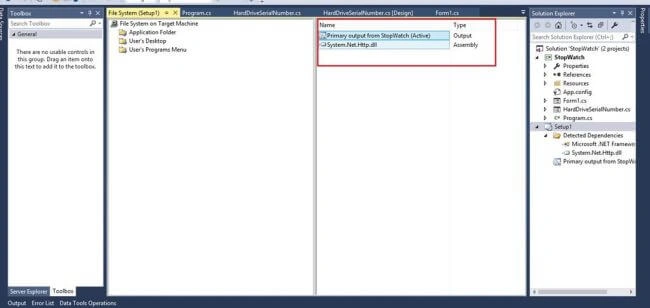
Right Click on the Primary Output ->Create Shortcut to Primary output
Right Click->Cut
Choose User’s Desktop on the left hand side->Paste the Primary Output on the Right Hand Side (To show the User’s Desktop)
Right Click on User’s Programs Menu-> Add->New Folder->Rename It
RightClick on the Right Hand Side->Click Add New Shortcut
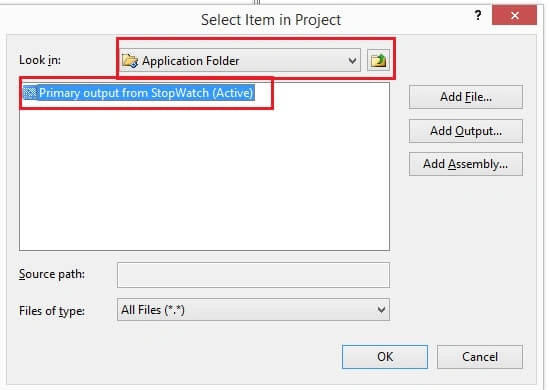
Choose application folder->Primary Output->ok
RightClick on the Setup from Solution Explorer->Build it->Go to the project physical path ->choose the setup project->Debug-> and you will find the Setup File,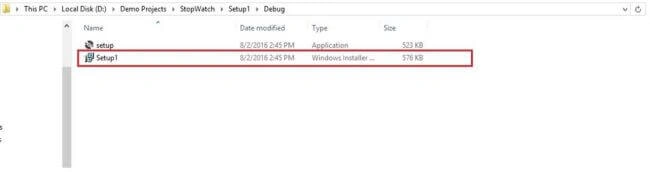
E-WorldPosted Jun 15, 2021, 4:09 AM
Great guidance. Its work for me. Many many thanks for sharing these explanations.
Prakash MondalPosted Feb 10, 2021, 9:37 AM
Setup created and opened successfully my PC(Windows 10 Pro), but after installation to another PC(Windows 10 Pro), can't open it.
dharani prakashPosted Apr 4, 2019, 9:48 AM
How to rename the setup.exe after development is complete?
Antonio JuniorPosted Mar 25, 2019, 6:14 AM
When I click Build and I will check in the project folder I can not find the Setup file
Subham PolpagedarPosted Jul 19, 2018, 6:49 AM
Sir how can we create setup file for windows form application that contains MS SQL database ?
anil kumarPosted May 3, 2018, 8:11 AM
Thankyou sir great .. good work please post more
Mubashir KhanPosted Mar 9, 2018, 1:36 PM
I have a resource folder which is used by my project but when i create setup file like his it is not including that folder how can i include my resource folder to setup file please i need help
Ketan ShindePosted Jan 31, 2018, 4:08 AM
Right Click on User’s Programs Menu-> Add->New Folder->Rename It RightClick on the Right Hand Side->Click Add New Shortcut
Ketan ShindePosted Jan 31, 2018, 4:08 AM
RightClick on the Right Hand Side->Click Add New Shortcut ---- Not getting
Ajaz KhanPosted Oct 24, 2017, 2:57 AM
Thanks sir it is very easier step for newcomers
SubashPosted Sep 7, 2016, 9:07 AM
Thanks sir useful one