

First see this table:
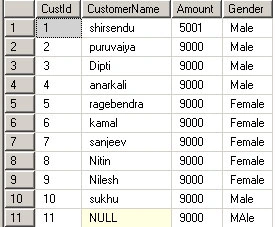
Here we have the Customer Name, Amount and Gender.
Now suppose somebody gives us 2 requirements for the table.
- Display the total number or count of "Male" and "Female" genders from the table by writing a single query.
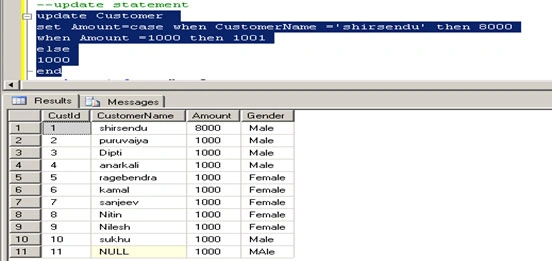
- Update the Amount to Rs 8000 for the CustomerName "Shirsendu" and the remaining customers update the Amount to 1000 Rs.
Now for doing the first requirements we have to use a Count Query.
So normally what we do, we write the following query:
select COUNT(gender)as MALE ,COUNT (gender) as FEMALE from dbo.Customer where Gender='Male'and Gender='Female'
When you run the query it will look like the following figure:
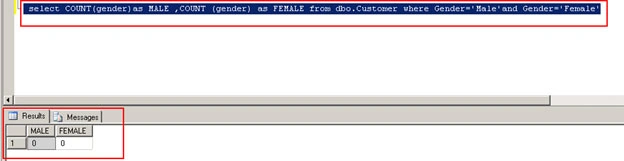
See here we are getting o,o count for Male and Female.
Because we can't execute a count of more than one column by simply giving the column name.
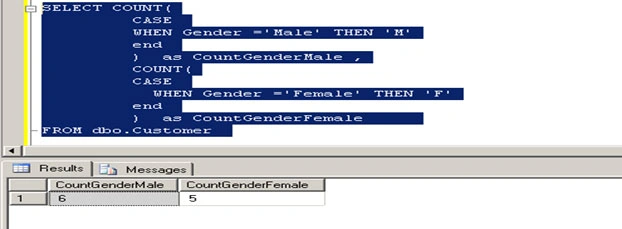
So here we have to to use a "Case" statement. Using "case" we can easily make the decesiion "If this that then this will be that".
Now the query is
SELECT COUNT(
CASE
WHEN Gender ='Male' THEN 'M'
end
) as CountGenderMale ,
surender bhyanPosted Jun 3, 2011, 2:29 PM
thanku bro :-)