

Introduction
In my previous article I told you about:
In today's article I will tell you about Checked Binding using Knockout in an ASP.NET Application.
Step 1
First of all you need to add an external Knockout js file into your application, you can either download it from the Internet or can download my application that is available at the start of this article in Zip Format and then can use the file attached with this Zip file.
After downloading the file you need to call it in the head section of your application.
<head runat="server">
<title></title>
<script src="knockout-2.3.0.js"></script>
</head>
Step 2
Now we can work on our application. First we will work on the ViewModel. For this you need to add a Script tag under the Body Section and then add this code:
<script type="text/javascript">
var x = {
needBurger: ko.observable(false),
selectBurger: ko.observableArray(["Veg Aloo Tikki Burger", "Chicken McGrilled Burger"])
};
x.selectBurger.push("msg");
ko.applyBindings(x);
</script>
Here first I created a function named as "x", in this function I create an Observable and an Observable Array,
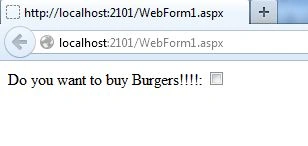
First an Observable is declared that is named needBurger, it's made false by default. That means that whatever it is applied to will not be seen until some conditions are not fulfilled.
Then an Array is declared that is also Observable, in this Array some default values are provided.
At the end Binding is applied to the x.
Until now our work on the View Model is completed so we can move forward and can work on the View of our application.
Step 3
Now we will work on the View of our application so add this code to your application:
<div>
<label>Do you want to buy Burgers!!!!: </label>
<input type="checkbox" data-bind="checked: needBurger" />
<br />
<br />
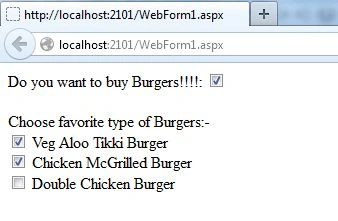
<div data-bind="visible: needBurger">
<label>Choose favorite type of Burgers:-</label>
<div><input type="checkbox" value="Veg Aloo Tikki Burger" data-bind="checked: selectBurger" /> Veg Aloo Tikki Burger</div>
<div><input type="checkbox" value="Chicken McGrilled Burger" data-bind="checked: selectBurger" /> Chicken McGrilled Burger</div>
<div><input type="checkbox" value="Double Chicken Burger" data-bind="checked: selectBurger" /> Double Chicken Burger</div>
</div>
</div>
Join the conversation! Your thoughts help the community grow.