

Introduction
JDBC is a technology to establish communication between a java program and a DBMS. It uses SQL (structured query language) for storing, updating, or removing data from a DBMS. The java program can be a stand-alone application, a web application or an enterprise application. The DBMS can be of
any type, such as Oracle, SQL Server or MS Access.
Driver Manager
This is an application available to the Java virtual machine for recognizing an appropriate driver from the list. The java program has to supply the path of a driver
to the driver manager for its initialization. This is an interface between the
java program and the DBMS. It provides a set of drivers for
communicating with various types of DBMS. These are available in a package as
ODBC (open database connective). The JDK provides a driver to communicate with the
ODBC. The combination of these two drivers is known as the JDBC.ODBC bridge driver. This
is also known as the default driver. A java program may use some explicit JDBC
driver available from DBMS vendors or any other external company. These drivers
are divided into three different types as type-2, type-3, and type-4.
Type 2 Drivers - the Native-API Driver
The JDBC type 2 drivers, also known, as the Native-API driver is a database
driver. The driver converts JDBC method calls into native calls to the database
API. The type 2 drivers are not written entirely in Java as it interfaces with
non-Java code that makes the final database calls.
Type 3 Drivers - the Network-Protocol Driver
The JDBC type 3 driver, also known as the network-protocol driver is a database
driver implementation which makes use of a middle-tier between the calling
program and the database. The middle-tier (application server) converts JDBC
calls directly or indirectly into the vendor-specific database protocol.
Type 4 Drivers - the Native-Protocol Driver
The JDBC type 4 drivers, also known as the native-protocol driver is a database
driver implementation that converts JDBC calls directly into the vendor-specific
database protocol. The type 4 drivers are written completely in Java and are
hence platform independent. It is installed inside of the Java Virtual Machine of
the client. It provides better performance over the type 1 and 2 drivers, as it
does not have the overhead of converting calls into ODBC or database API
calls.
Steps to follow for connecting to a DBMS
- Load the driver class into the runtime
environment by using the forName() method of java.lang class. This method accepts
a string parameter which contains the class name. This method throws a java.lang
class not found exception. The class is a predefined class and forName is the
static method of the class, which is used to load the driver into memory
for connectivity.
Ex:- Class.forName("sun.jdbc.odbc.JdbcOdbcDriver")
- Create a reference of java.sql.connection
by using the getConnection() method of the java.sql.DriverManager class. This method needs three parameters, including the path of the driver in JDBC:ODBC bridge. It also requires the DSN(Data source name) in the position below. The DSN can be created in
control panel
Ex: Connection con=DriverManager.getConnection("jdbc:odbc:dsnname","system","password");
The getConnection() method throws a java.sql.sql exception.
What is DSN?
This is a name provided to the DBMS driver present in ODBC. This recognizes the
database to be used of a specific DBMS.
Creation of DSN(database source name) for Oracle
Go to Start-Control panelAdministrative Tools- Data Sources (ODBC)-go to system
dsn tab-click add button-select a driver for which you want to set up a data
source (for Oracle- Oracle in XE)-select it and click finish-give any name
in the data source name textbox-then click ok button.
Create an instance of java.sql statement by
using create statement () method of connection. The statement is being used to
execute various sql commands.
Ex:- Statement stmt=con.createStatement();
Use an appropriate method of statement to
execute SQL commands. For the select command, use the executeQuery() method and for
insert, update, and delete use the executeUpdate() method.
Note:-
execute()- is for invoking the functions or stored procedures of SQL by the
CallableStatement.
executeUpdata()- is for the operations such as insert,update or delete on SQL by
Statement ,PreparedStatement.
executeQuery() - is for operation select of Sql by PreparedStatement or
Statement.
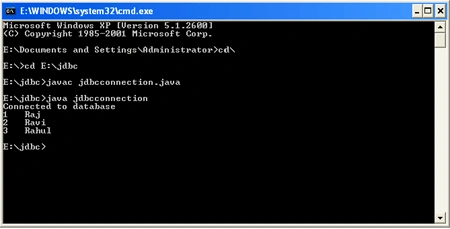
Example:- To display data from a database through JDBC and show the ouput
in the console.
- Create table employee (empno int,empname varchar(50))
- Insert into employee values (1,'Raj')
- Insert into employee values (2,'Ravi')
- Insert into employee values (3,'Rahul')
- /*This uses Oracle through a DSN */
- import java.sql.*;
- public class jdbcconnection
- {
- public static void main(String args[]) throws Exception
- {
- //Step-1
- //load the class for driver
- Class.forName("sun.jdbc.odbc.JdbcOdbcDriver");
- //Step -2
- Connection con = DriverManager.getConnection("jdbc:odbc:dsn1", "system", "pintu");
- //Step -3
- System.out.println("Connected to database");
- Statement stmt = con.createStatement();
- //Step-4
- ResultSet rs = stmt.executeQuery("select * from employee");
- //Fetching data from ResultSet and display
- while (rs.next())
- {
- //to fetch value from a column having number type of value
- int y = rs.getInt("empno");
- //to fetch value from a column having varchar/text type of value
- String x = rs.getString("empname");
- System.out.println(y + " " + x);
- }
- //Step-5
- con.close();
- }
- }
Compile
Javac jdbcconnection.java
Java jdbcconnection
JDBC statements
They are of three types
- Statement
- Prepared statement
- Callable statement
Statement interface-The createStatement()
method is useful to create a statement object and to execute simple queries. The statement interface fires Static queries.
Prepared Statement interface-It is derived from the Statement interface. The prepare statement() method is used to a create prepared statement object and used to
execute queries with unknown parameters or wherein the parameters are provided
at the run-time. A Prepared Statement is used to send SQL Statements to the Database
It not only contains the SQL Statement, but also the precompiled SQL Statement.
It means that when the Prepared Statement is executed, the DBMS just run the SQL
Statement without compiling it. Prepare statement is the type of statement used
to interact with the database. To avoid syntactical complexities it's the better
approach (eg: double quotes used with query strings).
We can insert many rows using a single prepared statement
Syntax
String str="insert into table values ("?,?,?")";
PreparedStatement stmt=con.prepareStatement (str);
It will execute before commit SQL query and also execute multiple select
statements, it will save time, faster execution. The PreparedStatement interface
fires Dynamic queries.
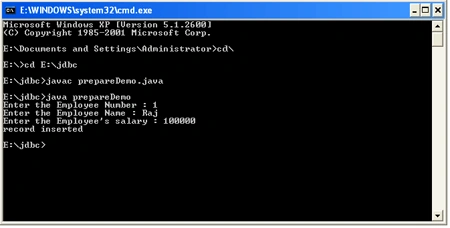
Ex:- To insert a record into a table using PreparedStatement
Table Creation
- create table employee(empno int,empname varchar(50),sal int)
- /*To insert record into a table by using PreparedStatement*/
- import java.sql.*;
- import java.util.*;
- public class prepareDemo
- {
- public static void main(String args[]) throws Exception
- {
- Class.forName("sun.jdbc.odbc.JdbcOdbcDriver");
- Connection con = DriverManager.getConnection("jdbc:odbc:dsn1", "system", "pintu");
- //step-1 -Reference creation of PreparedStatement
- PreparedStatement pstmt = con.prepareStatement("insert into employee(empno,empname,sal) values(?,?,?)");
- //step -2 reading from console and providing into sql
- Scanner sc = new Scanner(System.in);
- System.out.print("Enter the Employee Number : ");
- int empno = sc.nextInt();
- System.out.print("Enter the Employee Name : ");
- String empname = sc.next();
- System.out.print("Enter the Employee's salary : ");
- int sal = sc.nextInt();
- pstmt.setInt(1, empno);
- pstmt.setString(2, empname);
- pstmt.setInt(3, sal);
- //step-3
- pstmt.executeUpdate();
- System.out.println("record inserted");
- con.close();
- }
- }
Compile
Javac prepareDemo.java
Java prepareDemo
CallableStatement interface-It is derived from the prepared statement
interface and helpful in executing stored procedures.prepareCall() method is
used to create the callable statement object.
It is an interface in JDBC API, which can be used to calling the stored
procedures and functions in the backend like oracle, Sybase.
Syntax:
CallableStatement cst=con.prepareCall("{call <procedure name>(?,?)}");
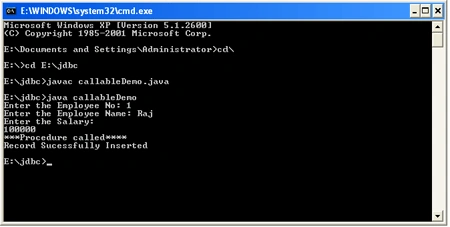
Ex:- To insert the record into a table by using CallableStatement
Table Creation
- create table employee(empno int,empname varchar(50),sal int)
- Create or replace procedure addemp(no number,nm varchar,s number)
- as
- begin
- insert into employee(empno,empname,sal) values(no,nm,s);
- end;
callableDemo.java file
- /*To use CallableStatement */
- import java.sql.*;
- import java.util.*;
- public class callableDemo
- {
- public static void main(String args[]) throws Exception
- {
- Class.forName("sun.jdbc.odbc.JdbcOdbcDriver");
- Connection con = DriverManager.getConnection("jdbc:odbc:dsn1", "system", "pintu");
- //Step-1
- CallableStatement cstmt = con.prepareCall("call addemp(?,?,?)");
- Scanner sc = new Scanner(System.in);
- System.out.print("Enter the Employee No: ");
- int x = sc.nextInt();
- System.out.print("Enter the Employee Name: ");
- String str = sc.next();
- System.out.println("Enter the Salary: ");
- String j = sc.next();
- //Step-2
- cstmt.setInt(1, x);
- cstmt.setString(2, str);
- cstmt.setString(3, j);
- //Step -3
- cstmt.execute();
- System.out.println("***Procedure called****");
- System.out.println("Record Sucessfully Inserted");
- con.close();
- }
- }
Compile
Javac callableDemo.java
Java callableDemo
Advantages of JDBC
JDBC is used to Provide Database Connectivity from java to a database. Using Java
Database Connectivity We can update/retrieve data to/from databases with java
programs
Disadvantages of JDBC
- JDBC is not easy if it is used in large projects. There is a big programming overhead.
- The programmer must hardcode the Transactions and concurrency code in the application.
- Handling the JDBC connections and properly closing the connection is also a big issue. Properly closing the connection is a must.
- JDBC is not good for big applications
Join the conversation! Your thoughts help the community grow.