

Introduction
Session and Application are very important in ASP.NET. When we move from one page to another page, the values of the previous page will get lost, If we want to hold the previous values, for that purpose we can use session level variable or application level variables.
Session level variable : Value will persist till the close of the browser.
Example : First of all we will take a button and text box from the toolbox on web form like the below image.

then we will add code on the button click.
using
System.Web;
using
System.Web.UI;
using
System.Web.UI.WebControls;
namespace
session
{
public partial
class _Default
: System.Web.UI.Page
{
protected void
Page_Load(object sender,
EventArgs e)
{
}
protected void
Button1_Click(object sender,
EventArgs e)
{
Session["username"] =
TextBox1.Text;
Response.Redirect("WebForm1.aspx");
}
}
}
Now we will add a new web form (WebForm1.aspx)
Solution Explorer->Right click->add->new item->Web Form->add.
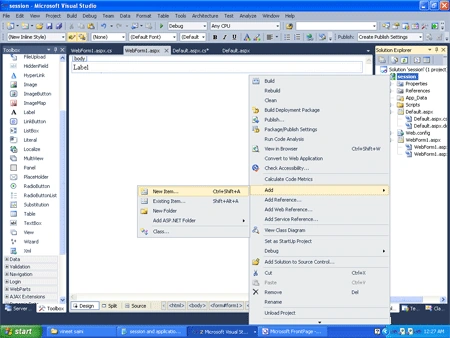

Now create a label on this web form, then add the following code on web form loading.
using System;
using
System.Collections.Generic;
using
System.Linq;
using
System.Web;
using
System.Web.UI;
using
System.Web.UI.WebControls;
namespace
session
{
public partial
class WebForm1
: System.Web.UI.Page
{
protected void
Page_Load(object sender,
EventArgs e)
{
Label1.Text = "Most welcome Mr./Mrs--"
+ Session["username"].ToString();
}
}
}
Now run the application (Press F5). Then enter the value in textbox.

Then click the ok button.

Application Level variable : Value will
persist till the down of web server.
Global.asax file : Global.asax file is ASP.NET application file. Global.asax
is extension of Global Application Class. Global.asax file resides in the IIS
virtual root of an ASP.NET application. It is used to declare application level variable.
There are many events in Global.asax file which are as follows:
Application_Init: Fires when the application initializes for the first time.
Application_Start: Fires the first time an application starts.
Session_Start: Fires the first time when a user's session is started.
Application_BeginRequest: Fires each time a new request comes in.
Application_EndRequest: Fires when the request ends.
Application_AuthenticateRequest: Indicates that a request is ready to be authenticated.
Application_Error: Fires when an unhandled error occurs within the application.
Session_End: Fires whenever a single user Session ends or times out.
Application_End: Fires when the application ends or times out.
References :
"http://en.wikipedia.org/wiki/Global.asax"
Example : HIT counter
Solution Explorer->Right click->add->new item->Global application class (Global.asax)->add likes below image.

Then coding on Global.asax file.
using
System;
using
System.Collections.Generic;
using
System.Linq;
using
System.Web;
using
System.Web.Security;
using
System.Web.SessionState;
namespace
Application
{ public class
Global : System.Web.HttpApplication
{
protected void
Application_Start(object sender,
EventArgs e)
{
Application["hits"] = 0;
}
protected void
Session_Start(object sender,
EventArgs e)
{
Application["hits"] = Int32.Parse(Application["hits"].ToString())
+ 1;
}
protected void
Application_BeginRequest(object sender,
EventArgs e)
{
}
protected void
Application_AuthenticateRequest(object sender,
EventArgs e)
{
}
protected void
Application_Error(object sender,
EventArgs e)
{
}
protected void
Session_End(object sender,
EventArgs e)
{
}
protected void
Application_End(object sender,
EventArgs e)
{
}
}
}
Now we will take a button on web form then
coding on button click.
using
System;
using
System.Collections.Generic;
using
System.Linq;
using
System.Web;
using
System.Web.UI;
using
System.Web.UI.WebControls;
namespace
Application
{
public partial
class _Default
: System.Web.UI.Page
{
protected void
Page_Load(object sender,
EventArgs e)
{
}
protected void
Button1_Click(object sender,
EventArgs e)
{
Response.Write("<h1>Your are user
Number-->" + Application["hits"].ToString());
}
}
}
Now run application (Press F5). Then click the button.

Again run application then click button.

So when we run the application again and again the number of views will be increment according to running mode of web application.
Summary
So session level variable or application level variable are used for the persist value till the close of browser or server.
Raviteja SwayampuPosted Jul 2, 2015, 5:35 AM
very good explanation sir
Md. Raskinur RashidPosted Jan 18, 2015, 12:54 AM
Thanks a lot
Bineesh ViswanathPosted Aug 12, 2013, 7:33 AM
Sir, this is what we say coding standard
Satish BPosted Jun 2, 2013, 5:00 PM
simply superb sir
Santosh YadavPosted Mar 16, 2013, 3:59 AM
Can we assign value in Applicaton["hits"] from .cs file insted of Global.asax file
Santosh YadavPosted Mar 16, 2013, 3:51 AM
very good post...
Nitya SharmaPosted Nov 3, 2011, 10:05 PM
If web application hosted on web farm than, how it is going to work. As far as I know it stores on server's memory, and in the web farm there application will be hosted on multiple servers to balance the load.