

Operators in TypeScript
A symbol that represents a specific action. An expression can be as simple as a single value or it can be a series of operations that result in a single value.
TypeScript supports the following types of operators:
-
Arithmetic Operators
-
Condition (or Ternary) Operators
-
Assignment Operators
-
Logical (or Relational) Operator
Arithmetic Operators
-
In an arithmetic expression, you can use arithmetic operators to operate on two or more values.
-
An arithmetic expression is evaluated based on the order of precedence of the operators.
-
In an arithmetic expression, to concatenate two or more strings, you can use the + operator.
-
In an arithmetic expression, the plus sign can be used for both numeric and string expressions.
The operators are summarized in the following table:
| Operator | Name | Description | Example | Result |
| x+y | Addition | Sum of x and y | 3+2 | 5 |
| x-y | Subtraction | Difference of x and y | 12-2 | 10 |
| x*y | Multiplication | Product of x and y | 2*10 | 20 |
| x/y | Division | Quotient of x and y | 30/5 | 6 |
| x%y | Modulus | Remainder of x divided by y | 7%3 | 1 |
| -x | Negation | Opposite of x | -9 | |
| x.y | Concatenation | Concatenate two strings | "Csharp"."corner" | Csharpcorner |
Example
The following example shows the arithmetic operations. In this example, I have an Arithmetic class and define an operator function in the class that performs various types of operations. This example shows addition, subtraction, multiplication, division and so on. Let's use the following procedure.
Step 1
Open Visual Studio 2012 and click "File" -> "New" -> "Project...". A window is shown. Give the name of your application as "operator" and then click ok.
Step 2
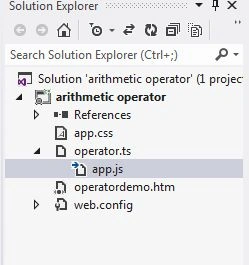
After this session the project has been created; your new project should look like the following. This window is called the Solution Explorer. The Solution Explorer contains the ts file, js file, CSS file, and Html files. See:
Coding
operator.ts
- class Arithmetic
- {
- operator(a: number, b: number)
- {
- Var add: number, sub: number, mul: number, div: number, mod: number, incre: number, dec: number;
- add = a + b;
- sub = a - b;
- mul = a * b;
- div = a / b;
- mod = a % b;
- incre = ++a;
- dec = --b;
- var span = document.createElement("span");
- span.innerText = "\nAddition Of Number is->" + add + "\n" + "Subtraction Of
- Number is -> "+sub+"\
- n "+"
- Multiplication Of Number is -> "+mul+"\
- n "+"
- Division
- Of Number is -> "+div+"\
- n "+"
- Modulus Of Number is -> "+mod+"\
- n "+"
- Increment Of
- First Number is -> "+incre+"\
- n "+"
- Decrement Of Second Number is -> "+dec;
- document.body.appendChild(span);
- }
- }
- window.onload = () =>
- {
- var a: number, b: number;
- a = parseInt(prompt("Enter A First Number"));
- b = parseInt(prompt("Enter A Second Number"));
- var greeter = new Arithmetic();
- var span = document.createElement("span");
- span.style.color = "green";
- span.innerText = "First number is->" + a + "\n" + "Second Number is->" + b + "\n";
- document.body.appendChild(span);
- greeter.operator(a, b);
- };
operatordemo.html
- < !DOCTYPEhtml >
- <
- htmllang = "en"
- xmlns = "http://www.w3.org/1999/xhtml" >
- <
- head >
- <
- metacharset = "utf-8" / >
- <
- title > Arithmetic Operator < /title>
- <
- linkrel = "stylesheet"
- href = "app.css"
- type = "text/css" / >
- <
- scriptsrc = "app.js" > < /script>
- <
- /head>
- <
- body >
- <
- h2 > Arithmetic Operator In TypeScript < /h2>
- <
- divid = "content" / >
- <
- /body>
- <
- /html>
app.js
- var Arithmetic = (function() {
- function Arithmetic() {}
- Arithmetic.prototype.operator = function(a, b) {
- var add;
- var sub;
- var mul;
- var div;
- var mod;
- var incre;
- var dec;
- add = a + b;
- sub = a - b;
- mul = a * b;
- div = a / b;
- mod = a % b;
- incre = ++a;
- dec = --b;
- var span = document.createElement("span");
- span.innerText = "\nAddition Of Number is->" + add + "\n" + "Subtraction Of Number is->" + sub + "\n" + "Multiplication Of Number is->" + mul + "\n" + "Division Of Number is->" + div + "\n" + "Modulus Of Number is->" + mod + "\n" + "Increment Of First Number is->" + incre + "\n" + "Decrement Of Second Number is->" + dec;
- document.body.appendChild(span);
- };
- return Arithmetic;
- })();
- window.onload = function() {
- var a;
- var b;
- a = parseInt(prompt("Enter A First Number"));
- b = parseInt(prompt("Enter A Second Number"));
- var greeter = new Arithmetic();
- var span = document.createElement("span");
- span.style.color = "green";
- span.innerText = "First number is->" + a + "\n" + "Second Number is->" + b + "\n";
- document.body.appendChild(span);
- greeter.operator(a, b);
- };
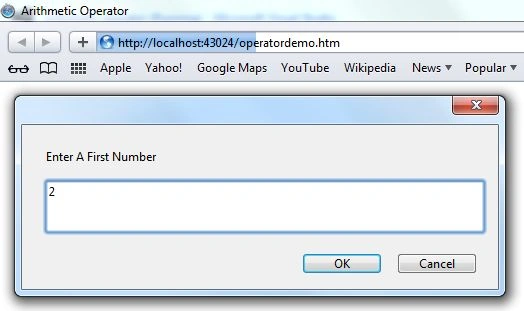
Output 1
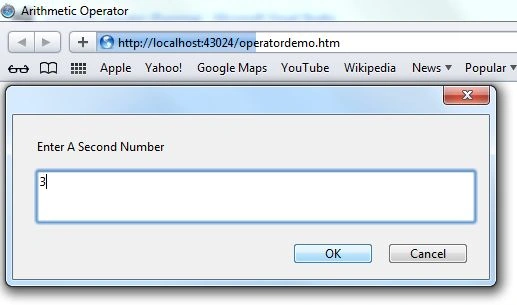
Output 2
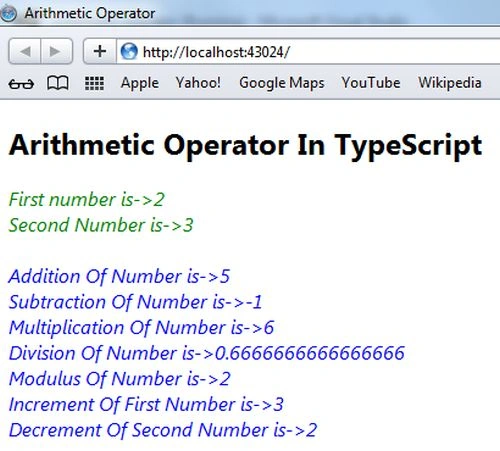
Output 3
Referenced By
http://www.typescriptlang.org/
Amit Kumar SinghPosted Dec 15, 2016, 11:43 PM
Nice one ............................
ahmed mahmoudPosted Dec 4, 2012, 2:12 PM
thanks alot