

In today's article we will learn about programming Windows Phone 8. This article will begin a series of articles on Windows Phone 8 Programming. Basic objects are oriented to beginners with Windows Phone. To learn programming Windows Phone well you should first equip yourself with some knowledge of basic C # programming, Silverlight, object-oriented programming... and a little for Photoshop to paint will help.
0. Preparing
Here I will not refer to the technology detailed below, the architecture of the Windows Phone platform that focuses on specific techniques, the specific application; things that will help you in the process of learning Windows Phone. With the knowledge of the architecture, it is thought that you can equip yourself by Google.
To develop the Windows Phone 8 application you need to have the following software:
- Windows 8 64 bit. Note: only 64 bit!
- Visual Studio: Here I have not tested on Visual Studio 2010 or less. You can use the Visual Studio 2012 or 2013 Preview (at the time of writing 08/2013 the version of Visual Studio 2013 is the Preview). The examples all use Visual Studio 2013 Preview.
- Windows Phone SDK 8.0 - Note: If the installion of Visual Studio 2013 Preview built the Windows Phone SDK 8.0 then you should not need to install it again.
Link download
- Windows 8 enterprise Evaluation: http://technet.microsoft.com/vi-vn/evalcenter/hh699156.asp
- Visual Studio 2012 / Visual Studio 2013 Preview: http://www.microsoft.com/visualstudio/eng/downloads
- Windows Phone SDK 8.0: http://download.microsoft.com/download/9/3/8/938A5074-461F-4E3D-89F4-5CE2F42C1E36/fulltril30/exe/WPexpress_full.exe
1. Begining the first application
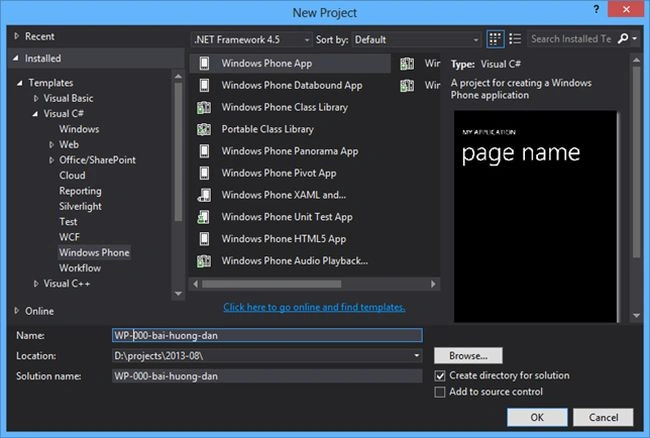
As usual in Visual Studio, create a new project using the menu by selecting "File" -> "New" -> "Project...". In the list of templates select "Visual C#" -> "Windows Phone". Here will be a list of sample projects for Windows Phone; we choose "Windows Phone App" to create an empty default project, enter a name in the "Name", then a "Location" to save your project at.
The languages you can use to develop Windows Phone apps:
- First C# is indispensable. This is the default option and only on Windows Phone 7.
- HTML5, CSS3 and JS. The differences with Windows Phone 7 is support for programming with HTM5/CSS3/JS. This could be a big advantage for you when switching from Web Programming to Windows Phone 8.
- C++. With Windows Phone 8 programmers can develop applications in C + + with the Direct3D library, we can say that this is great news for C++ followers.
2. Enviroment
From Visual Studio 2012, we have worked with dark gray tones, a light colored font and the title bar is highlighted with shades of eye-catching monochrome. It is possible to work with this new interface that provides something pleasant and very interesting to work with. Especially in Visual Studio 2013 Preview, there are some new smarter ago, making XAML code in C # as well faster and more compact.
The image below shows the basic framework in Visual Studio 2013 Preview. On the left is the application screen, the middle frame is where to write XAML code, the right is a toolbox of support.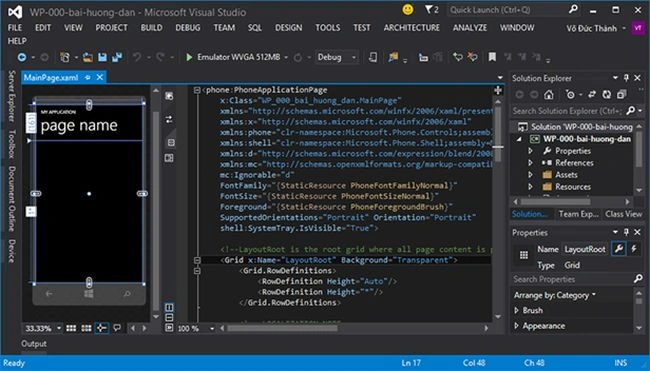
3. Support tools used
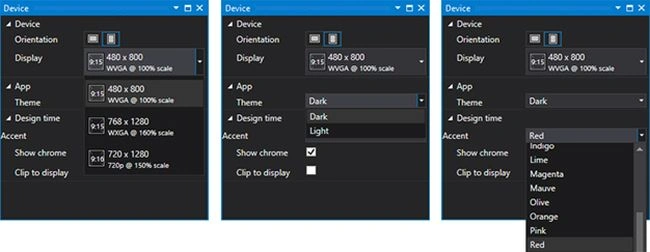
The first toolbox, Device, sets some properties on the Windows Phone Virtual Machine. Include the following information:
- Orientation: Set the screen horizontally or vertically (default)
- Display: Select the screen size for the device. If Windows Phone 7 supports only one screen size is 480x800, the Windows Phone has the 2 new sizes, 768x1280 and 720x1280 (pixel units). Of course standard applications can be designed to run on multiple screen sizes, they will be more complex, you will find it difficult initially, but when you have done well, you will probably find it very interesting.
- Theme: Here we will choose bright colors (Light) or dark (Dark) for applications running on virtual machines.
- Accent: Set the tone for the application.
If you've ever worked on Visual Studio, then make no stranger to the toolbox: Solution Explorer (the file folder containing the Project), Propertis (for setting attributes for the objects in the project) and the ToolBox (contains controls for interface design). As we saw with the new interface in Visual Studio 2013, dialog boxes look much nicer, the Toolbox icons are especially very eye-catching and refreshing.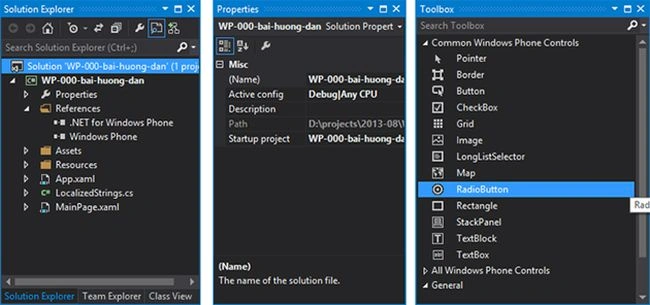
4. Some basic settings need to know
In the Solution Explorer dialog box, to find the file WMAppManifest.xml, here is contained the configuration information for your application, such as: name, description, application, page main application screen size application support, tile (avatar) of the application. Looking at the value we see NavigationPage: MainPage.xaml. This is the page first run when the application starts, there is a default value that is created when you first create a new project, you can select any of the other Page 1 Page key for your application.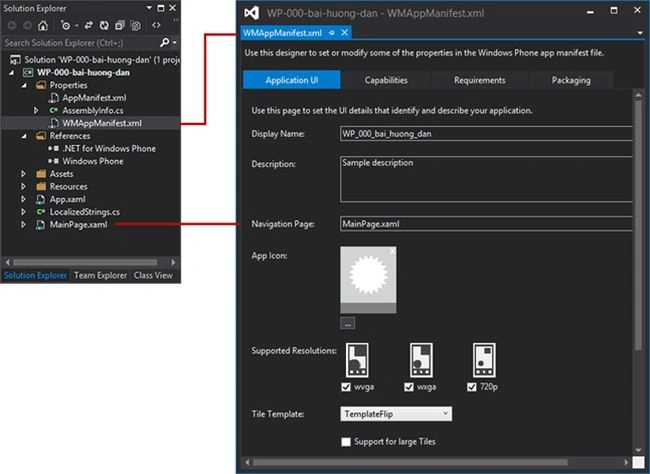
5. Select the screen size for the virtual machine
There are 3 standard screen sizes for Windows Phone 8 devices: WVGA (480x800), WXGA (768x1280) and 720p (720x1280). As for the standard WVGA screen with additional options for the factory 512MB low profile, 512MB RAM. If you select Device, then the application will be run on the machine that has been set before.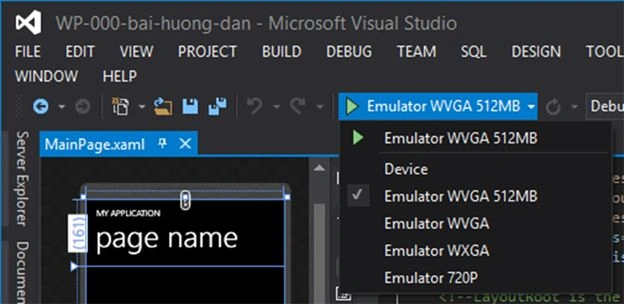
6. Deployment on Emulator
Below the image is a virtual machine with Windows Phone 8 720P screen size, the virtual machine will be installed first as some basic applications on real phones. The front is the 3 button functions as on the series. The virtual machine supports a number of tools to help you to test simulator test applications more intuitively in the absence of a real machine to test. There are 4 main groups of settings:
- Accelerometer: Emulators tilt for the device, useful in case testing game with accelerometer sensor.
- Location: Emulates the location of the virtual machine on earth, you can choose any location you want, use Bing Maps here.
- Screenshot: It's useful when you want to capture the screen of your application.
- Network: Set up a network for your device.
Note: If we want to resize the virtual machine then the virtual machine should now go off, then run the new virtual machines with different screen sizes.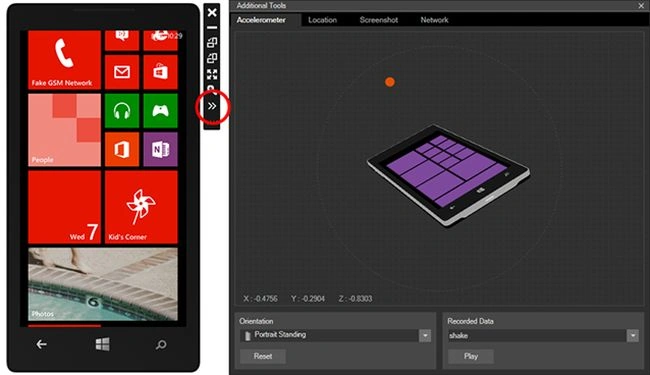
Through this article you must have had a glimpse of Programming on Windows Phone 8 applications. Hope you will help beginner Windows Phone.
Sincerely!
From my site: http://microsofttech.net/lap-trinh/lap-trinh-windows-phone-8-cho-nguoi-moi-bat-dau.html
Join the conversation! Your thoughts help the community grow.