

Introduction
Before reading further, read the following articles.
- Overview of Scalable Vector Graphics (SVG)
- Scalable Vector Graphics - Rectangle
- Scalable Vector Graphics - Circle
- Scalable Vector Graphics - Ellipse
- Scalable Vector Graphics - Line
- Scalable Vector Graphics - Polyline
- Scalable Vector Graphics - Polygon
- Scalable Vector Graphics - Path 1
- Scalable Vector Graphics - Path 2
- Scalable Vector Graphics - Path 3
- Scalable Vector Graphics - Text 1
- Scalable Vector Graphics - Text 2
Now let's proceed to understand SVG filters.
Filters in SVG provides special effects for SVG graphics. The filter effects can be done with a series of graphics operations on the given source image or graphics to produce the modified graphics as the result. The result of the filter effect is rendered to the target device instead of original source graphics.
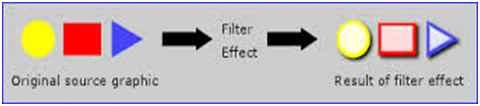 The tag <filter> is used here to define the filter for the graphics. This tag uses an id attribute to uniquely identify it and filters are defined in the <def> tag and referenced by graphics elements by their ids. In other words, setting the value of the “filter” property on a given element such that it references the filter effect.
Note: More than one filter can be used in each SVG element.
The following are the available filter elements provided by SVG.
The tag <filter> is used here to define the filter for the graphics. This tag uses an id attribute to uniquely identify it and filters are defined in the <def> tag and referenced by graphics elements by their ids. In other words, setting the value of the “filter” property on a given element such that it references the filter effect.
Note: More than one filter can be used in each SVG element.
The following are the available filter elements provided by SVG.
SVG filters
- <feBlend> for image combination
- <feColorMatrix> for color transformations
- <feComponentTransfer>
- <feComposite>
- <feConvolveMatrix>
- <feDiffuseLighting>
- <feDisplacementMap>
- <feFlood>
- <feGaussianBlur>
- <feImage>
- <feBurn>
- <feMorphology>
- <feOffset> for drop shadows
- <feSpecularLighting>
- <feTile>
- <feTurbulence>
- <feDistantLight> for lighting
- <fePointLight> for lighting
- <feSpotLight> for lighting
Attributes used
- x & y are the x-axis and y-axis coordinates of the filter bounding box respectively. The default value is (0,0).
- Width & height are the width and height of the filter bounding box. The default value is (0,0).
- filterRes is the number representing filter regions.
- xlink:href refers to another filter.
- filterUnits & primitiveUnits are the units to define a filter effects region. It specifies the coordinates system for the various length values within the filter and for the attributes defining the subregion of the filter. If filterUnits is “useSpaceOnUse (default)” then the values will represent values in the current user's coordinate system instead of the filter element used. And if filterUnits is defined as then the “objectBoundingBox” values will represent fractions or percentages of the bounding box on the referencing element in place when the filter element is used.


Summary
In this article, we learned about Scalable Vector Graphics - Filters 1.
Prasanna MuraliPosted May 20, 2016, 11:25 AM
Nice one....
Nilesh JadavPosted Aug 17, 2015, 4:24 AM
Nice one sir
Sibeesh VenuPosted Aug 17, 2015, 4:13 AM
Nice Share. Thank you.
Ankit BansalPosted Aug 17, 2015, 1:26 AM
thanks for share...
Vaikesh K PPosted Aug 17, 2015, 12:37 AM
Nice
Pankaj Kumar ChoudharyPosted Aug 16, 2015, 5:12 AM
Nice explain sir
Karthikeyan KPosted Aug 16, 2015, 3:06 AM
Good one sir... thanks for sharing
Santhakumar MunuswamyPosted Aug 16, 2015, 2:14 AM
Nice Article. Thanks for sharing
Rajeesh MenothPosted Aug 16, 2015, 1:35 AM
Good One
RakeshPosted Aug 16, 2015, 1:18 AM
Nice one sir