

Introduction
Before reading further, read the following articles.
- Overview of Scalable Vector Graphics (SVG)
- Scalable Vector Graphics - Rectangle
- Scalable Vector Graphics - Circle
- Scalable Vector Graphics - Ellipse
- Scalable Vector Graphics - Line
- Scalable Vector Graphics - Polyline
- Scalable Vector Graphics - Polygon
- Scalable Vector Graphics - Path 1
- Scalable Vector Graphics - Path 2
- Scalable Vector Graphics - Path 3
- Scalable Vector Graphics - Text 1
- Scalable Vector Graphics - Text 2
- Scalable Vector Graphics - Filters 1
- Scalable Vector Graphics - Filters 2
Now let's proceed to understand the Drop shadow SVG filter.
SVG Drop Shadow
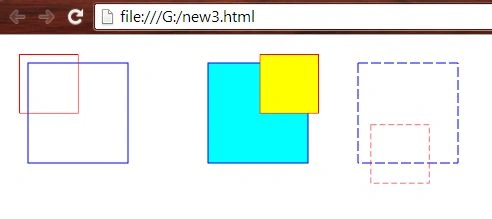
- <html>
- <body>
- <svg height="300" width="500">
- <defs>
- <filter id="offsetFilter1" x="-20" y="-20" width="70" height="70">
- <feOffset in="SourceGraphic" />
- </filter>
- <filter id="offsetFilter2" x="-20" y="-20" width="70" height="70">
- <feOffset in="SourceGraphic" dx="230" />
- </filter>
- <filter id="offsetFilter3" x="-20" y="-20" width="70" height="70">
- <feOffset in="SourceGraphic" dx="270" dy="120"/>
- </filter>
- </defs>
- <rect x="20" y="20" width="100" height="100"
- style="stroke: blue; fill: none; " />
- <rect x="20" y="20" width="100" height="100"
- style="stroke: red; fill: none; filter: url(#offsetFilter1);" />
- <rect x="200" y="20" width="100" height="100"
- style="stroke: blue; fill: cyan; " />
- <rect x="200" y="20" width="100" height="100"
- style="stroke: red; fill: yellow; filter: url(#offsetFilter2);" />
- <rect x="350" y="20" width="100" height="100"
- style="stroke: blue; fill: none; stroke-dasharray: 10 3;" />
- <rect x="350" y="20" width="100" height="100"
- style="stroke: red; fill: none; stroke-dasharray: 10 5; filter: url(#offsetFilter3);" />
- </svg>
- </body>
- </html>
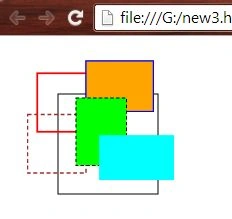
- <html>
- <body>
- <svg height="300" width="500">
- <defs>
- <filter id="offsetFilter1" x="-20" y="-20" width="70" height="70">
- <feOffset in="SourceGraphic" />
- </filter>
- <filter id="offsetFilter2" x="-20" y="-20" width="70" height="70">
- <feOffset in="SourceGraphic" dx="180" />
- </filter>
- <filter id="offsetFilter3" x="-20" y="-20" width="70" height="70">
- <feOffset in="SourceGraphic" dy="130"/>
- </filter>
- <filter id="offsetFilter4" x="-20" y="-20" width="70" height="70">
- <feOffset in="SourceGraphic" dx="150" dy="110"/>
- </filter>
- <filter id="offsetFilter5" x="-20" y="-20" width="70" height="70">
- <feOffset in="SourceGraphic" dx="250" dy="250"/>
- </filter>
- </defs>
- <rect x="50" y="50" width="100" height="100"
- style="stroke: black; fill: none; " />
- <rect x="50" y="50" width="100" height="100"
- style="stroke: red; stroke-width: 3; fill: none; filter: url(#offsetFilter1);" />
- <rect x="50" y="50" width="200" height="150"
- style="stroke: blue; fill: orange; stroke-width: 4; filter: url(#offsetFilter2);" />
- <rect x="50" y="50" width="150" height="150"
- style="stroke: brown; stroke-width: 4; fill: none; stroke-dasharray: 10 7; filter: url(#offsetFilter3);" />
- <rect x="50" y="50" width="150" height="200"
- style="stroke: black; fill: lime; stroke-width: 3; stroke-dasharray: 10 7; filter: url(#offsetFilter4);" />
- <rect x="50" y="50" width="250" height="150"
- style="fill: cyan; filter: url(#offsetFilter5);" />
- </svg>
- </body>
- </html>
Offsetting the Alpha channel.
- <html>
- <body>
- <svg height="300" width="500">
- <defs>
- <filter id="offsetFilter1" x="-20" y="-20" width="70" height="70">
- <feOffset in="SourceAlpha" />
- </filter>
- <filter id="offsetFilter2" x="-20" y="-20" width="70" height="70">
- <feOffset in="SourceAlpha" dx="250" dy="120"/>
- </filter>
- </defs>
- <rect x="50" y="50" width="100" height="100"
- style="stroke: orange; fill: none; " />
- <rect x="50" y="50" width="100" height="100"
- style="stroke: blue; stroke-width: 3; fill: none; filter: url(#offsetFilter1);" />
- <rect x="200" y="50" width="100" height="100"
- style="stroke: green; fill: lightgreen; " />
- <rect x="200" y="50" width="100" height="100"
- style="stroke: blue; stroke-width: 3; fill: lightblue; filter: url(#offsetFilter2);" />
- </svg>
- </body>
- </html>
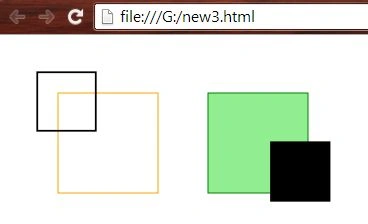
We can see that the rectangles are filled by colors, but the output is Black and White due to the filter on the applied Alpha channel.
Want to read more.
Summary
In this article, we learned about Scalable Vector Graphics - Filters 3.
Prasanna MuraliPosted May 20, 2016, 11:25 AM
Nice one....
Karthikeyan KPosted Aug 19, 2015, 8:45 AM
Thanks for share
Yashwanth MuthineniPosted Aug 19, 2015, 8:13 AM
Nice Share
Santhakumar MunuswamyPosted Aug 18, 2015, 2:37 PM
Good one
Shridhar SharmaPosted Aug 18, 2015, 1:45 PM
this series remind me the graduation days when I used to study Computer Graphics.Anyway nice series.
Abhishek JaiswalPosted Aug 18, 2015, 11:41 AM
Good one, keep sharing more! :)
Gopi ChandPosted Aug 18, 2015, 11:16 AM
Thanks to all for your valuable comments
Chervine BhiwooPosted Aug 18, 2015, 11:00 AM
Nice
Sandeep KumarPosted Aug 18, 2015, 9:50 AM
Nice Article sir :)
Nilesh JadavPosted Aug 18, 2015, 2:48 AM
Great post sir
Vaikesh K PPosted Aug 18, 2015, 1:35 AM
Nice share
Rajeesh MenothPosted Aug 18, 2015, 12:37 AM
Nice Share
Gopi ChandPosted Aug 18, 2015, 12:07 AM
Thank you :)
Karthikeyan KPosted Aug 17, 2015, 11:26 PM
Good one