Introduction
In this example, we will create a web page that displays a formatted view of data with a master detail hierarchy using nested Repeater controls. We will use the Northwind sample for our example. There are many different ways to accomplish this task. We will use data binding and data relations in an effort to get a simple solution.
Sample In Action
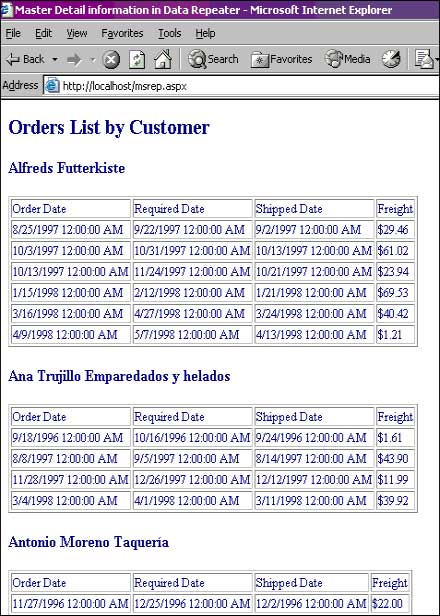
Details
Step 1: Create the user interface
Our user interface consists mainly of two Repeater controls, one nested within the other.
1. Add a repeater control on the web page for displaying the customer name. Display the data-bound value of Company Name in the Item Template of the repeater. Add a repeater control to display the Order details for each customer record.
<H2> Orders List by Customer </H2>
<asp:Repeater runat="server" id="RepCust" onItemDataBound="ShowOrders">
<ItemTemplate>
<h3><%# ((DataRowView)Container.DataItem)["CompanyName"] %> </h3>
<asp:Repeater id="RepOrders" runat="server"></asp:Repeater>
</ItemTemplate>
</asp:Repeater>
2. Create a table structure within the nested Repeater "RepOrders" to display the details of the Orders as shown in the code snippet below. We display the OrderDate, RequiredDate, ShippedDate and Freight values for Orders for each customer in the ItemTemplate of the second repeater control. The code should now look as follows.
<H2> Orders List by Customer </H2>
<asp:Repeater runat="server" id="RepCust" onItemDataBound="ShowOrders">
<ItemTemplate>
<h3><%# ((DataRowView)Container.DataItem)["CompanyName"] %> </h3>
<asp:Repeater id="RepOrders" runat="server">
<HeaderTemplate>
<table border=1 >
<tr>
<td>Order Date</td>
<td>Required Date</td>
<td>Shipped Date</td>
<td>Freight</td>
</tr>
</HeaderTemplate>
<ItemTemplate>
<tr>
<td><%# ((DataRowView)Container.DataItem)["OrderDate"]%></td>
<td><%# ((DataRowView)Container.DataItem)["RequiredDate"]%></td>
<td><%# ((DataRowView)Container.DataItem)["ShippedDate"]%></td>
<td><%# DataBinder.Eval(Container.DataItem, "Freight", "{0:c}")%> </td>
</tr>
</ItemTemplate>
<FooterTemplate>
</table>
</FooterTemplate>
</asp:Repeater>
</ItemTemplate>
</asp:Repeater>
Step 2: Bind the data
1. We will now create and fill datasets to display the customers and orders data.
void Page_Load(Object sender, EventArgs e)
{
string strSql, strConn;
DataSet ds= new DataSet();
strConn = "server=localhost;Initial Catalog=Northwind;uid=sa;pwd=";
strSql ="select * from Customers";
SqlDataAdapter daCust = new SqlDataAdapter(strSql, strConn);
daCust.Fill(ds, "Customers");
strSql ="select * from Orders";
SqlDataAdapter daOrders = new SqlDataAdapter(strSql, strConn);
daOrders.Fill(ds, "Orders");
}
2. Now we will add a DataRelation object which links each Customer to the corresponding Orders in the dataset.
void Page_Load(Object sender, EventArgs e)
{
string strSql, strConn;
DataSet ds= new DataSet();
strConn = "server=localhost;Initial Catalog=Northwind;uid=sa;pwd=";
strSql ="select * from Customers";
SqlDataAdapter daCust = new SqlDataAdapter(strSql, strConn);
daCust.Fill(ds, "Customers");
strSql ="select * from Orders";
SqlDataAdapter daOrders = new SqlDataAdapter(strSql, strConn);
daOrders.Fill(ds, "Orders");
DataRelation rel = new DataRelation("CustOrdRel",
ds.Tables["Customers"].Columns["CustomerID"],ds.Tables["Orders"].Columns["CustomerID"]);
ds.Relations.Add(rel);
}
3. As shown below, bind the customers data to the first repeater control "RepCust"
void
Page_Load(Object sender, EventArgs e)
{
string strSql, strConn;
DataSet ds= new DataSet();
strConn = "server=localhost;Initial Catalog=Northwind;uid=sa;pwd=";
strSql ="select * from Customers";
SqlDataAdapter daCust = new SqlDataAdapter(strSql, strConn);
daCust.Fill(ds, "Customers");
strSql ="select * from Orders";
SqlDataAdapter daOrders = new SqlDataAdapter(strSql, strConn);
daOrders.Fill(ds, "Orders");
DataRelation rel = new DataRelation("CustOrdRel",
ds.Tables["Customers"].Columns["CustomerID"],ds.Tables["Orders"].Columns["CustomerID"]);
ds.Relations.Add(rel);
RepCust.DataSource =ds.Tables["Customers"].DefaultView;
RepCust.DataBind();
}
4. Now we will add the code which display the Order information for each Customer. This is the most important part of the article.
This function is added as the event handler for the ItemDataBound event for the first repeater control RepCust. As each row item is bound, we access the ItemData contained within the RepCust Repeater row item. We bind the nested repeater control RepOrders with the DataView of the Child Data table based on the DataRelation that we created in our Page_Load event using this ItemData control - we make use of the CreateChildView method of the RepeaterItem obtained in the ItemDataBound event. Since the RepOrders repeater control is nested within the RepCust repeater control, we need to use the FindControl method to access the RepOrders control.
void
ShowOrders(Object sender, RepeaterItemEventArgs e)
{
if (e.Item.ItemType == ListItemType.Item || e.Item.ItemType == ListItemType.AlternatingItem)
{
((Repeater)e.Item.FindControl("RepOrders")).DataSource=((DataRowView)e.Item.DataItem).CreateChildView("CustOrdRel");
((Repeater)e.Item.FindControl("RepOrders")).DataBind();
}
}
Complete Code Listing: nestedrep.aspx
<%@ Page Language="C#" Debug="true"%>
<%@ Import Namespace="System.Data" %>
<%@ Import Namespace="System.Data.SqlClient" %>
<html>
<head>
<title>Master Detail information in Data Repeater </title>
<script runat="server">
void Page_Load(Object sender, EventArgs e)
{
string strSql, strConn;
DataSet ds= new DataSet();
strConn = "server=localhost;Initial Catalog=Northwind;uid=sa;pwd=";
strSql ="select * from Customers";
SqlDataAdapter daCust = new SqlDataAdapter(strSql, strConn);
daCust.Fill(ds, "Customers");
strSql ="select * from Orders";
SqlDataAdapter daOrders = new SqlDataAdapter(strSql, strConn);
daOrders.Fill(ds, "Orders");
DataRelation rel = new DataRelation("CustOrdRel", ds.Tables["Customers"].Columns["CustomerID"],ds.Tables
"Orders"].Columns["CustomerID"]);
ds.Relations.Add(rel);
RepCust.DataSource =ds.Tables["Customers"].DefaultView;
RepCust.DataBind();
}
void ShowOrders(Object sender, RepeaterItemEventArgs e)
{
if (e.Item.ItemType == ListItemType.Item || e.Item.ItemType ==
istItemType.AlternatingItem)
{
((Repeater)e.Item.FindControl("RepOrders")).DataSource= ((DataRowView)e.Item.DataItem).CreateChildView
"CustOrdRel");
((Repeater)e.Item.FindControl("RepOrders")).DataBind();
}
}
</script>
</head>
<body>
<H2> Orders List by Customer </H2>
<asp:Repeater runat="server" id="RepCust" onItemDataBound="ShowOrders">
<ItemTemplate>
<h3><%# ((DataRowView)Container.DataItem)["CompanyName"] %> </h3>
<asp:Repeater id="RepOrders" runat="server">
<HeaderTemplate>
<table border="1">
<tr>
<td>Order Date</td>
<td>Required Date</td>
<td>Shipped Date</td>
<td>Freight</td>
</tr>
</HeaderTemplate>
<ItemTemplate>
<tr>
<td><%# ((DataRowView)Container.DataItem)["OrderDate"]%></td>
<td><%# ((DataRowView)Container.DataItem)["RequiredDate"]%></td>
<td><%# ((DataRowView)Container.DataItem)["ShippedDate"]%></td>
<td><%# DataBinder.Eval(Container.DataItem, "Freight", "{0:c}")%></td>
</tr></ItemTemplate>
<FooterTemplate>
</table>
</FooterTemplate>
</asp:Repeater>
</ItemTemplate>
</asp:Repeater>
</body>
NOTE:
This article is for purely educational purposes. This article is entirely original, unless specified. Any resemblance to other material is an un-intentional coincidence and should not be misconstrued as malicious, slanderous, or any anything else hereof.