Dynamic Fragments in Cached Web Pages
ASP.Net 2.0 offers an elaborate set of options for caching web pages. Caching improves the performance of web applications in situations where the data presented to the end user is of more or less constant nature.
ASP.Net provides a feature to improve the overall user experience by allowing portions of cached pages to be dynamically updated before the user is presented with the web page. This results in a more personalized experience for the user, while taking advantage of the caching benefits at the same time.
A conceptual example in real life would be the concept of greeting cards. Packs of greeting cards are available for an occasion, but each greeting card that is sent out from the pack is personalized with a wish for the person(s) receiving the greeting card.
The greeting cards in this case are corresponding to our web pages. Just as we could have one set of greeting cards for a single occasion, we can cache our web page based on parameters (and other values). The personal salutation in each greeting card sent out, would be translated to a Post-Cache Substitution in our web page. This feature allows specifying dynamic contents for some fragments in a cached web page.
In the samples below, we will use a SQL Server Express DB named SalesDB, and connect to the Products table. The Products table is updated once daily (for the purpose of our sample) and is a good candidate for caching.
The structure of the Products table in our sample is as follows
| Column |
Type |
| ProductID |
Int (Identity) |
| ProductName |
Varchar(50) |
| UnitPrice |
Money |
| StartDate |
SmallDateTime |
| EndDate |
SmallDateTime |
The backend database and/or the page contents can be replaced as preferred.
Simple Example: Cached page dynamically updated using Substitution API
The use of the Substitution API involves a static method that returns a string and an invocation to the Response.WriteSubstitution method by passing this static method as a parameter. Let's take a look at a sample demonstrating the use of the Substitution API.
In the following sample, the web page is cached for 60 seconds. The current server date displayed in the web page is dynamically updated using the Substitution API call Response.WriteSubstitution method. The parameter specified to this API call is a static callback method on an arbitrary object that is accessible by the page. This static function takes the HttpContext as an input parameter and returns the string which is dynamically substituted in the cached web page response. The value displayed for the "Catalog Generated" is the cached time and the Current Server time displays the current time on the server.
Sample Code: Simple Example: Cached page dynamically updated using Substitution API
<%@ Page Language="C#" %>
<%@ OutputCache Duration="60" VaryByParam = "none" %>
<!DOCTYPE html PUBLIC "-//W3C//DTD XHTML 1.0 Transitional//EN" "http://www.w3.org/TR/xhtml1/DTD/xhtml1-transitional.dtd">
<script runat="server">
static protected string GetServerDate(HttpContext context)
{
return DateTime.Now.ToString();
}
</script>
<html xmlns="http://www.w3.org/1999/xhtml" >
<head runat="server">
<title>Untitled Page</title>
</head>
<body>
<form id="form1" runat="server">
<div>
<span style="color: maroon; font-family: Arial"><strong><span style="text-decoration: underline">
Product Catalog</span><br />
</strong>
<br />
</span>
<asp:GridView ID="GridView1" runat="server" AutoGenerateColumns="False" DataSourceID="SqlDataSource1"
style="font-family: Arial" BackColor="White" BorderColor="#CC9966" BorderStyle="None" BorderWidth="1px" CellPadding="4">
<Columns>
<asp:BoundField DataField="ProductName" HeaderText="ProductName" SortExpression="ProductName" />
<asp:BoundField DataField="UnitPrice" HeaderText="UnitPrice" SortExpression="UnitPrice" />
<asp:BoundField DataField="ProductID" HeaderText="ProductID" InsertVisible="False"
ReadOnly="True" SortExpression="ProductID" />
</Columns>
<FooterStyle BackColor="#FFFFCC" ForeColor="#330099" />
<RowStyle BackColor="White" ForeColor="#330099" />
<SelectedRowStyle BackColor="#FFCC66" Font-Bold="True" ForeColor="#663399" />
<PagerStyle BackColor="#FFFFCC" ForeColor="#330099" HorizontalAlign="Center" />
<HeaderStyle BackColor="#990000" Font-Bold="True" ForeColor="#FFFFCC" />
</asp:GridView>
<asp:SqlDataSource ID="SqlDataSource1" runat="server" ConnectionString="<%$ ConnectionStrings:SalesDBConnectionString %>"
SelectCommand="SELECT [ProductName], [UnitPrice], [ProductID] FROM [Orders]"></asp:SqlDataSource>
</div>
<br />
<hr />
Catalog Generated: <%= DateTime.Now.ToString() %>
<br />
Current Server Time: <% Response.WriteSubstitution(new HttpResponseSubstitutionCallback(GetServerDate)); %>
</form>
</body>
</html>
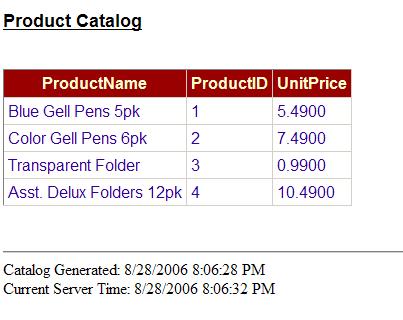
Multiple substitutions - Cached web page with multiple dynamic updates using Substitution API
The following sample extends the first sample, providing multiple dynamic updates substituting real time data within the cached web page. Note that the HttpContext argument passed to the static callback method can be used to access the Context.
<%@ Page Language="C#" %>
<%@ OutputCache Duration="60" VaryByParam = "none" %>
<!DOCTYPE html PUBLIC "-//W3C//DTD XHTML 1.0 Transitional//EN" "http://www.w3.org/TR/xhtml1/DTD/xhtml1-transitional.dtd">
<script runat="server">
static protected string GetServerDate(HttpContext context)
{
return DateTime.Now.ToString();
}
static protected string GetUserName(HttpContext context)
{
return context.User.Identity.Name;
}
</script>
<html xmlns="http://www.w3.org/1999/xhtml" >
<head runat="server">
<title>Untitled Page</title>
</head>
<body>
<form id="form1" runat="server">
<div>
<span style="color: maroon; font-family: Arial"><span>
User: <% Response.WriteSubstitution(new HttpResponseSubstitutionCallback(GetUserName)); %>
<br />
<strong><span style="text-decoration: underline">
<br />
Product Catalog</span></strong></span><br />
<br />
</span>
<asp:GridView ID="GridView1" runat="server" AutoGenerateColumns="False" DataSourceID="SqlDataSource1"
style="font-family: Arial" BackColor="White" BorderColor="#CC9966" BorderStyle="None" BorderWidth="1px" CellPadding="4">
<Columns>
<asp:BoundField DataField="ProductName" HeaderText="ProductName" SortExpression="ProductName" />
<asp:BoundField DataField="UnitPrice" HeaderText="UnitPrice" SortExpression="UnitPrice" />
<asp:BoundField DataField="ProductID" HeaderText="ProductID" InsertVisible="False"
ReadOnly="True" SortExpression="ProductID" />
</Columns>
<FooterStyle BackColor="#FFFFCC" ForeColor="#330099" />
<RowStyle BackColor="White" ForeColor="#330099" />
<SelectedRowStyle BackColor="#FFCC66" Font-Bold="True" ForeColor="#663399" />
<PagerStyle BackColor="#FFFFCC" ForeColor="#330099" HorizontalAlign="Center" />
<HeaderStyle BackColor="#990000" Font-Bold="True" ForeColor="#FFFFCC" />
</asp:GridView>
<asp:SqlDataSource ID="SqlDataSource1" runat="server" ConnectionString="<%$ ConnectionStrings:SalesDBConnectionString %>"
SelectCommand="SELECT [ProductName], [UnitPrice], [ProductID] FROM [Orders]"></asp:SqlDataSource>
</div>
<br />
<hr />
Catalog Generated: <%= DateTime.Now.ToString() %>
<br />
Current Server Time: <% Response.WriteSubstitution(new HttpResponseSubstitutionCallback(GetServerDate)); %>
</form>
</body>
</html>
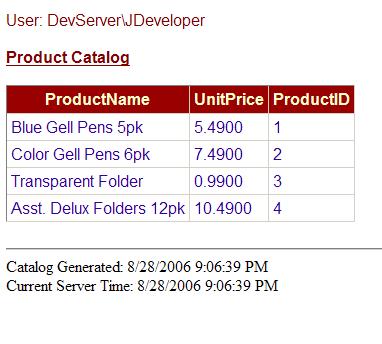
Multiple substitutions - Multiple Dynamic cache updates using the Substitution Control
The Substitution server control can also be used to provide post cache substitution. The control provides the MethodName property. The method specified for this property needs to be a static method on the controls containing Page or UserControl.
<%@ Page Language="C#" %>
<%@ OutputCache Duration="60" VaryByParam = "none" %>
<!DOCTYPE html PUBLIC "-//W3C//DTD XHTML 1.0 Transitional//EN" "http://www.w3.org/TR/xhtml1/DTD/xhtml1-transitional.dtd">
<script runat="server">
static protected string GetServerDate(HttpContext context)
{
return DateTime.Now.ToString();
}
static protected string GetUserName(HttpContext context)
{
return context.User.Identity.Name;
}
</script>
<html xmlns="http://www.w3.org/1999/xhtml" >
<head runat="server">
<title>Untitled Page</title>
</head>
<body>
<form id="form1" runat="server">
<div>
<span style="color: maroon; font-family: Arial"><span>
User:
<asp:Substitution ID="Substitution2" runat="server" MethodName="GetUserName" />
<br />
<strong><span style="text-decoration: underline">
<br />
Product Catalog</span></strong></span><br />
<br />
</span>
<asp:GridView ID="GridView1" runat="server" AutoGenerateColumns="False" DataSourceID="SqlDataSource1"
style="font-family: Arial" BackColor="White" BorderColor="#CC9966" BorderStyle="None" BorderWidth="1px" CellPadding="4">
<Columns>
<asp:BoundField DataField="ProductName" HeaderText="ProductName" SortExpression="ProductName" />
<asp:BoundField DataField="UnitPrice" HeaderText="UnitPrice" SortExpression="UnitPrice" />
<asp:BoundField DataField="ProductID" HeaderText="ProductID" InsertVisible="False"
ReadOnly="True" SortExpression="ProductID" />
</Columns>
<FooterStyle BackColor="#FFFFCC" ForeColor="#330099" />
<RowStyle BackColor="White" ForeColor="#330099" />
<SelectedRowStyle BackColor="#FFCC66" Font-Bold="True" ForeColor="#663399" />
<PagerStyle BackColor="#FFFFCC" ForeColor="#330099" HorizontalAlign="Center" />
<HeaderStyle BackColor="#990000" Font-Bold="True" ForeColor="#FFFFCC" />
</asp:GridView>
<asp:SqlDataSource ID="SqlDataSource1" runat="server" ConnectionString="<%$ ConnectionStrings:SalesDBConnectionString %>"
SelectCommand="SELECT [ProductName], [UnitPrice], [ProductID] FROM [Orders]"></asp:SqlDataSource>
</div>
<br />
<hr />
Catalog Generated: <%= DateTime.Now.ToString() %>
<br />
Current Server Time:
<asp:Substitution ID="Substitution1" runat="server" MethodName="GetServerDate" />
</form>
</body>
</html>

How it works
When Post Cache Substitution is used, a substitution buffer is added to the response. The cacheability is changed to "server only" to ensure that the output is not cached on the client-side. A server-side trip is required to replace the substitution buffer.
When the substitution buffer is written, the substitution delegate is invoked each time to produce true output for the dynamic fragment.
Adrotator Control
The Adrotator control implements post cache substitution out of the box. No additional setting are required-the Adrotator control will always display random adverisements (instead of caching a single ad), irrespective of whether the container page is cached.
Note: Post-cache substitution is not supported within a user control when the cached user control is setup to provide fragment caching.
Resources