This application is a scientific calculator, which is resizable and performs some basic operations like addition, subtraction, multiplication, division and some trigonometric functions.
The application is a windows application with a textbox to display results and a number of buttons for the numbers and functions on it.
Screen Shots: Figure 1 shows the screen shot of the normal calculator. Figure 2 shows the resized one. As is clear from Figure 2, on stretching the form all the controls on it get resized accordingly.
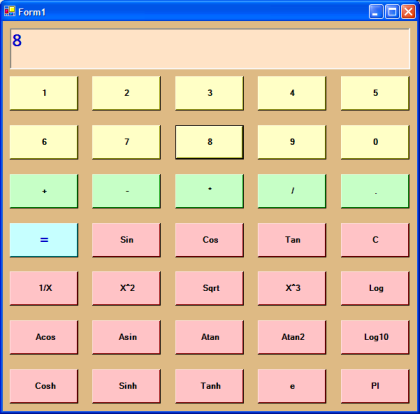
Figure 1.
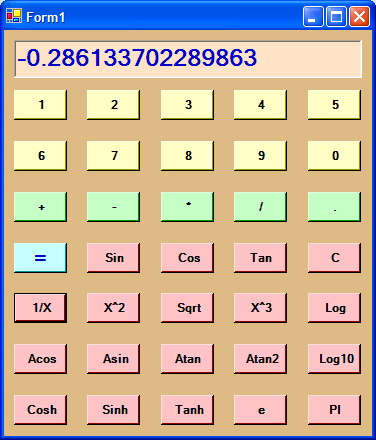
Figure 2.
The main functions performing the operations are as shown in the code below:
private void Form1_Resize(object sender, System.EventArgs e)
{
int rtopButton = ClientRectangle.Height/5;
foreach (Control ct in this.Controls)
{
if (ct is TextBox)
{
Rectangle rdisp = new Rectangle();
rdisp.Width = ClientRectangle.Width;
rdisp.Height = ClientRectangle.Height/7;
rdisp.Inflate(-10,-10);
SetControlSize(ct,rdisp);
}
if (ct is Button)
{
int ypos = int.Parse(ct.Name[ct.Name.Length-1].ToString());
int xpos = int.Parse(ct.Name[ct.Name.Length-2].ToString());
Rectangle rbt = new Rectangle();
rbt.Width = ClientRectangle.Width/5;
rbt.Height = ClientRectangle.Height/8;
Point ptopleft = new Point(ypos*ClientRectangle.Width/5, xpos*ClientRectangle.Height/8);
rbt.Location = ptopleft;
rbt.Inflate(-10,-10);
SetControlSize(ct,rbt);
}
}
}
private void SetControlSize(Control ct, Rectangle rc)
{ ct.Width = rc.Width;
ct.Height = rc.Height;
ct.Location = rc.Location;
}
private void Numeric_Click(object sender, System.EventArgs e)
{
Button bt = (Button) sender;
if (clrDisplay)
{
lblResult00.Text="";
clrDisplay = false;
}
if (bt.Text == ".")
{
if ((lblResult00.Text.IndexOf(".",0) >= 0))
bt.Text = "";
}
lblResult00.Text = lblResult00.Text + bt.Text;
}
private void OperationClick(object sender, System.EventArgs e)
{
Button btnOp = (Button) sender;
tring op = btnOp.Text;
double result=0.0;
clrDisplay = true; // clear display on next numeric click
if (prevOP == "")
num1 = double.Parse(lblResult00.Text);
else
num2 = double.Parse(lblResult00.Text);
switch(op)
{
case "Sin" : result = Math.Sin(num1);
prevOP="";
lblResult00.Text = result.ToString();
num1 = result;
return;
case "Cos" : result = Math.Cos(num1);
prevOP="";
lblResult00.Text = result.ToString();
num1 = result;
return;
case "Tan" : result = Math.Tan(num1);
prevOP="";
lblResult00.Text = result.ToString();
num1 = result;
return;
case "Sinh" : result = Math.Sinh(num1);
prevOP="";
lblResult00.Text = result.ToString();
num1 = result;
return;
case "Cosh" : result = Math.Cosh(num1);
prevOP="";
lblResult00.Text = result.ToString();
num1 = result;
return;
case "Tanh" : result = Math.Tanh(num1);
prevOP="";
lblResult00.Text = result.ToString();
num1 = result;
return;
case "Asin" : result = Math.Asin(num1);
prevOP="";
lblResult00.Text = result.ToString();
num1 = result;
return;
case "Acos" : result = Math.Acos(num1);
prevOP="";
lblResult00.Text = result.ToString();
num1 = result;
return;
case "Atan" : result = Math.Atan(num1);
prevOP="";
lblResult00.Text = result.ToString();
num1 = result;
return;
case "Atan2" : result = Math.Atan(num1);
prevOP="";
lblResult00.Text = result.ToString();
num1 = result;
return;
case "e" : result = Math.E;
prevOP="";
lblResult00.Text = result.ToString();
num1 = result;
break;
case "PI" : result = Math.PI;
prevOP="";
lblResult00.Text = result.ToString();
num1 = result;
break;
case "Log10" : result = Math.Log10(num1);
prevOP="";
lblResult00.Text = result.ToString();
num1 = result;
return;
case "1/X" :
if (num1 != 0)
{
num1 = 1/num1;
result = num1;
prevOP="";
lblResult00.Text = result.ToString();
num1 = result;
return;
}
break;
case "X^2":
num1 *= num1;
result = num1;
prevOP="";
lblResult00.Text = result.ToString();
num1 = result;
return;
case "X^3":
num1 *= num1;
num1 *= num1;
result = num1;
prevOP="";
lblResult00.Text = result.ToString();
num1 = result;
return;
case "Log":
result = Math.Log(num1);
prevOP="";
lblResult00.Text = result.ToString();
num1 = result;
return;
case "Sqrt":
result = Math.Sqrt(num1);
prevOP="";
lblResult00.Text = result.ToString();
num1 = result;
return;
}
switch (prevOP)
{
case "+" :
result = num1 + num2;
break;
case "-" :
result = num1 - num2;
break;
case "*" :
result = num1 * num2;
break;
case "/" :
result = num1 / num2;
break;
}
if (prevOP != "")
{ lblResult00.Text = result.ToString();
num1 = result;
}
if (op == "=")
prevOP = "";
else
prevOP = op;
}
}