Overview
Enterprise Library is a set of tested, reusable application blocks that address common problems developers face when developing enterprise-based applications. The application blocks incorporate best practices for .NET applications and are easy-to-install plug-ins. However, before integrating these blocks, make sure you have a clear understanding of the application requirements and of the common scenarios projected by the application block's design. For example, data access application block leverages the ADO.NET to encapsulate its complexity and enhancement features.
The salient features of the Enterprise Library architecture include,
- Application blocks are based on consistent design patterns and implementation approaches.
- Each block can be further extended by developers to meet their project requirements.
- Enterprise Library is an easy-to-install plug-in application. The Enterprise Library Configuration Console (GUI) enables you to define configuration settings for different blocks instead of manually setting the configuration file(s).
- Enterprise Library ships with documentation and code samples.
- Application blocks can work either independently or with one another. For example, Caching Block can use Data Access block to store and retrieve cached data in database.
- Application blocks are tested and implement best practices for .NET-based applications.
- Application blocks help handle challenges of developing complex, enterprise-based applications.
Application Blocks
The following application blocks are the part of Enterprise Library:
- Data Access Application Block
This block implements standard database functionality by leveraging and encapsulating the implementation of ADO.NET such as reading data or submitting data to database server from application/business layer, execute stored procedure or in-line SQL statements, connection management, caching the parameter as well as command etc. Developers can plug in their application to different types of database providers such as MS-SQL Server, Oracle or DB2 without changing application code.
- Caching Application Block
This block helps developers to incorporate caching mechanism in their projects. The block supports in-memory cache, isolated storage cache and data backing storage and allows consumption of data access from application block to store and retrieval of cached data from database.
- Exception handling Application Block
This block helps developers to create a consistent way to handle exceptions raised in different layers of the application without breaking the layer. The block provides a mechanism for reuse of common exception-handling logic, wrapping one exception with another, replace one exception with another and logging exception information etc.
- Logging and Instrumentation Application Block
The logging and instrumentation application block helps developers to incorporate standard logging and instrumentation functionality to their application. Using this block, you can log information to multiple locations such as Event Log, E-Mail, Database, Message Queue, File and WMI.
- Security Application Block
This block is designed to incorporate security functionality that helps resolve common security problems in applications such as authorization and authentication, performance, role management or profile management, and caching user's profile etc.
- Cryptography Application Block
This block helps to incorporate cryptography functionality such as encrypting and validating to keep data tamper-proof. The block implements all best practices of cryptography and developers can leverage different cryptography providers by changing the configuration settings even without modifying application code thus maximizing utilization of a specific cryptography algorithm.
- Configuration Application Block
This is a critical block in the Enterprise Library. The Configuration Application block is required to consume any of the above blocks. The main purpose of this block is to maintain the configuration settings of other blocks. Each block refers the Configuration Application block to identify the each one's and others' configuration setting. For example, to cache data in MS-SQL server, the configuration application block contains the configuration settings of caching application block as well as data access application block. The caching application block refers configuration block to identify its own settings and that of the data application block to locate the database to store and retrieve cached data.
Common
Apart from the above blocks, Enterprise Library includes an assembly called Common. The Common block contains a set of commonly used function to all the blocks. For example, if an application block needs basic cryptography functionality without consuming the cryptography application block, the block can leverage the common library to avail cryptography functionality. The common block reduces dependency of one block on another and removes dependency of a third party library. Applications must consume this to use Enterprise Library.
Enterprise Library Configuration Console
Enterprise Library uses Enterprise Library Configuration Console, a graphical tool that allows changing and validating an application block's configuration settings (XML configuration file) by eliminating the difficulties that are encountered during manual settings.
Enterprise Library uses Test Driven Development (TDD) approach to test application blocks. Test driven development is one of the core practices of Extreme Programming (XP). TDD uses tests to drive design and implementation of software, makes the complex software very simple and ensures defect-free software. The unit tests in Enterprise Library can be written using NUnit (.NET testing framework) through TTD approach and must be written before the application blocks are implemented. Refer http://www.nunit.org to know more on NUnit.
Application blocks are strong names and provide versioning and naming protection. That means it can be placed in GAC and shared among the applications. The enterprise library uses standard naming convention. For example,
Microsoft.Practices.EnterpriseLibrary.Caching for caching block or
Microsoft.Practices.EnterpriseLibrary.Data for data access block etc.
Enterprise Library Architecture overview
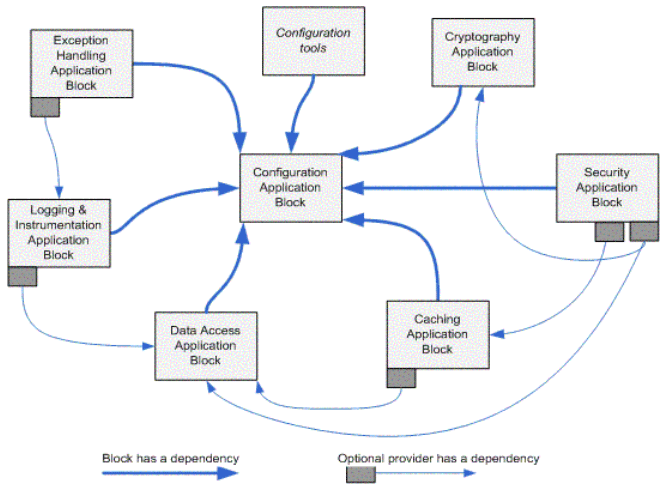
[Figure 1] Showing the overview of Enterprise Library and how the blocks are communicating
All of the application blocks are designed with a limited number of dependencies so that they can be used individually and with other application blocks. All application blocks require that the Configuration Application Block be installed. This is because the Enterprise Library uses this application block to access the configuration information for every other application block. For example if you want to use Logging and Instrumentation Application Block, your application must consume use Configuration application Block and then Logging and Instrumentation Application Block. In order to log the information in database you need to consume the Data access Application Block ( optional dependency ) for Logging and Instrumentation Application Block .