

Suppose we are building a contact group application in ASP.NET MVC3 using razor view engine.
Here one contact group can hold multiple contact information. That means it is a 1 to many relationship.
Now we have 2 model classes.
- Group
- Contact
Under the controller folder we have one controller class named "groupcontroller.cs".
Now under the "view" folder we have a different view.
Now we have to deal with "create.cshtml".
Here while typing your group name it will automatically show a possible group name like {friend,family,twiter friend,company e.t.c}.
So for that first we have to include the Jquery in our "create.cshtml" file like in the following code:
<link href="@Url.Content("~/Content/Site.css")" rel="stylesheet" type="text/css" />
<link href="../../Content/themes/base/jquery.ui.autocomplete.css" rel="stylesheet"
type="text/css" />
<script src="../../Scripts/jquery-ui-1.8.11.js" type="text/javascript"></script>
<script src="../../Scripts/jquery-ui-1.8.11.min.js" type="text/javascript"></script>
Now in the razor view engine we are displaying and taking the group name value like in the following code segment:
<fieldset>
<b><font color="red">Enter Your Group Name on which you will insert your Contact Information</font></b>
<div class="editor-label" >
@Html.LabelFor(model => model.Group.GroupName)
</div>
<div class="editor-field">
@Html.EditorFor(model => model.Group.GroupName)
@Html.ValidationMessageFor(model => model.Group.GroupName)
</div>
</fieldset>
See the " @Html.EditorFor(model => model.Group.GroupName)
Now we have to write a Jquery with dealing @Html.EditorFor
Please see the following JavaScript section code:
<script type="text/javascript">
$(function() {
var availableTags = [
"Buisness",
"College Friend",
"Colligue",
"Company",
"Friend",
"Family",
"Personal",
"Achool Friend",
"Relative",
"FacebookFriend",
"Twiter Follower",
"Others",
];
$("#Group_GroupName").autocomplete({
source: availableTags
});
});
</script>
See here first I have stored all my possible groupnames in an "availableTags" variable.
After that under the $ section I have written the id for the " @Html.EditorFor(model => model.Group.GroupName)
So here the id will be "Group_GroupName".
So after that while running the application we will see like the following result.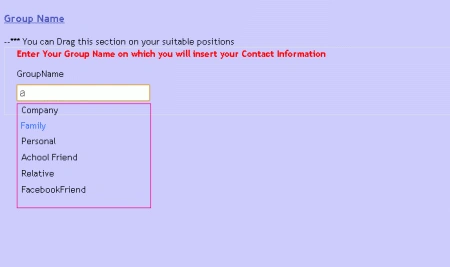
See in the above picture while typing a letter "a" it is displaying all possible letters.
See here I have used a hard-coded value; we can get that value from a database itself and with dealing with Jquery we can populate the Autocomplete extender textbox.
Conclusion : So in this article we got to know how to use an Autocomplete textbox in razor view engine using Jquery.
farooq smdPosted Jun 21, 2016, 12:27 PM
nice one
ravi jotungiyaPosted Sep 18, 2012, 5:33 AM
Thank you for sharing
Steven ChalkPosted Mar 11, 2012, 4:38 AM
This needs to be improved. What you are showing here is no more than the simple examples on the jquery website. This needs to show an ajax call to a controller action and returning json to the browser. This example is just a simple, local script.
Adora KrausePosted Jan 31, 2012, 11:08 PM
Its a very good and useful article.
Sonakshi SinghPosted Jan 31, 2012, 10:53 PM
Thank you for sharing