What about making an application for restaurant billing world-wide, or a web site which can be used by people of different cultures, speaking different languages.
Here is a sequence of articles, to teach you, how to make applications, web-sites for global usage by using the .NET framework.
Localization means "process of translating resources for a specific culture", and
Globalization means "process of designing applications that can adapt to different cultures".
Before one thinks about making any Globalize App, he/she should plan the app.
Always think about the 2 aspects: -
- Proper Globalization: - Your Application should be able to Accept, Verify, and Display All global kind of data; It should well also be able to operate over this Data, accordingly. We will discuss more about this "Accordingly operations over diff. culture data".
- Localizability and Localization: - Localizability stands for clearly separating the components of culture based Operations regarding the user interface, and other operations from the executable code.
And why so?
Because, one shall not be writing diff. pieces of logical code for diff. cultures, a separate team (expert in the regional languages) should be handling the User interface issues.
Last thing, Localization, this as stated earlier is the phase/process during which the resources will be translated to be used for a specific culture.
.NET framework, has greatly simplified the task of creating the applications targeting the clients of multiple cultures.
The namespaces involved in creation of globalize, localizing applications are
- System.Globalization
- System.Resources
- System.Text
The utmost basic entity in this scenario is Culture.
The Culture information (usually called CultureInfo) includes the Language, Country/region, Calendar, Formats of Date, Currency, number System, And Sorting Order.
This all information is defined inside CultureInfo class, which is inside the System.Globalization namespace.
To understand a culture lets compare two cultures.
| Culture Name |
Culture Identifier |
Language / Country-Region |
| Fr-FR |
0x040C |
French / France |
| Hi-IN |
0x0439 |
Hindi / India |
A complete list of cultures is available at
http://msdn.microsoft.com/library/default.asp?url=/library/en-us/cpref/html/frlrfSystemGlobalizationCultureInfoClassTopic.asp
According to MSDN, The culture names follow the RFC 1766 standard in the format "<languagecode2>-<country/regioncode2>", where <languagecode2> is a lowercase two-letter code derived from ISO 639-1 and <country/regioncode2> is an uppercase two-letter code derived from ISO 3166.
The object raised from this class, when set true will be changing the culture of your application. But it's never so that you make an app. In English culture, and raise an object of CultureInfo class for French language, and automatically everything will start working in French.
For each culture's UI, that is the text, images you want to see over the forms or web-pages you'll have to define the translations explicitly.
This information is known as resources, and they exist in form of .resx files.
These are xml files, and to read, write, manage them there are various classes listed under the namespace System.Resources.
The appearance of wild card characters, languages with (Non - Latin characters) like Hindi, Kannad, Urdu, Hebrew e.t.c Unicode (Why Unicode?), UTF-7,8 character encoding is required, The classes represented in the System.Text namespace are used to convert the block of bytes to and from characters.
The cultures also follow a hierarchy, the hierarchy is as follows
- Invariant culture
- Neutral Culture
- Specific Culture
The Invariant Culture is culture / language insensitive, we can refer to it by empty string "". Or by it's Culture Identifier 0x007F. The Language is English by default but it's not associated with any country, although using it may lead to a wrong sort order (but it's very rare). When you don't specify a culture, it's by default Invariant.
Neutral Culture is only associated with language but not country, while Specific Culture is associated with the language as well as the country and region.
Let us walkthrough an example to create an application which will change it's Text properties (UI), as and when the language of the system will be changed.
Create a Windows application (VB / C#), Name it "LocalizedApp", now just Set the forms Localizable property to true, at this time the default language is set to English (United States).
Place a Label Control over your form (Say Wel_Label), and Set its text property to "How are you?" from the properties window.
Let us now program this application for multilingual support; I'll program it for Hindi (India), and French (France) cultures.
"How are you" is equivalent to "comment soyez vous" in French (France), and is equivalent to  in Hindi (India).
Now change your Forms Language Property to French (France), set the label's (Wel_Label) Text property to "comment soyez vous", save your program, and compile it.
Again change the Form's language property to Hindi (India), and set the label's (Wel_Label) text property to , Also set the Label's Font to Mangal, Save your project and compile it.
Now, just give a look to your right side solution explorer window, click over the Tab button "Show All Files", it should look like this
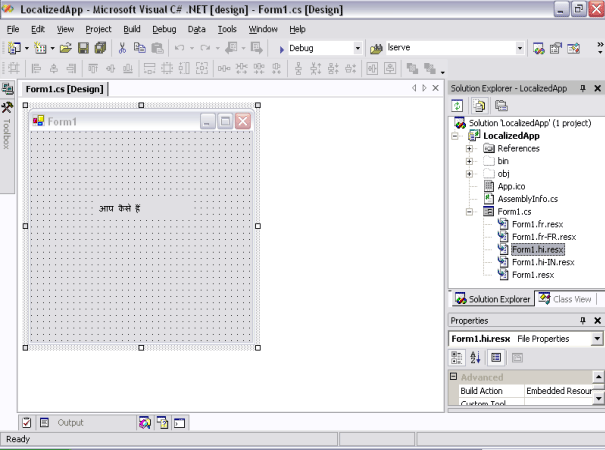
As you can see now, under Form1.cs there are 5 files, let us understand these files.
The file which is at bottom Form1.resx is the resource file, and it was made for invariant culture when we set the Form's Localizable property to True.
The remaining four files can be grouped amongst two groups' French group, and Hindi group.
Each group contains two files: -
1st Form_Name.neutralCulture.resx or say Form1.fr.resx or Form1.hi.resx.
2nd Form_Name.neutralculture-SpecificCulture.resx or Form1.fr-FR.resx or Form1.hi-IN.resx.
Let's study the contents of both of these files, open the Neutral Culture file, here I'll consider the file Form1.fr.resx, this file contains 2 data tables Data, and resheader.
Data Table Data Contains fields like Name, value, comment, type, and mime type, and for your amazing ness these all fields are empty; while if we open the Specific Culture file say Form1.hi-IN.resx, it also contains similar data tables "Data", and "resheader", this time the data table "data" is filled up, the data in this data table is specific to the label control, these are the properties subjected to change when we will load the specific culture, you can deliberately alter this file (After you are aware of the know how's of globalization trade).
Now, just change the Language of your system from Control Panel à Regional And Language Options, change the Language from English (United States) to French (France), and try running your program, voila it's showing the message "Comment Soyez Vous" over the label control. Now change this Language to Hindi (India), and see the difference.
Note: - keep your windows CD with you; it will be required to change the language.
We are done with a real basic taste of localizing an application, according to the current language of your system.
In Part - 2
We will discuss doing this all and more from code only, and Making an application which will change its language, UI on the will of user with out changing the language of the system.
UNICODE, UTF -7, UTF-8
The Unicode is a coded character set which can represent 40,000 defined elements (Characters), ranging from various languages.
Let us first understand the ASCII codes ASCII code is a 8 bit byte code, which can maximum represent 256 characters. Each byte can represent a character.
Like 01000001 = 65 = 'A', and so on.
This way the Maximum chars represented = 28 = 256.
Now, how do we extend this range to get a larger character set, the idea is to add up a Character Encoding Scheme with the Character coding scheme.
This way you can increase the range from 8 bit to 16 bit, as
CCS (8 bit) + CES (8 bit) = New character set Or UTF-16.
This set can represent 216 characters = 65,536 characters.
For, deep insights just follow the address http://czyborra.com/utf/ .