Blue Theme Orange Theme Green Theme Red Theme
 
Safari Books Online
Home | Forums | Videos | Photos | Downloads | Blogs | Interviews | Jobs | Beginners | Training
 | Consulting  
Submit an Article Submit a Blog 
 Jump to
Skip Navigation Links
TechnologyExpand Technology
WebsiteExpand Website
 Resources  
Close
 Our Network  
Close
Search :       Advanced Search »
Home » Pocket PC » Databinding with Pocket PC

Databinding with Pocket PC


This articles shows how to write data-driven applications for Pocket PC using ADO.NET and .NET Compact Framework.

Total page views :  27339
Total downloads : 
   Print Read/Post comments Post a comment  Similar Articles  
   Email to a friend  Bookmark  Author's other articles  
 
Become a Sponsor

I have been hearing so much about the development of pocket PC applications and how useful they actually are that I decided to develop a pocket PC Application for myself just to see what the difference is between pocket pc applications and desktop applications.

In the beginning I faced a couple of issues, the main problem being how to connect a pocket PC application to a database. Since I could not install the database on a pocket PC and populate it with all my records, I tried to find a way  to integrate my pocket PC application with the database. For this purpose I worked on several logics and also tried to find out solutions on the internet but it did not help much except for providing me with some bits and pieces of codes.  I could not find any solution which could help me to connect a pocket PC Application to my database. There were some sites I encountered which explained this process but the code was difficult to understand for beginners. I did not want to use that code because I always try to present solutions in a way which is useful for newbie(s).
 
Finally I came up with an idea to connect our pocket pc application to a database and have discussed it below.

Prepare Yourself For Pocket PC Applications

  • Microsoft Visual Studio Beta 2 Release Installed
  • Pocket PC Emulator Installed
    (you will find it in your dvd:\vs\wcu\ARM\vs_emulator.exe)
  • Introductory knowledge of C#

Introduction of Pocket PC Application

Before we start, I would like to tell you that a pocket PC is as expensive for me as it is for you guys, so we are going to use a pocket PC Emulator.

First let us concentrate on our main goal. Yes! Our main goal is to connect a pocket PC application to our database. For that we are going to develop the following two systems.

  1. A Pocket PC Application
  2. A Webservice that will connect our Pocket PC to the Database

As anyone who has ever built a smart client system knows, the code running on the smart client device is only part of the overall system. Much of the work actually occurs on the servers that support the system. Whether as databases or processing engines, servers must behave and communicate efficiently. Designing a successful smart client system requires an equal amount of attention to be paid to the server design as well as the smart client itself.

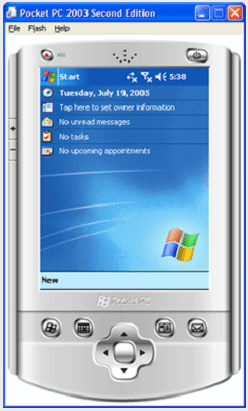
What is Emulator?

An emulator is a computer program or system that accepts the same inputs and produces the same outputs as a real Pocket PC device.

Fig. 1.0
Let's Start Developing The Application!

Step 1: Setting up the database.

The first thing you need to do is to create a database [table: FAQ].

Note: We are using Microsoft SQL server, but you can also use any other database

Note: You can use any database for this purpose,  All you will need to configure is the connectionString.

Step 2: Creating a webservice.

Since we do not have direct communication with the server, we need to create a webservice in order to transfer data from the server to our pocket pc application.

Our webservice will fetch records from the database server, populate those records in the dataset and then return that dataset.

To create a webservice:

  1. Open Visual Studio .net 2005
  2. From the top menu, click File.
  3. lick New Web Site.
  4. Click Asp.net Web Service.


Note: You can name the webservice as you like, but keep in mind if you rename the webservice you will need to rename its references on my code as well.

There you go! After clicking OK on the dialog box shown above, VS .Net 2005 will create the webservice architecture for you, now all you will need to do is to write the code for it as per your need.

5. In the solution explorer double click the service.asmx page.


6. Create a webmethod and name it ReturnData().

[WebMethod]   

public DataSet ReturnData()
{
String ConnectionString = "Data Source=Danish-it;Initial Catalog=KBFAQ;Persist Security Info=True;User ID=sa;Password=airforce";
SqlConnection SqlCon =
new SqlConnection(ConnectionString);
SqlCon.Open();
SqlDataAdapter SqlDa =
new SqlDataAdapter("Select keywords,answer,title from FAQ", SqlCon);
DataSet Ds =
new DataSet();
SqlDa.Fill(Ds);
return Ds;
}

Note: Test your webservice by pressing the F5 key on your keyboard and then invoking you function.
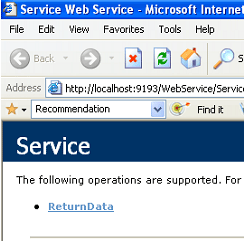
 

  • Click ReturnData.


  • Click invoke.
  • If your browser generates an XML containing the data you have queried for, it means your webservice is working correctly!

Step 3: Creating pocket pc application.

Finally, we are on the last step of creating our pocket pc application.

Don't waste time, lets do it!

  1. Open Visual Studio .net 2005
  2. From the top menu, click File.
  3. Click New Project.
  4. Expand Visual C# node à Expand Smart Device node
  5. Click Pocket PC 2003 and select Device Application from the left pane.

Click OK on the dialog box like the one shown above and let VS .Net 2005 create a device application for you.

Once done, you will see a screen similar to the one below.
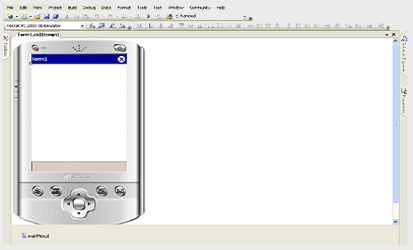
 

  • Place a datagrid and a button on the form.
  • Rename the datagrid to myDataGrid


Now, add a webservice reference on the form.

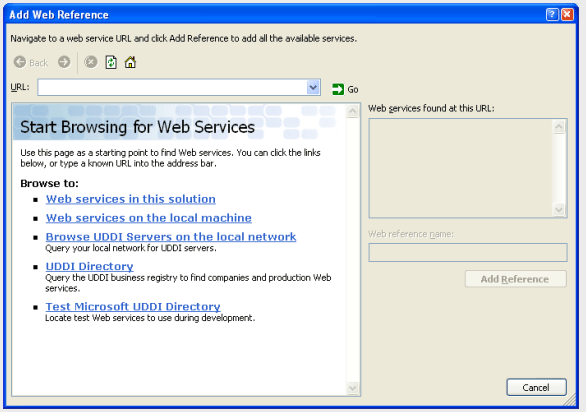
  • Right click on the project name and then click Add Web Reference.


You will the see the following screen.
Note: After creating the webservice make sure you create its virtual directory on IIS.

  • On the screen like the one shown above, click on Web services on the local machine.  Doing so will show the list of all webservices available on your machine.

  • Clicking on the webservice name you created for your pocket pc project will enable the Web reference name textbox and the Add Reference button on the right.
  • Type PpcService in the Web reference name textbox and click the Add Reference button. Now the web reference is added to your local pocket pc application.
  • Click on the web reference from the Solution Explorer and then click on the properties window; the current web reference URL path is set to localhost, replace it to your server name.

  • Switch to designer view and double click the button. This will create an on_click event for your button.

Type the following code in this event.

private void load_Click(object sender, EventArgs e)
{
PpcService.Service Ws =
new PpcService.Service();
DataSet Ds =
new DataSet("danish");
Ds = Ws.ReturnData();
myDataGrid.DataSource = Ds.Tables[0];
myDataGrid.Refresh();
}

Now on pressing the F5 key, VS .Net 2005 will ask you for the emulator settings.
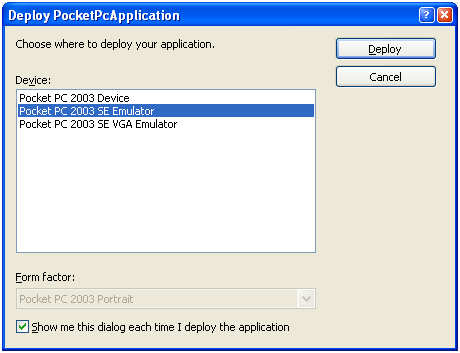
 

Select Pocket PC 2003 Emulator and click deploy.


Think, done! Congratulations!


Login to add your contents and source code to this article
 About the author
 
Danish Hameed
Danish Hameed is a Bachelor's of science in computer science. He has participated and scored remarkable positions in programming and software competitions. Currently working as Software Engineer in eLearning industry.
Looking for C# Consulting?
C# Consulting is founded in 2002 by the founders of C# Corner. Unlike a traditional consulting company, our consultants are well-known experts in .NET and many of them are MVPs, authors, and trainers. We specialize in Microsoft .NET development and utilize Agile Development and Extreme Programming practices to provide fast pace quick turnaround results. Our software development model is a mix of Agile Development, traditional SDLC, and Waterfall models.
Click here to learn more about C# Consulting.
 
Introducing MaxV - one click. infinite control. Hyper-V Hosting from MaximumASP.
Finally – a virtual platform that delivers next-generation Windows Server 2008 Hyper-V virtualization technology from a managed hosting partner you can truly depend on. Visit www.maximumasp.com/max for a FREE 30 day trial. Hurry offer ends soon. Climb aboard the MaxV platform and take advantage of High Availability, Intelligent Monitoring, Recurrent Backups, and Scalability – with no hassle or hidden fees. As a managed hosting partner focused solely on Microsoft technologies since 2000, MaximumASP is uniquely qualified to provide the superior support that our business is built on. Unparalleled expertise with Microsoft technologies lead to working directly with Microsoft as first to offer IIS 7 and SQL 2008 betas in a hosted environment; partnering in the Go Live Program for Hyper-V; and product co-launches built on WS 2008 with Hyper-V technology.
Dynamic PDF
ceTE software specializes in components for dynamic PDF generation and manipulation. The DynamicPDF™ product line allows you to dynamically generate PDF documents, merge PDF documents and new content to existing PDF documents from within your applications.
SQL and .NET performance profiling in one place
Investigate SQL and .NET code side-by-side with ANTS Performance Profiler 6, so you can see which is causing the problem without switching tools.
Go.NET
Build custom interactive diagrams, network, workflow editors, flowcharts, or software design tools. Includes many predefined kinds of nodes, links, and basic shapes. Supports layers, scrolling, zooming, selection, drag-and-drop, clipboard, in-place editing, tooltips, grids, printing, overview window, palette. 100% implemented in C# as a managed .NET Control. Document/View/Tool architecture with many properties&events. Optional automatic layout.
Dundas Software
Dundas Chart for .NET is the most advanced .NET charting package available today.  With an extremely complete feature set, elegant architecture and easy implementation, Dundas Chart can quickly add advanced Charting functionality to enhance and transform ASP.NET and Windows Forms applications.  Whether you are implementing charting into internal projects, or building applications for clients, Dundas Chart offers advanced technology and advanced results to get the most out of data.
60 FREE UI Controls from DevExpress
Register for your FREE copy on over 60 free presentation controls from DevExpress - Absolutely Free-of-Charge without any royalties or distribution costs. Visit Devexpress.com/60 today. Free controls include advanced lists box, dropdown calendar, rich text edit, spin edit, tab control and so much more!

DevExpress engineers feature rich presentation controls and reporting tools for WinForms, ASP.NET, WPF, and Silverlight. Our technologies help you build your best, see complex software with greater clarity and deliver compelling business solutions for Windows and the web in the shortest possible time.
Clickatell's SMS Gateway
Clickatell's Developer Solutions allow you to SMS enable any website or application via a range of API's. Learn More about our API connections.
Free access to .NET Memory Management video
Everything you need to know about Garbage Collection, Temporary Objects, Fragmentation, Finalization and common causes of memory leaks in .NET. Watch the video here.
Microsoft Visual Studio 2010
Visualize your workspace with new multiple monitor support, powerful Web development, new SharePoint support with tons of templates and Web parts, and more accurate targeting of any version of the .NET Framework. Get set to unleash your creativity.
Nevron Chart for .NET 2010.1 Now Available
The leading .NET charting control now features PDF, Flash and Silverlight export, visualization of large datasets and more. Deliver true charting functionality to your BI, Scorecard, Presentation or Scientific apps. Download evaluation now.
Developer-Ready ASP.NET 2.0 Web Hosting with 3 MONTHS FREE
Now supporting .NET 3.0 Framework with Windows Workflow Foundation, Windows Communication Foundation (WCF), Windows Presentation Foundation (WPF), windows CardSpace (WCS)! Providing more flexibility for Developers with Web Services Support and a User/Permission Manger. Also supporting MS SQL 2005/2000 with Real-Time Backups, FREE Automated Attach .MDF Tool, FREE SQL Restore and Shrink SQL DB Tools, and SQL
Read the Top 10 Books for Microsoft Developers, 15 Days FREE
Try Safari Books Online - 15 Days FREE + 15% Off for 1 Year
 
 Post a Feedback, Comment, or Question about this article
Subject:
Comment:
Become a Sponsor
 Comments
Good introductory article by Mahesh On November 13, 2005
Pretty good article in step by step tutorial form. Good job. Keep it up.
Reply | Email | Delete | Modify | 
Re: Good introductory article by Danish On November 18, 2005
Thanks alot
Reply | Email | Delete | Modify | 
unable to establish connection to webservice by Denver On March 24, 2006
Your code was very useful.But we are unable to establish a connection with the webservice.We get an error like"Could not establish connection to network."Could you please help with this.
Reply | Email | Delete | Modify | 
Have problem. by Dana On March 26, 2006

I find the article very simple and easy. BUT I have an exception "Could not establish a connection to network". Even If I change the localhost with the name of the server or the IP address. And even change the temp url to server name or ip address of the webservice when create it. I have the same exception.


BUT also I want to ask is there any internet configuration need to connect the emulater to internet. because when try to invoke the webservice from the internet explorer of the emulater it say I do not have a modem or internet setting.


Can you help me please.

thanks a lot

Reply | Email | Delete | Modify | 
Please help me by Sana On May 3, 2006
We are unable to establish a connection with the webservice.We get an error like"Could not establish connection to network."Could you please help with this.
Reply | Email | Delete | Modify | 
Unable to establish connection to webservice... by Ryan On May 3, 2006

Step 1...

 Install "Active sync" first... this is needed to connect to the Pocket PC (I recommend downloading the latest version here.)


Step 2...

  Run the program (the emulator should open)


Step 3.. 

Connect your virtual pocket pc to active sync.

  • Make sure active sync is running and your program.....active sync will say "not connected.
  • in the system tray (by the clock) you will see a new icon... click on the little icon.. it looks like a pda.
  • click on the pocket pc you are running then on the menu and click actions then cradle
  • in active sync go to the menu and click file--> connections settings --> then click connect.
  • active sync should now be connected. (It will say connected.)

Step 4...

 Check to make sure the pocket pc has a connection to the webservice..


  try...

  http://NameOfMyPC/NameOfFolder/Service.asmx

    or... if you are on a domain try...

  http://NameOfMyPC.myDomain.net/NameOfFolder/Service.asmx


Step 5...

After the address is found stop the pocket pc and change the PpcService URL (in properties) to the address that worked...


it should be something like...


  http://NameOfMyPC/NameOfFolder/Service.asmx

    or... if you are on a domain try...

  http://NameOfMyPC.myDomain.net/NameOfFolder/Service.asmx


Step 6...

Run.. then connect.... then click "load grid"...hopefully this will work for you


Reply | Email | Delete | Modify | 
VB.Net version by Raffy On December 12, 2006

Hi Danish,

Can these work using VB.NET?

Thanks.

Raffy V.

Reply | Email | Delete | Modify | 
Need your help... by Raffy On December 12, 2006

I am new to mobile programming, How is it possible to send a message to a pocket pc? By a text message? or just an email?

Need your help about this.

Thanks

Raffy V.


Reply | Email | Delete | Modify | 
this code doesnt work by nilesh On June 6, 2007
when i created this application the web service gives me error "object reference not set to an instance of an object" at time of referencing it and when i run this code using my web service's local address it gives me error"cannot establish connection to netwoek" so guide me in same.
Reply | Email | Delete | Modify | 
Error Msg by Kanmani Ramya On October 9, 2007
i tried with this, this was very usefull to me, but getting an error msg "Could not establish connection to network" while running the Pocket PC Appln. Pls get me a soln for this.
Reply | Email | Delete | Modify | 
But it doesn't work with wireless by Anirudha On January 28, 2008
The Pocket PC application successfully communicates when ActiveSynch is ON and it is connected through data cable, but when i tried to connect though wireless, it fails to communicate. Please help me out. Thanks, Anirudha
Reply | Email | Delete | Modify | 
Good Piece of Code by Sriram On February 4, 2008
thanks for the article. it is very useful. i have a simple doubt. Is it possible to change the Web Reference URL during runtime from the PDA.? And is it possible to collect the Server IP to which the PDA is connected through USB Cable using active Sync. Please help me in this regard.
Reply | Email | Delete | Modify | 
C# on pocket pc and scanners by Rahul On February 4, 2008
Hi, I am newbie moving from the world of databases to mobile technology. I was wondering if there were any good articles for me to start from and if there is any website that teaches you how to create and deploy on scanners and pocket pc. Any help is appreciated. Thanks
Reply | Email | Delete | Modify | 
Excellent by suresh On May 19, 2009
Simple and Warth...
Reply | Email | Delete | Modify | 
Thanx brother by shabbir On March 17, 2010

you have solved my many days pending task
thanx for that

Regard
Rizwan

Reply | Email | Delete | Modify | 
Re: Thanx brother by paula On May 29, 2010
go in file settings/Connection /Advanced/select networks select my work network click in edit and proxy settings check This networks connects to the internet click in ok. ready.
Reply | Email | Delete | Modify | 
ANTS Performance Profiler 6.0
 Hosted by MaximumASP  |  Found a broken link?  |  Contact Us  |  Terms & conditions  |  Privacy Policy  |  Site Map  |  Suggest an Idea  |  Media Kit
Current Version: 5.2010.8.14
 © 2010  contents copyright of their authors. Rest everything copyright Mindcracker. All rights reserved.