

Introduction
This article demonstrates how to create a WCF service application. This article also covers basic information of all the contracts and a code demonstration.
What is WCF?
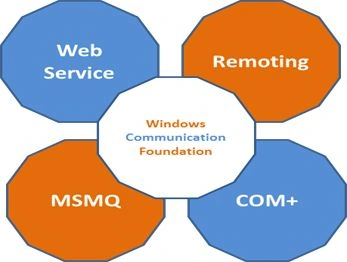
WCF is a combined feature of Web Service, Remoting, MSMQ, and COM+. WCF provides a common platform for all .NET communication. It is a part of .Net 3.0.
Difference between WCF and Web service
| Web Service | WCF |
| In a web service we need to add the [WebService] attribute to the class. | In WCF we need to add the [ServiceContract] attribute to the class. |
| Add the [WebMethod] attribute to the method in a web service. |
Add the [OperationContract] attribute to the method in WCF. |
| For serialization in a web service use the System.Xml.serialization namespace. |
WCF uses the System.Runtime.Serialization namespace for serialization. |
| We can host a web service in IIS. |
We can host WCF in IIS, WAS (Windows Activation Service), self-hosting and a Windows Service. |
How to create a WCF service
Let's see how to create a WCF service application step-by-step.
Step 1
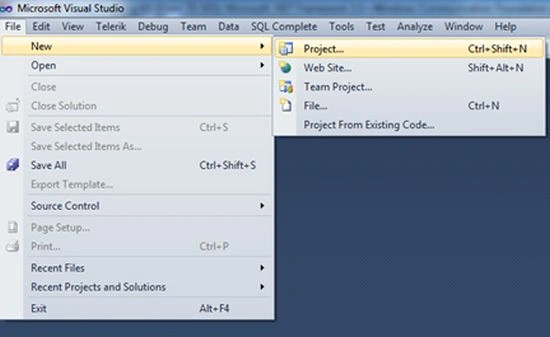
Start Menu >> All Programs >> Microsoft Visual Studio 2010 >> Microsoft Visual Studio 2010
In that "File" >> "New" >> "Project..."
Step 2
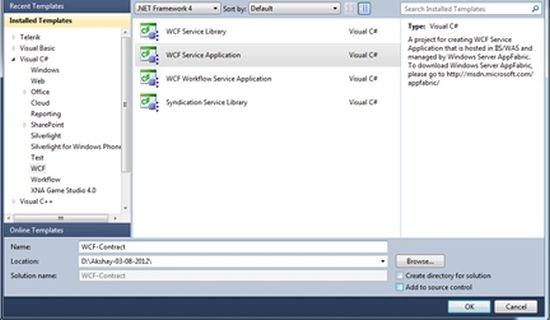
- Select WCF from Installed Templates
- Select .NET Framework 4 from dropdownlist
- Select WCF Service Application
- Give the desired name and select the location
- Click on OK button
Step 3
Now your Windows Communication Foundation service application is ready as a default service. You will see in Solution Explorer Service1.svc and IService1.cs
Open the IService1.cs file, as in:
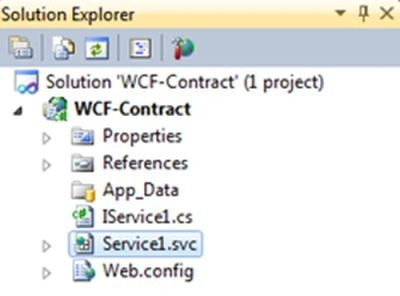
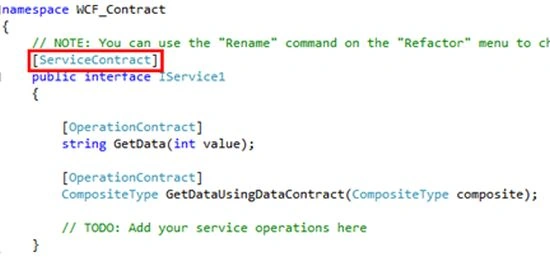
In this file, you will find a ServiceContract, OperationContract, and DataContract.
Service Contract
Service contract is an attribute applied to an interface i.e. IService1. It describes which operations the client can perform on the services.
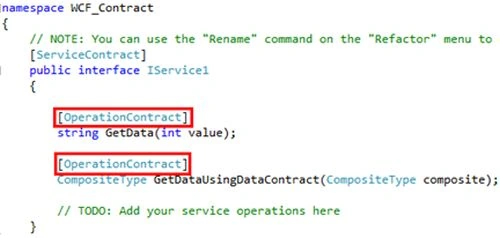
Operation Contract
Operation Contract is an attribute applied to methods in interfaces i.e. IService1. It is used to define a method in an interface.
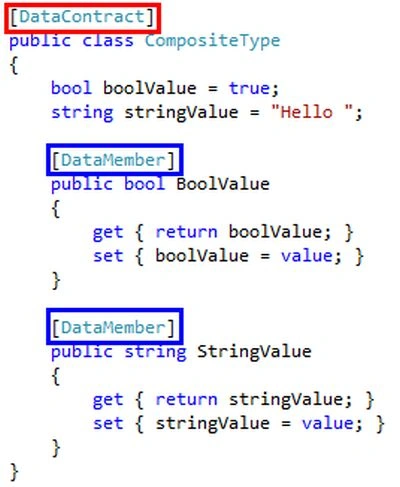
Data Contract
DataContract defines which data types are passed to and from the service. It is used to define a class and the DataMember attribute is used to define the properties.
WCF Contracts map directly to a corresponding web services standard:
- ServiceContracts map to WSDL
- DataContracts map to XSD
- MessageContracts map to SOAP
Step 4
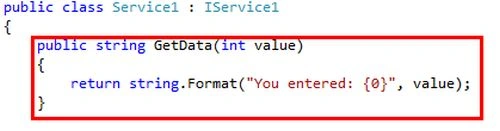
There is one method "GetData" which accepts parameters of type int.
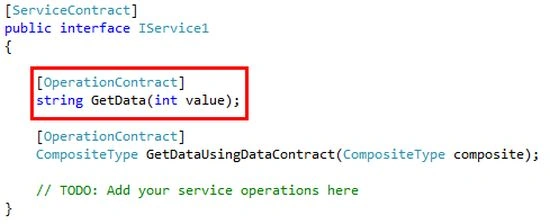
An implementation of this method is in the Service1.svc.cs file. This method returns a string with the value you passed as a parameter.
Step 5
Now let us run this service.
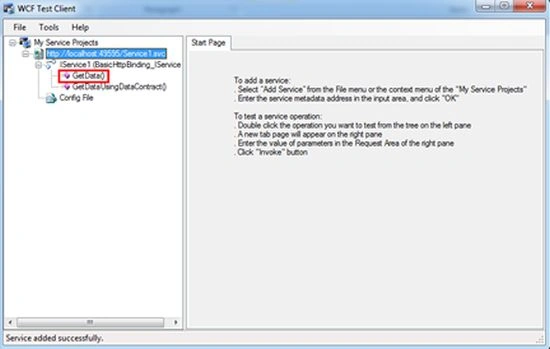
You can test your service in WCF Test Client. WCF Test Client is a GUI tool which enables us to enter parameters, invoke services with these parameters and view the responses returned by services.
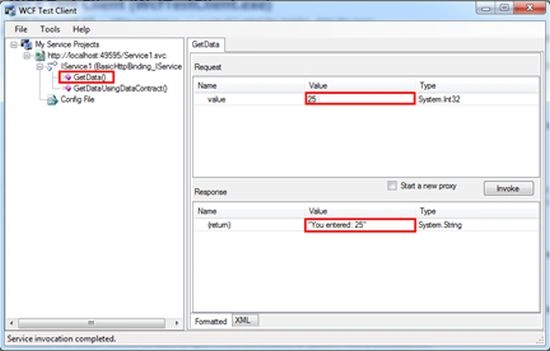
Now double-click on the "GetData" method and enter a parameter value of type System.int32. Here I enter "25" as parameter value and press the "Invoke" button. You will get "You entered: 25" as a response.
Conclusion
We have seen a very basic example of a WCF Service application. We entered a parameter value of type int and got the entered value as a response.
Next >> WCF Fault Contracts - Day 2
Ankur MistryPosted Dec 11, 2015, 11:10 AM
nice share
Humayun Kabir MamunPosted Mar 4, 2015, 2:53 AM
Nice...
Akshay DalviPosted Jul 14, 2014, 3:00 AM
Hello, Nice articales. But kindly post the link for list of all articles. It would be very helpful. Thanks
kalu singh raoPosted Feb 10, 2014, 3:45 AM
should be improve article.........
Santhosh SubramaniamPosted Jan 21, 2014, 6:07 AM
good
Purushottam RathorePosted Dec 3, 2013, 11:17 PM
Nice article and good explanation. Thanks
AniPosted Nov 7, 2013, 2:37 AM
Good one. could you please explain us why wcf service when we have web service. Thanks in advance
Vithal WadjePosted Oct 7, 2013, 1:34 PM
super article sir,but we are missing you and your article on C# corner
Anurag SarkarPosted May 28, 2013, 2:38 PM
Thanks Sir.
sridhar thotaPosted May 23, 2013, 6:58 AM
well explained each contract.
ankur pipaliyaPosted May 11, 2013, 1:44 PM
really good mota bhai ...
Umesh KumarPosted Apr 23, 2013, 8:10 AM
Really excellent article.
Praneet RanePosted Mar 20, 2013, 2:32 AM
Nice article.
Vamshi spPosted Mar 19, 2013, 11:35 PM
Nice artical for beginners
Rishikesh Kumar SinghPosted Feb 12, 2013, 6:22 AM
really very nice article..
priyam patelPosted Feb 3, 2013, 5:25 AM
very nice explanation...
Sanjiv KumarPosted Jan 3, 2013, 4:01 AM
full marks
Sharad GuptaPosted Dec 13, 2012, 11:13 AM
good one..........
Sandeep Singh ShekhawatPosted Nov 3, 2012, 10:49 PM
Thanks @Akshay Patel
Akshay PatelPosted Oct 28, 2012, 12:22 PM
@sandeep - F5 or click on debug menu and select 'start debugging'
Sandeep Singh ShekhawatPosted Oct 28, 2012, 5:48 AM
Good Article...!! How can go in step 5?
Darshan MistryPosted Oct 16, 2012, 6:09 AM
good one article it is............
Kunal VaishyaPosted Oct 10, 2012, 6:48 AM
Nice one example dear go0d one example for beginners keep writing and share knowledge with us
Mahesh ChandPosted Oct 2, 2012, 11:49 AM
Great advice Sam. I agree. For some readers who are new to WCF and any other topics, covering basic concepts is very important before get into details. This is how I start.
Akshay PatelPosted Oct 1, 2012, 9:12 AM
@Sam - will definitely write on basic concepts
Deepak MiddhaPosted Sep 28, 2012, 12:03 AM
Hi Akshay,Nice Article.
Sam HobbsPosted Sep 27, 2012, 9:38 PM
I wrote a web service a few weeks ago; my first. In my opinion, the most useful introduction is a conceptual one, and it is also the most difficult to find. You have written many impressive articles and I know you know the stuff. The challenge is to be able to communicate the concepts, and that is a theme I have had since when I was in High School before you were born. I hope you are able to write articles about the concepts of WCF and such. One very simple, basic concept is how to decide whether to create a WCF Service Application or a WCF Service Library. I researched that a lot and one thing I learned is that there is not much difference between the two. Another topic is the relationship of a WCF Service to a Web Service. Also, how are SOAP and JSON relevant? Answers to questions such as these are obvious to people that alraedy know the answers but for those of us that do not, it really helps to explain things in ways that communicates concepts that beginers do not yet have. Concepts are more important than details for learning something new, at least for me.